
Web app · Finance
Overtime Tax Tracker
Watch your No-Tax-on-Overtime deduction add up, one shift at a time
Log the hours you went over 40 at time-and-a-half or double-time and the FLSA premium — the only piece the IRS lets you deduct — is isolated and stacked on a dial against your $12,500 or $25,000 cap, phase-out included. Free, no install.
Stored in your browser only. Nothing you do in the web version is sent to our servers. Clear your browser data and it's gone — so export a backup from the in-app menu if you want to keep it.
This app is a community proposal.
Try the full browser version now. We build the iPhone and Android app once 100 people upvote it.
We'll email you once, when it ships. Unsubscribe anytime.
In your browser
What you can do in Overtime Tax Tracker on the web
The premium, not the pay
Your time clock shows gross overtime dollars. This isolates base rate × the extra half (or the full extra hour at double-time) — the deductible FLSA premium — for every shift you log.
A running dial against your cap
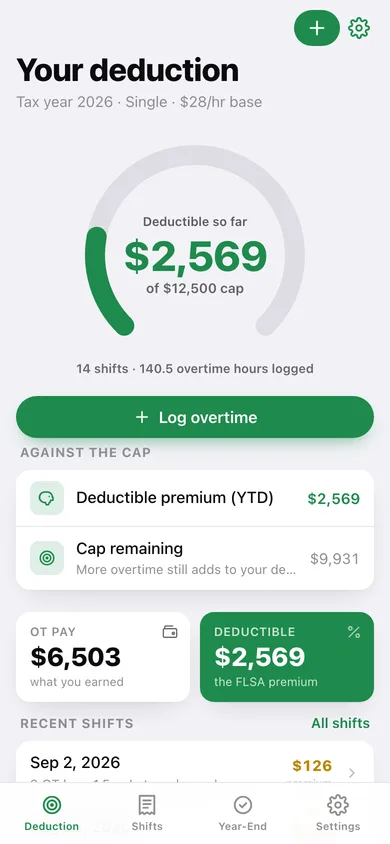
Year-to-date deductible premium on a 270° gauge against the $12,500 single or $25,000 married-filing-jointly ceiling, with cap remaining and any premium already over the top.
Income phase-out built in
Set your estimated MAGI and the cap drops $100 for every $1,000 over $150,000 single (or $300,000 joint), right down to zero — so the dial shows the deduction you can actually claim.
Shift log with monthly premium subtotals
Every overtime week with its hours, rate, base-rate snapshot and note, grouped by month with the premium each month earned.
Year-End Code TT check
Enter the qualified-overtime figure from W-2 Box 12 Code TT and reconcile it against every shift you logged — with the dollar delta and what it means.
Trends and CSV export
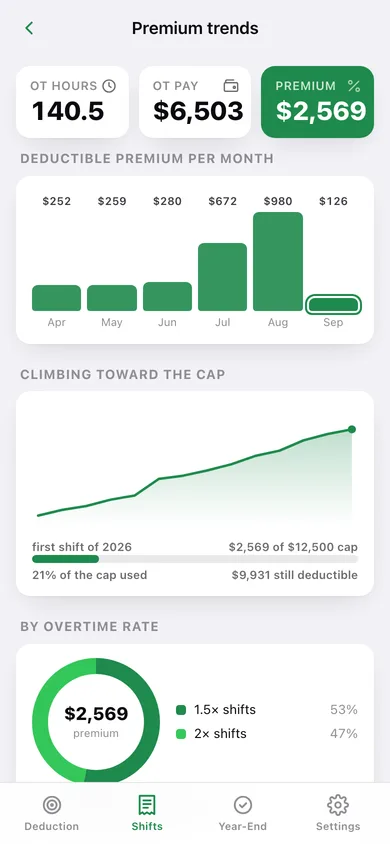
Premium per month, a cumulative climb toward the cap, a split by overtime rate, and a CSV of every shift for your tax preparer.
Screens
Every screen, rebuilt for the browser
-
1
Your deduction
The deduction gauge — YTD deductible premium against your effective cap — plus total OT pay beside the deductible half, the phase-out notice, and recent shifts.
-
2
Shifts
Every overtime shift grouped by month with the premium each month earned.
-
3
Shift detail
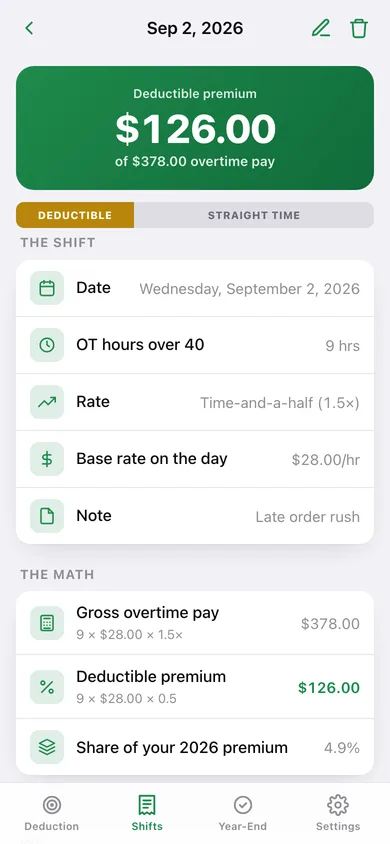
One shift: deductible premium, the split against gross overtime pay, and the arithmetic behind both.
-
4
Log shift
Date, OT hours over your standard week, 1.5× or 2×, base rate on the day and a note — with a live premium preview.
-
5
Setup
Base hourly rate, standard workweek, filing status, tax year and estimated MAGI — the numbers that set your cap.
-
6
Year-End Check
Enter W-2 Box 12 Code TT and reconcile it against your logged premium, with the delta and what to do about it.
-
7
Premium trends
Premium per month, the cumulative climb toward your cap, and a breakdown by overtime rate.
-
8
Settings
Your pay profile, logging defaults, CSV and JSON export, sample data and erase.
Try it with sample data: Adds a $28/hr single-filer profile and twelve overtime shifts across the last two months — a mix of time-and-a-half weeks and double-time call-ins — so the gauge, the shift log and the trend charts are all populated. You can start fresh at any time.
Ready? It's free.
No account, no install, no subscription. Everything you do stays in this browser.
Your say
What should Overtime Tax Tracker do? Tell us before we build it.
Tell us what to build next.
Comments need a free Google sign-in, so every one is from a real person.
Sign in with Google to commentNo comments yet — be the first to say what this app should do next.
Questions
Is the web version of Overtime Tax Tracker free?+
Yes. Every screen is free to use: no subscription, no in-app purchases, no account.
Do I need an account?+
No. Open Overtime Tax Tracker and start using it right away. Sign in with Google only if you want to upvote an app, save it to your list, or leave a comment.
Where is my data stored?+
Only in this browser's local storage. Nothing you enter is sent to our servers, so we can't see it, back it up, or restore it. Clearing site data, a private window, or another device starts empty. Export a backup from the in-app menu to keep it.
Is there a Overtime Tax Tracker app for iPhone or Android?+
Not yet. Overtime Tax Tracker is a community proposal: the browser version is complete, and we build the iPhone and Android app once 100 people upvote it. Upvoters get one email when it ships.