
Web app · Productivity
OffRamp
A focus timer with somewhere to put the thought that just derailed you
Start a block, watch the visual time-bar drain, and when “did I email Sarah?” arrives, park it in one tap and carry on. Afterwards you triage every parked thought — Did it, Schedule, Discard. Five body-doubling ambiences synthesized in the tab. Free, no install, no streaks.
Stored in your browser only. Nothing you do in the web version is sent to our servers. Clear your browser data and it's gone — so export a backup from the in-app menu if you want to keep it.
This app is a community proposal.
Try the full browser version now. We build the iPhone and Android app once 100 people upvote it.
We'll email you once, when it ships. Unsubscribe anytime.
In your browser
What you can do in OffRamp on the web
Visual time-bar countdown
A tall pill drains as the block runs and shifts to amber in the final fifth — built for time-blindness, not for a tiny digit in a corner.
One-tap thought parking
A Park button sits under the bar for the whole session. Type the thought, tap once, and you are back in the block with nothing to hold in working memory.
Triage inbox after every block
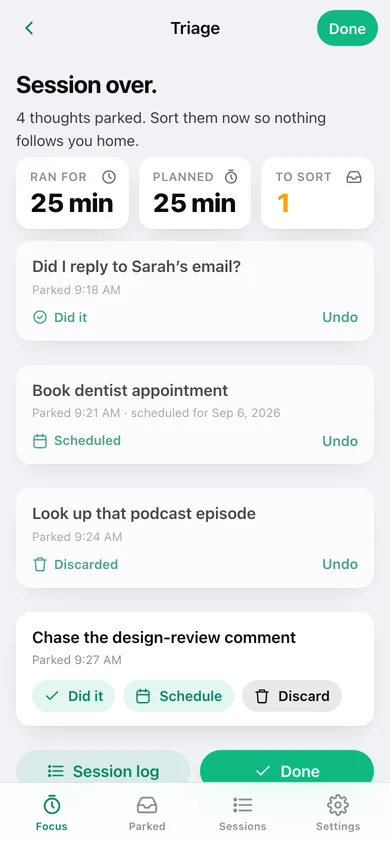
Each parked thought becomes a card with three honest answers: Did it, Schedule for a day, or Discard. A Parked tab collects everything still waiting across sessions.
Five body-doubling ambiences
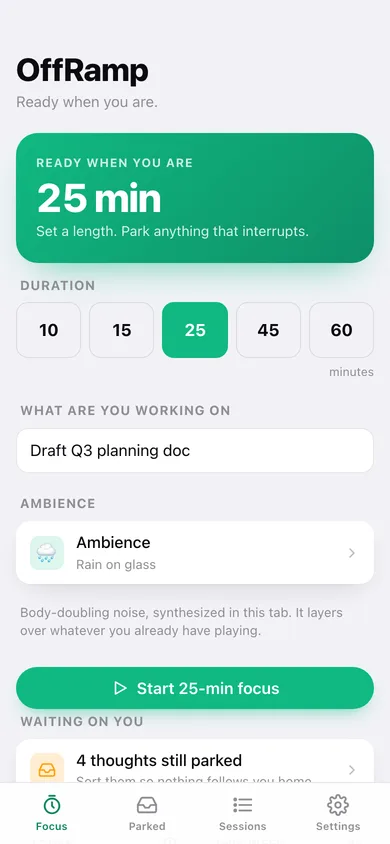
Cafe, library hush, rain on glass, fire crackle and brown noise — each synthesized in this tab from filtered noise, so nothing is downloaded and it layers over whatever you already have playing.
A calm session log
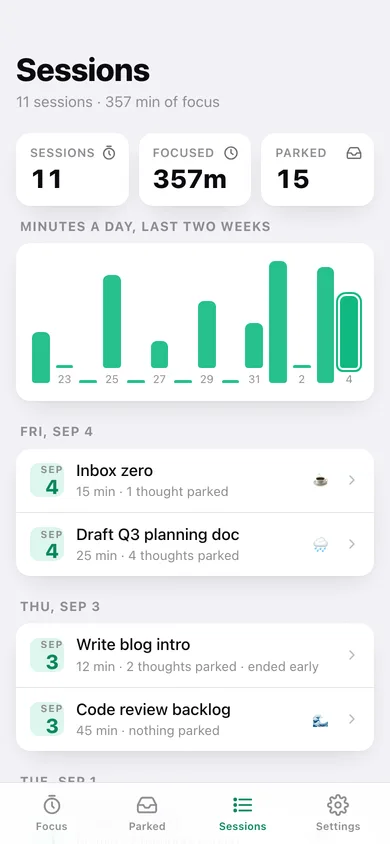
Every finished block with its task, length, ambience and parked thoughts, plus minutes-a-day for the last two weeks. Counts minutes, never points.
No rewards, no streaks, no shame
Four time-bar palettes, adjustable default and break lengths, and not a single trophy — ADHD users already have enough shame about productivity.
Screens
Every screen, rebuilt for the browser
-
1
Focus
Pick a length, name the block, arm an ambience, and start. Today and this week in minutes.
-
2
Session
The draining time-bar, the countdown, the Park button and Finish.
-
3
Triage
Session over — sort everything you parked so nothing follows you home.
-
4
Parked
Every parked thought across sessions, filtered by To triage, Did it, Scheduled or Discarded.
-
5
Sessions
The session log by day with minutes-a-day over the last two weeks.
-
6
Session detail
How much of the planned block ran, the ambience, and every thought parked in it.
-
7
Ambience
Audition the five loops and choose the one that arms with every session.
-
8
Settings
Default and break length, time-bar palette, default ambience, export, sample data and erase.
Try it with sample data: Loads eleven focus sessions across the last two and a half weeks — with real tasks, ambiences, early finishes and fourteen parked thoughts in every triage state. You can start fresh at any time.
Ready? It's free.
No account, no install, no subscription. Everything you do stays in this browser.
Your say
What should OffRamp do? Tell us before we build it.
Tell us what to build next.
Comments need a free Google sign-in, so every one is from a real person.
Sign in with Google to commentNo comments yet — be the first to say what this app should do next.
Questions
Is the web version of OffRamp free?+
Yes. Every screen is free to use: no subscription, no in-app purchases, no account.
Do I need an account?+
No. Open OffRamp and start using it right away. Sign in with Google only if you want to upvote an app, save it to your list, or leave a comment.
Where is my data stored?+
Only in this browser's local storage. Nothing you enter is sent to our servers, so we can't see it, back it up, or restore it. Clearing site data, a private window, or another device starts empty. Export a backup from the in-app menu to keep it.
Is there a OffRamp app for iPhone or Android?+
Not yet. OffRamp is a community proposal: the browser version is complete, and we build the iPhone and Android app once 100 people upvote it. Upvoters get one email when it ships.