
Web app · Finance
OffClock
Log the minutes you worked off the clock — and see what they are worth
Pick what happened (before punch-in, through break, after close, a 9:47pm manager text, unpaid training, a bag check), spin the minutes, save. OffClock stamps it, turns it into dollars at your rate, and exports a date-ordered chronology. Free, no install.
Stored in your browser only. Nothing you do in the web version is sent to our servers. Clear your browser data and it's gone — so export a backup from the in-app menu if you want to keep it.
This app is a community proposal.
Try the full browser version now. We build the iPhone and Android app once 100 people upvote it.
We'll email you once, when it ships. Unsubscribe anytime.
In your browser
What you can do in OffClock on the web
Ten-second incident logger
Six classic off-the-clock categories, minute presets and a stepper. Every entry carries both when it happened and an immutable stamp of when you saved it, so the record reads as contemporaneous.
Minutes to dollars, at both rates
Set your hourly rate once and every logged minute becomes money — at the regular rate, plus the extra 0.5x on incidents you flag as overtime weeks.
Court-style timeline with monthly subtotals
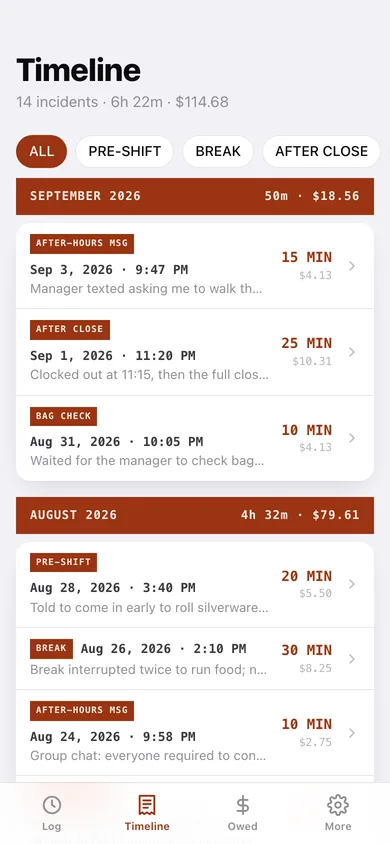
Reverse-chronological, filterable by category, with an unpaid-minutes and dollars bar over every month.
The Owed dashboard
Year-to-date minutes, regular dollars, overtime extra, the unpaid total and the doubled liquidated-damages figure — plus a month-by-month bar chart and a donut of where your minutes go.
Year card you can share
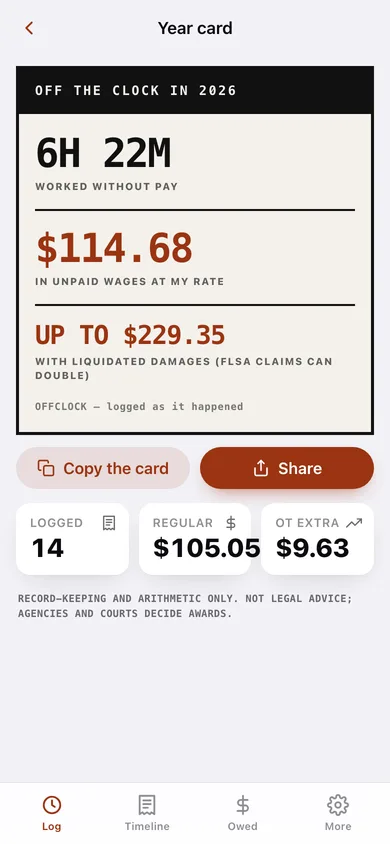
One stark poster: hours worked without pay, wages unpaid at your rate, and what that looks like doubled. Copy it or share it as text.
Chronology export
A date-ordered record of every incident with both timestamps, the dollar math and your notes — downloadable as plain text or CSV, the document intake teams ask new complainants for.
Screens
Every screen, rebuilt for the browser
-
1
This month
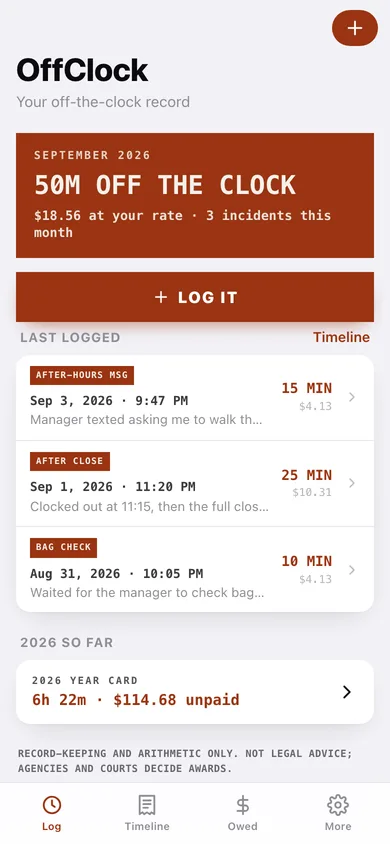
Hours off the clock this month, what they are worth, the LOG IT button and your last three incidents.
-
2
Log unpaid time
Category grid, minute presets, note, who asked, the overtime-week flag and a happened-earlier date.
-
3
Incident detail
One incident: minutes, dollars at both rates, when it happened and the fixed stamp of when it was logged.
-
4
Edit incident
Correct the category, minutes, time, note, who asked and the overtime flag — the logging stamp stays fixed.
-
5
Timeline
Reverse-chronological ledger grouped by month with unpaid-minutes and dollars subtotals, filterable by category.
-
6
Owed
Year totals: minutes, regular dollars, overtime extra, unpaid total and the doubled figure, with charts.
-
7
Year card
The shareable poster — hours without pay, unpaid wages, and the liquidated-damages figure.
-
8
Chronology export
Pick a date range, choose what to include, preview it and download the chronology as text or CSV.
-
9
Rate setup
Employer, role, state, hourly rate and weekly overtime threshold.
-
10
More
Jobs and rates, logging defaults, export, sample data and erase.
Try it with sample data: Adds a sample job at $16.50/hr and fourteen realistic off-the-clock incidents spread over the last five weeks — closing checklists, bag checks, after-hours manager texts, unpaid training and interrupted breaks. You can start fresh at any time.
Ready? It's free.
No account, no install, no subscription. Everything you do stays in this browser.
Your say
What should OffClock do? Tell us before we build it.
Tell us what to build next.
Comments need a free Google sign-in, so every one is from a real person.
Sign in with Google to commentNo comments yet — be the first to say what this app should do next.
Questions
Is the web version of OffClock free?+
Yes. Every screen is free to use: no subscription, no in-app purchases, no account.
Do I need an account?+
No. Open OffClock and start using it right away. Sign in with Google only if you want to upvote an app, save it to your list, or leave a comment.
Where is my data stored?+
Only in this browser's local storage. Nothing you enter is sent to our servers, so we can't see it, back it up, or restore it. Clearing site data, a private window, or another device starts empty. Export a backup from the in-app menu to keep it.
Is there a OffClock app for iPhone or Android?+
Not yet. OffClock is a community proposal: the browser version is complete, and we build the iPhone and Android app once 100 people upvote it. Upvoters get one email when it ships.