
Web app · Business
Sealbook
A working notary's record book — journal, miles and income, in any browser
Log every notarial act with the fields state law asks for (signer, ID method, act, document, fee, thumbprint and refusal flags), attach round-trip miles valued at the IRS rate, and get a monthly income split of notarial fees vs travel fees and net. Commission and bond countdown included. Free, no account.
Stored in your browser only. Nothing you do in the web version is sent to our servers. Clear your browser data and it's gone — so export a backup from the in-app menu if you want to keep it.
This app is a community proposal.
Try the full browser version now. We build the iPhone and Android app once 100 people upvote it.
We'll email you once, when it ships. Unsubscribe anytime.
In your browser
What you can do in Sealbook on the web
Statutory-style journal entries
Signer name and address; ID method (driver's license, passport, state ID, military ID, credible witness or personally known) with issuing state and expiration; act (acknowledgment, jurat, oath, copy certification, signature witnessing, protest); document, date/time, fees, thumbprint and refused flags; full-text search.
Mileage at the IRS rate
Log a round trip on a journal entry or standalone (supply runs, training). Miles this year, deduction value, a 12-week heatmap and month-by-month trips, all at your editable IRS rate per mile.
Income the way your preparer wants it
Gross fees YTD, mileage deduction and acts YTD; a stacked notarial-vs-travel chart; per-month net with a summary that separates SE-tax-exempt notarial fees from travel fees.
Commission keeper
Commission number, state, expiration, bond provider and amount, E&O policy — with a renewal countdown on the journal that turns red inside 90 days.
CSV for clerks, audits and taxes
Export the journal, the mileage log or income by month as CSV, plus a full JSON backup.
Screens
Every screen, rebuilt for the browser
-
1
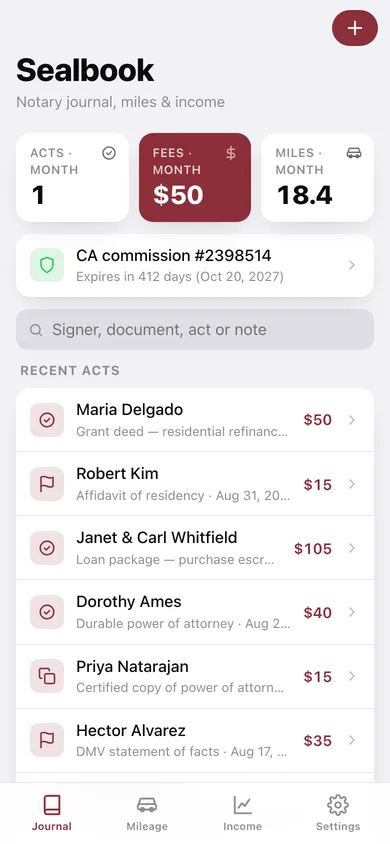
Journal
Acts, fees and miles this month, your commission countdown, search, and the recent acts.
-
2
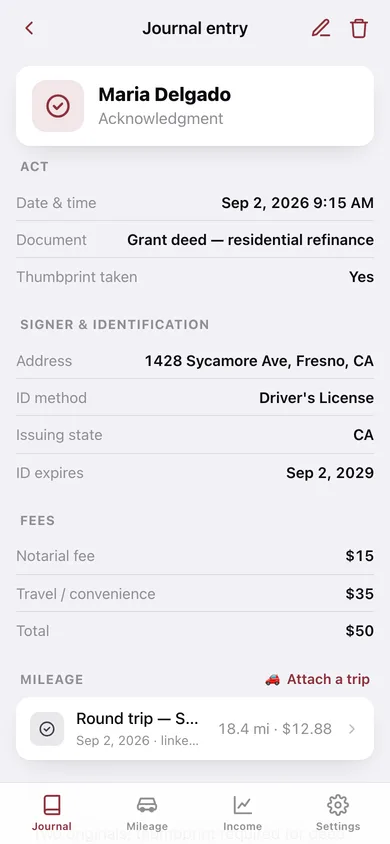
Journal entry
Act, signer & identification, fees, attached trips and notes for one notarial act.
-
3
New / edit entry
The statutory entry form with ID method logic, fees, optional round trip and notes.
-
4
Mileage
Miles this year, deduction value, IRS rate, 12-week heatmap and trips grouped by month.
-
5
Log trip
Date, round-trip miles, purpose and an optional link to a recent signing.
-
6
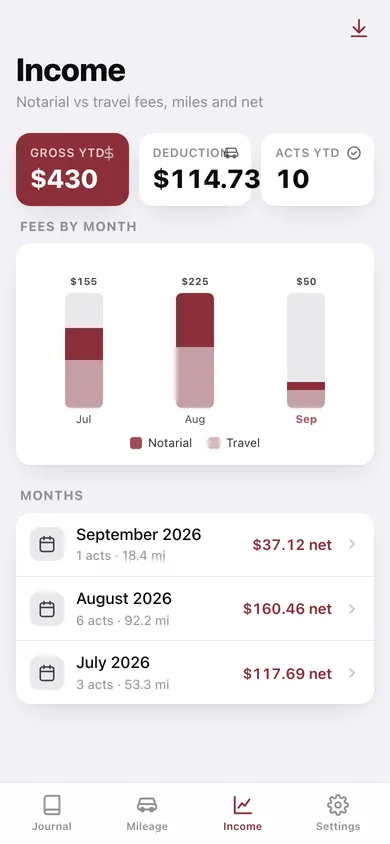
Income
YTD gross fees, mileage deduction and acts; notarial-vs-travel fees by month; net per month.
-
7
Month detail
Net income hero, the full summary lines for your preparer, and that month's entries.
-
8
Commission
Renewal countdown card plus commission, bond and E&O details.
-
9
Export
Journal, mileage or income-by-month CSV and a JSON backup.
-
10
Settings
Commission shortcut, default notarial fee, IRS rate per mile, home state, records and erase.
Try it with sample data: Loads a California mobile notary's last two months: a commission on file, eleven journal entries (deeds, loan packages, a credible-witness POA, one refused act) and eight round trips including a supply run and a training class. You can start fresh at any time.
Ready? It's free.
No account, no install, no subscription. Everything you do stays in this browser.
Your say
What should Sealbook do? Tell us before we build it.
Tell us what to build next.
Comments need a free Google sign-in, so every one is from a real person.
Sign in with Google to commentNo comments yet — be the first to say what this app should do next.
Questions
Is the web version of Sealbook free?+
Yes. Every screen is free to use: no subscription, no in-app purchases, no account.
Do I need an account?+
No. Open Sealbook and start using it right away. Sign in with Google only if you want to upvote an app, save it to your list, or leave a comment.
Where is my data stored?+
Only in this browser's local storage. Nothing you enter is sent to our servers, so we can't see it, back it up, or restore it. Clearing site data, a private window, or another device starts empty. Export a backup from the in-app menu to keep it.
Is there a Sealbook app for iPhone or Android?+
Not yet. Sealbook is a community proposal: the browser version is complete, and we build the iPhone and Android app once 100 people upvote it. Upvoters get one email when it ships.