
Web app · Education
Minutes Owed
The private tally of IEP minutes scheduled, delivered and still owed
Enter each service line once — speech 30 min twice a week, OT 45 weekly — and the expected session calendar builds itself around your school year and breaks. Two taps a day (happened, missed, shortened) keep the record; the balance and a dated gap report do the arithmetic. Free, in your browser.
Stored in your browser only. Nothing you do in the web version is sent to our servers. Clear your browser data and it's gone — so export a backup from the in-app menu if you want to keep it.
This app is a community proposal.
Try the full browser version now. We build the iPhone and Android app once 100 people upvote it.
We'll email you once, when it ships. Unsubscribe anytime.
In your browser
What you can do in Minutes Owed on the web
Service lines as written on the IEP
Type, minutes per session, sessions per week, individual or group, staff member, start date and which weekdays the sessions land on.
Expected session calendar
Every expected session for the school year is generated from the lines, minus weekends, breaks and holidays you mark — never hand-entered week by week.
Two-tap daily check
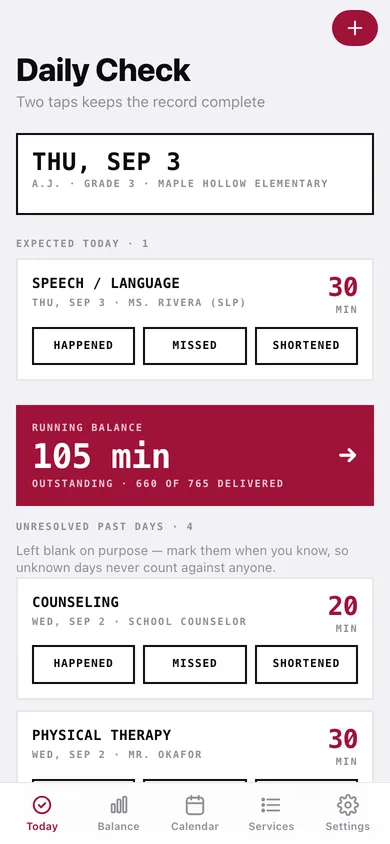
One stamp card per expected session: Happened, Missed or Shortened with the minutes actually delivered. Unknown past days stay unresolved instead of counting as missed.
Owed balance
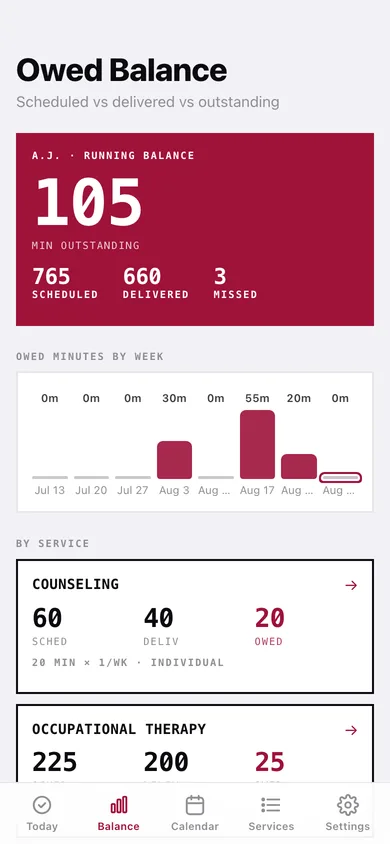
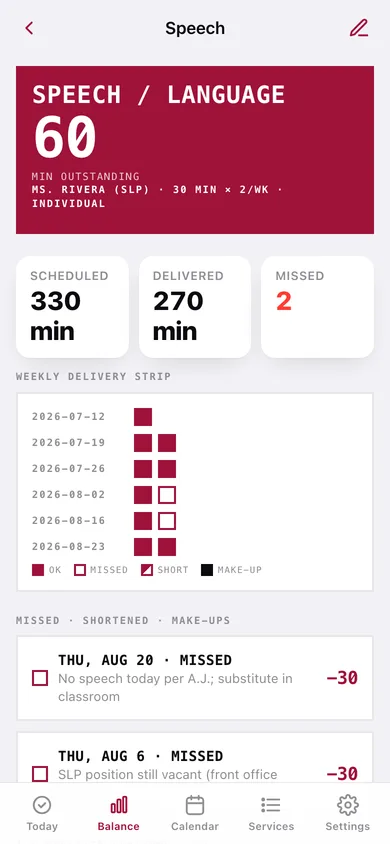
Scheduled vs delivered vs outstanding per service and per grading period, owed minutes by week, and a weekly delivery strip per service.
Gap report
Pick services and a date range and download the session-by-session table as CSV or a plain-text record with totals by service and the records-not-advice footer.
Children, make-ups and archives
Track several children, log make-up sessions the school delivers outside the calendar, and archive a finished school year with its final balances.
Screens
Every screen, rebuilt for the browser
-
1
Daily Check
Today’s expected sessions as stamp cards, the running balance, and unresolved past days to backfill.
-
2
Owed Balance
Total minutes outstanding, owed by week, by service and by grading period.
-
3
Service
One service line: outstanding minutes, weekly delivery strip, missed/shortened/make-ups and every expected session.
-
4
Session
Stamp a single session, see scheduled vs delivered vs gap, and keep a note.
-
5
Session Calendar
Month wall of status squares — solid delivered, hollow missed, split shortened, gray no-school.
-
6
Services
The child header, every IEP service line with its owed minutes, and setup links.
-
7
Service line
Add or edit a service line — dosage, weekdays, delivery, staff, start date.
-
8
School Year
School-year window, breaks and holidays, grading periods, rebuild the calendar.
-
9
Children
Roster; make a child active, edit or delete.
-
10
Archives
Archived school years with their final balances.
-
11
Gap Report
Choose services and dates, preview totals and rows, download CSV or text.
-
12
Settings
How the record works, the disclaimer, backup, sample data and erase.
Try it with sample data: Adds A.J. (Grade 3) with four IEP service lines, a school year with Fall and Winter breaks and two grading periods, and seven weeks of stamped history showing real speech, OT and counseling gaps. You can start fresh at any time.
Ready? It's free.
No account, no install, no subscription. Everything you do stays in this browser.
Your say
What should Minutes Owed do? Tell us before we build it.
Tell us what to build next.
Comments need a free Google sign-in, so every one is from a real person.
Sign in with Google to commentNo comments yet — be the first to say what this app should do next.
Questions
Is the web version of Minutes Owed free?+
Yes. Every screen is free to use: no subscription, no in-app purchases, no account.
Do I need an account?+
No. Open Minutes Owed and start using it right away. Sign in with Google only if you want to upvote an app, save it to your list, or leave a comment.
Where is my data stored?+
Only in this browser's local storage. Nothing you enter is sent to our servers, so we can't see it, back it up, or restore it. Clearing site data, a private window, or another device starts empty. Export a backup from the in-app menu to keep it.
Is there a Minutes Owed app for iPhone or Android?+
Not yet. Minutes Owed is a community proposal: the browser version is complete, and we build the iPhone and Android app once 100 people upvote it. Upvoters get one email when it ships.