
Web app · Finance
MileWay
Log a drive, classify it, and watch your IRS deduction add up
Business, medical, charity or personal — MileWay applies the right 2024 IRS standard rate the moment you classify a trip, keeps one-tap routes and per-vehicle totals, and exports a Schedule C-ready CSV. Free, no account.
Stored in your browser only. Nothing you do in the web version is sent to our servers. Clear your browser data and it's gone — so export a backup from the in-app menu if you want to keep it.
This app is a community proposal.
Try the full browser version now. We build the iPhone and Android app once 100 people upvote it.
We'll email you once, when it ships. Unsubscribe anytime.
In your browser
What you can do in MileWay on the web
Trip log with the right rate applied
Every trip carries miles, date, from/to, notes and a vehicle; classify it Business ($0.67/mi), Medical ($0.21), Charity ($0.14) or Personal and the deduction is computed for you.
In-tab trip timer
Start a trip, MileWay times the drive and turns your start and arrival odometer readings into miles, then drops you straight into the classify form.
One-tap saved routes
Save the drives you make often — office to client, warehouse loop, physical therapy — and log today's trip with a single tap at the same miles and category.
Vehicles with running odometer
Track several vehicles separately; each shows its trips, miles logged and an odometer estimated from the starting reading you entered.
Year stats and tax-season CSV
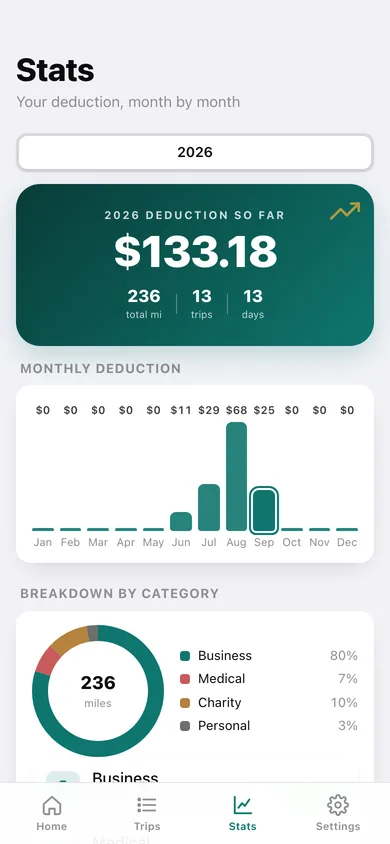
Pick a year for a deduction hero, monthly deduction bars, a miles-by-category donut and a per-category breakdown, then download an itemised CSV with rate and deduction columns.
Everything unlocked, stored locally
No account, no cloud, no subscription — trips, routes and vehicles live in this browser and export as JSON any time.
Screens
Every screen, rebuilt for the browser
-
1
Home
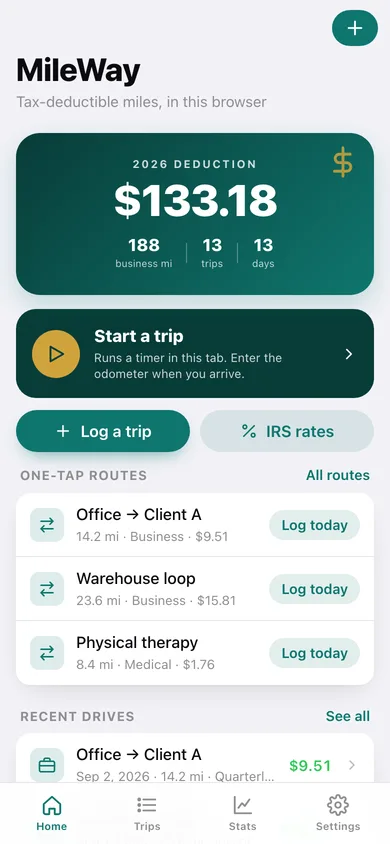
Year-to-date deduction hero with business miles and trip count, Start a trip, one-tap routes and your recent drives.
-
2
Trip in progress
A live timer for the drive, the starting odometer, and a Stop & classify button that carries the miles into the log form.
-
3
Log a trip
Miles, live deduction preview, the four IRS categories with their rates, date, from/to, notes and vehicle.
-
4
All trips
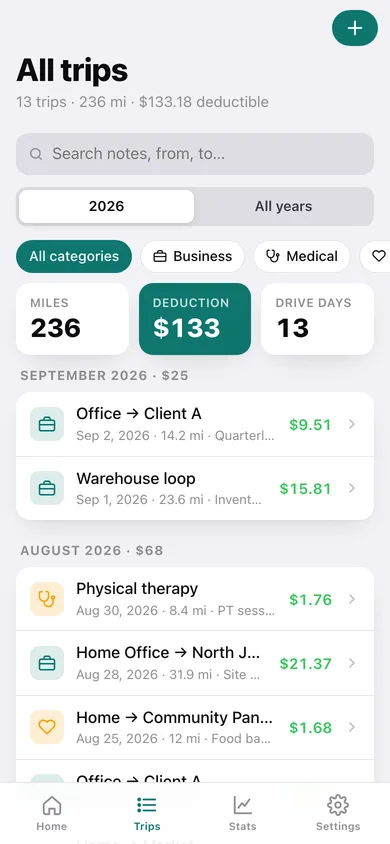
Search, year and category filters, running miles and deduction totals, and every drive grouped by month.
-
5
Trip detail
The deduction for one drive, its route legs, the rate applied, and quick actions to reclassify, repeat or save it as a route.
-
6
Saved routes
Recurring drives with their miles, category and per-log deduction, each loggable for today in one tap.
-
7
Vehicles
Each vehicle with its make, model, year, trips, miles logged and estimated odometer.
-
8
Stats
Year picker, deduction hero, monthly deduction bars, miles-by-category donut and the tax-season CSV export.
-
9
IRS rates
The 2024 standard mileage rates per category with the schedule each belongs on and your miles logged against each.
-
10
Settings
Default category, logging chime, the rate table, your lifetime totals, plus export, sample data and erase.
Try it with sample data: Loads a 2022 Toyota RAV4, three saved routes and thirteen drives over the last three months across all four categories, so the deduction hero, monthly chart and category donut are all populated. You can start fresh at any time.
Ready? It's free.
No account, no install, no subscription. Everything you do stays in this browser.
Your say
What should MileWay do? Tell us before we build it.
Tell us what to build next.
Comments need a free Google sign-in, so every one is from a real person.
Sign in with Google to commentNo comments yet — be the first to say what this app should do next.
Questions
Is the web version of MileWay free?+
Yes. Every screen is free to use: no subscription, no in-app purchases, no account.
Do I need an account?+
No. Open MileWay and start using it right away. Sign in with Google only if you want to upvote an app, save it to your list, or leave a comment.
Where is my data stored?+
Only in this browser's local storage. Nothing you enter is sent to our servers, so we can't see it, back it up, or restore it. Clearing site data, a private window, or another device starts empty. Export a backup from the in-app menu to keep it.
Is there a MileWay app for iPhone or Android?+
Not yet. MileWay is a community proposal: the browser version is complete, and we build the iPhone and Android app once 100 people upvote it. Upvoters get one email when it ships.