
Web app · Education
Math Blast
Times tables with no ads, no timer tears and a mastery score for every one of the 169 facts
Add up to four kids, set a session cap a grown-up chooses, and drill 0×0 through 12×12 with four answer chips. Wrong answers show the right fact and move on — no buzzers. A colour-coded mastery map and a supportive weekly streak show what’s sticking. Free, in your browser, no install.
Stored in your browser only. Nothing you do in the web version is sent to our servers. Clear your browser data and it's gone — so export a backup from the in-app menu if you want to keep it.
This app is a community proposal.
Try the full browser version now. We build the iPhone and Android app once 100 people upvote it.
We'll email you once, when it ships. Unsubscribe anytime.
In your browser
What you can do in Math Blast on the web
Per-fact adaptive spaced repetition
Every one of the 169 facts keeps its own Elo-style mastery score. Facts you miss come back sooner; facts you know back off — the same engine as the iPhone app.
Parent-set session cap
1, 2, 5 or 10 minutes per kid. The countdown bar drains and the drill stops there — no infinite-engagement loops.
No buzzers, no big red X
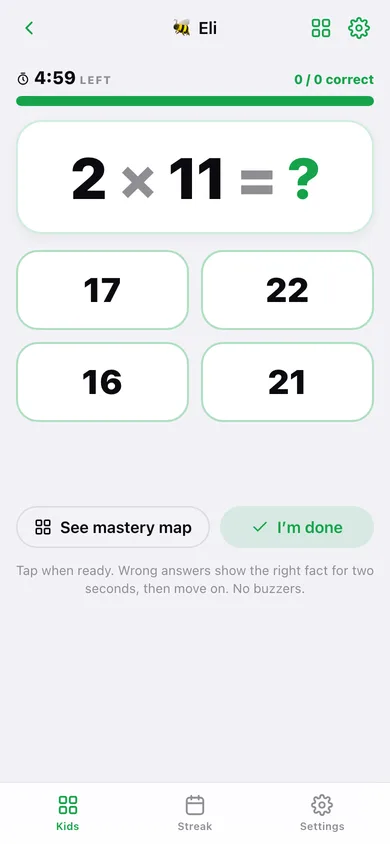
Tap when ready. A wrong answer shows the correct fact for two seconds, then quietly moves on.
Mastery map
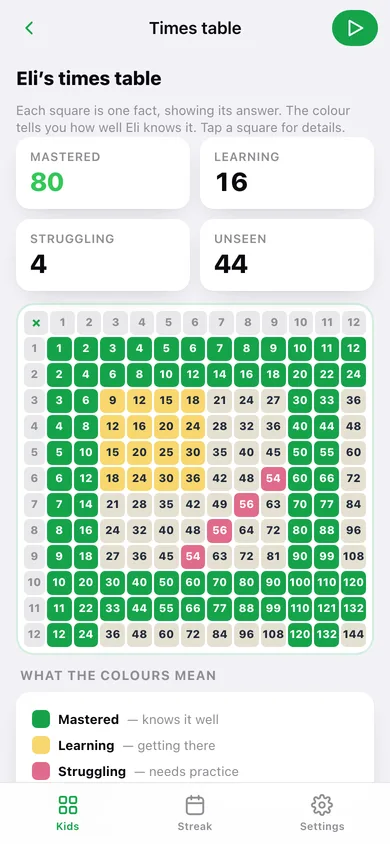
A 12×12 times table where each square shows the answer and is tinted mastered, learning, struggling or unseen. Tap any square for its stats.
Up to four kids
Each kid has their own avatar, difficulty range (up to ×5 or ×12), session cap and progress. No logins.
Supportive streak
Days drilled this week, an 8-week heatmap and every session — with no penalty for skipping a day.
Screens
Every screen, rebuilt for the browser
-
1
Kids
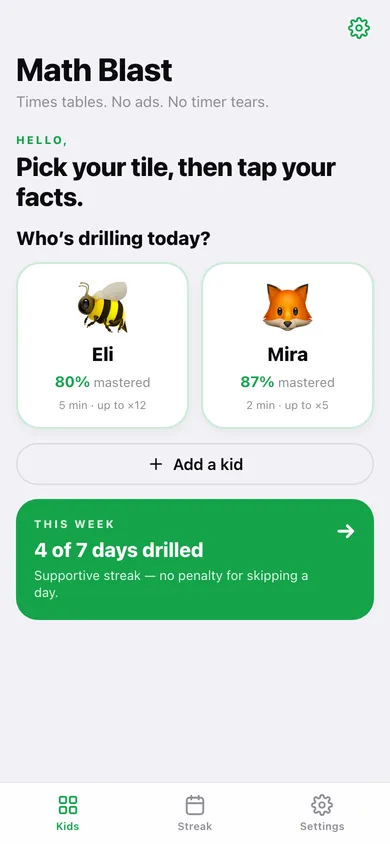
Who’s drilling today — one tile per kid with their mastery percentage, plus this week’s days drilled.
-
2
Drill
Countdown, the fact in giant type, four answer chips and gentle feedback.
-
3
Time’s up
Right answers, accuracy, an encouraging line and mastery counts after a session.
-
4
Times table
The 12×12 mastery map coloured by how well each fact is known.
-
5
Kid settings
Session cap, difficulty range, recent sessions, reset or remove.
-
6
Streak
Seven day tiles, accuracy, heatmap and every recent session by kid.
-
7
Settings
Kids, the optional chime, how it works, backup, sample data and erase.
Try it with sample data: Adds Eli (🐝) and Mira (🦊) with realistic mastery across their times tables and fourteen drill sessions over the last three weeks. You can start fresh at any time.
Ready? It's free.
No account, no install, no subscription. Everything you do stays in this browser.
Your say
What should Math Blast do? Tell us before we build it.
Tell us what to build next.
Comments need a free Google sign-in, so every one is from a real person.
Sign in with Google to commentNo comments yet — be the first to say what this app should do next.
Questions
Is the web version of Math Blast free?+
Yes. Every screen is free to use: no subscription, no in-app purchases, no account.
Do I need an account?+
No. Open Math Blast and start using it right away. Sign in with Google only if you want to upvote an app, save it to your list, or leave a comment.
Where is my data stored?+
Only in this browser's local storage. Nothing you enter is sent to our servers, so we can't see it, back it up, or restore it. Clearing site data, a private window, or another device starts empty. Export a backup from the in-app menu to keep it.
Is there a Math Blast app for iPhone or Android?+
Not yet. Math Blast is a community proposal: the browser version is complete, and we build the iPhone and Android app once 100 people upvote it. Upvoters get one email when it ships.