
Web app · Health And Fitness
Longlife
One longevity page each morning — your score, and the rules behind it
A 90-second daily check-in (sleep, zone 2, sunlight, fasted, supplements) turns into a 0–100 score with a plain-English reason, plus the 17 published rules of Attia, Sinclair, Johnson and Huberman with evidence strength and where they disagree. Free, no install, no account.
Stored in your browser only. Nothing you do in the web version is sent to our servers. Clear your browser data and it's gone — so export a backup from the in-app menu if you want to keep it.
This app is a community proposal.
Try the full browser version now. We build the iPhone and Android app once 100 people upvote it.
We'll email you once, when it ships. Unsubscribe anytime.
In your browser
What you can do in Longlife on the web
Today's score, explained
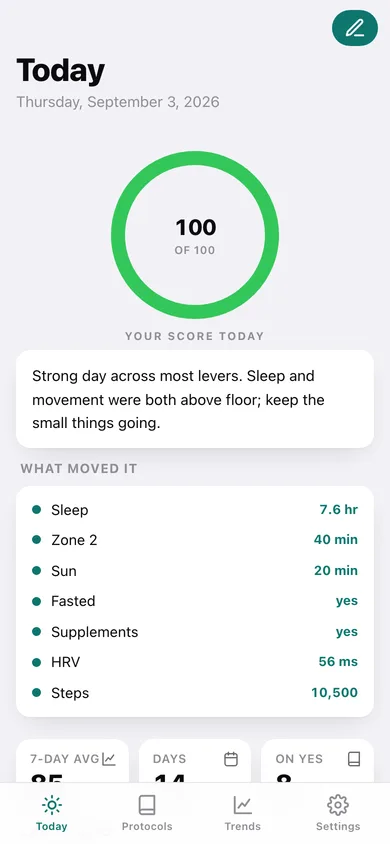
The same 0–100 heuristic as the iPhone app — sleep 20, zone 2 18, sun 14, fasted 10, supplements 10, HRV 14, steps 14 — with a one-paragraph reason and a dot per lever showing what moved it.
The 90-second check-in
Steppers for sleep hours, HRV, zone 2 minutes, sunlight minutes and steps, toggles for a 12-hour fast and supplements, plus a note. A live preview shows the score before you save.
17 rules, four founders
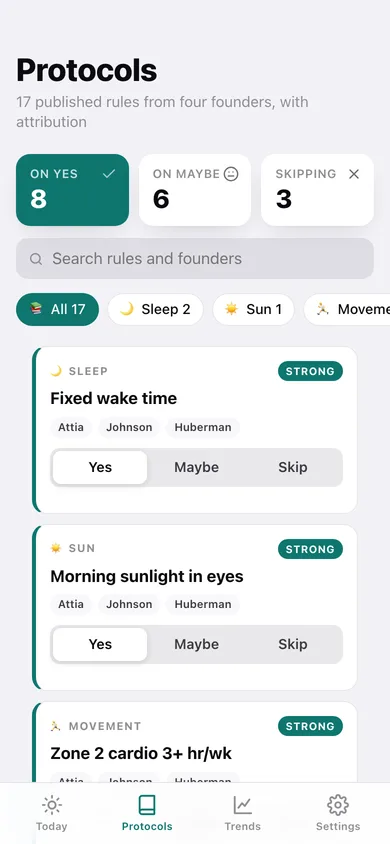
The whole protocol library — fixed wake time, morning light, zone 2, heavy strength, protein, creatine, omega-3, magnesium, vitamin D, NMN, rapamycin, TRE, alcohol, sauna, cold, screens before bed, meditation — each with Attia, Sinclair, Johnson and Huberman side by side.
Evidence and disagreement flags
Every rule carries its evidence strength (Strong / Moderate / Weak) and is flagged when the founders contradict each other, so NMN and protein don't read like settled science.
Yes / Maybe / Skip per rule
Sort the library into your own protocol. Your stances feed the Today page's rule of the day and the count on the home screen.
The four lines that matter
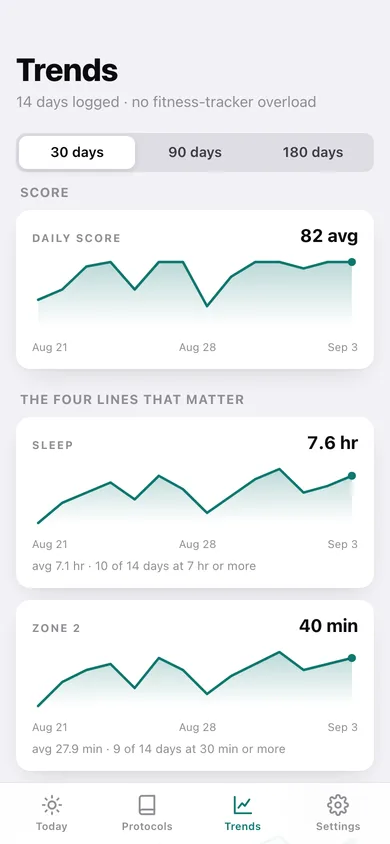
30 / 90 / 180-day arcs of sleep, zone 2, HRV and steps, plus the daily score line and a protocol-adherence bar chart — no fitness-tracker overload.
Screens
Every screen, rebuilt for the browser
-
1
Today
The score ring, the paragraph that explains it, every lever with a dot, and the last seven days as bars.
-
2
Check-in
Five questions with a live score preview, plus a note and the day it belongs to.
-
3
One day
A saved check-in: its score, what moved it, and the note you left.
-
4
Protocol library
All 17 rules by category, with evidence, founder badges, disagreement flags and Yes / Maybe / Skip.
-
5
One rule
A single rule with all four founders' published positions, its evidence strength and neighbouring rules.
-
6
Trends
Score line plus sleep, zone 2, HRV and steps over 30, 90 or 180 days, and days-the-lever-was-pulled.
-
7
Settings
Check-in options, stance reset, CSV and JSON export, sample data, erase, and the app's promises.
Try it with sample data: Loads 14 consecutive daily check-ins with real notes, and sets eight rules to Yes and three to Skip so the library and trends look lived-in. You can start fresh at any time.
Ready? It's free.
No account, no install, no subscription. Everything you do stays in this browser.
Your say
What should Longlife do? Tell us before we build it.
Tell us what to build next.
Comments need a free Google sign-in, so every one is from a real person.
Sign in with Google to commentNo comments yet — be the first to say what this app should do next.
Questions
Is the web version of Longlife free?+
Yes. Every screen is free to use: no subscription, no in-app purchases, no account.
Do I need an account?+
No. Open Longlife and start using it right away. Sign in with Google only if you want to upvote an app, save it to your list, or leave a comment.
Where is my data stored?+
Only in this browser's local storage. Nothing you enter is sent to our servers, so we can't see it, back it up, or restore it. Clearing site data, a private window, or another device starts empty. Export a backup from the in-app menu to keep it.
Is there a Longlife app for iPhone or Android?+
Not yet. Longlife is a community proposal: the browser version is complete, and we build the iPhone and Android app once 100 people upvote it. Upvoters get one email when it ships.