
Web app · Productivity
Linger
Pocket is gone. Save it, read it clean, listen to it — free, in any browser
A calm read-later library: paste a link and its text, read it in a serif, sepia, distraction-free reader, have your browser narrate it paragraph by paragraph, and keep highlights with notes. Everything stays in this browser. No account, no subscription.
Stored in your browser only. Nothing you do in the web version is sent to our servers. Clear your browser data and it's gone — so export a backup from the in-app menu if you want to keep it.
This app is a community proposal.
Try the full browser version now. We build the iPhone and Android app once 100 people upvote it.
We'll email you once, when it ships. Unsubscribe anytime.
In your browser
What you can do in Linger on the web
A queue that tells you the truth
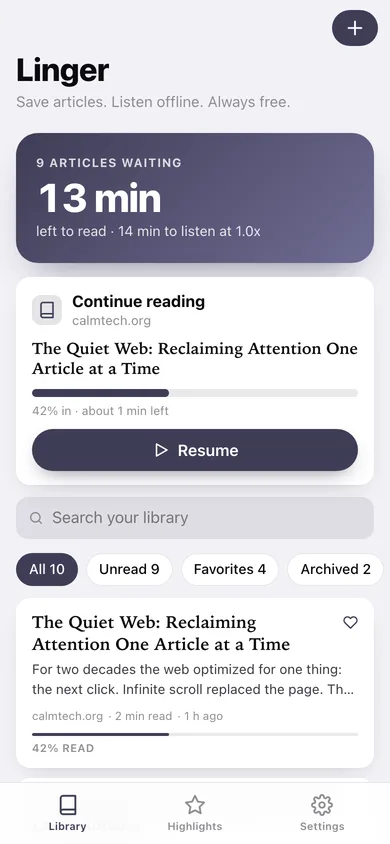
The home screen leads with how much reading and listening is actually left in your unread queue, and offers to resume whatever you were part-way through.
Distraction-free reader
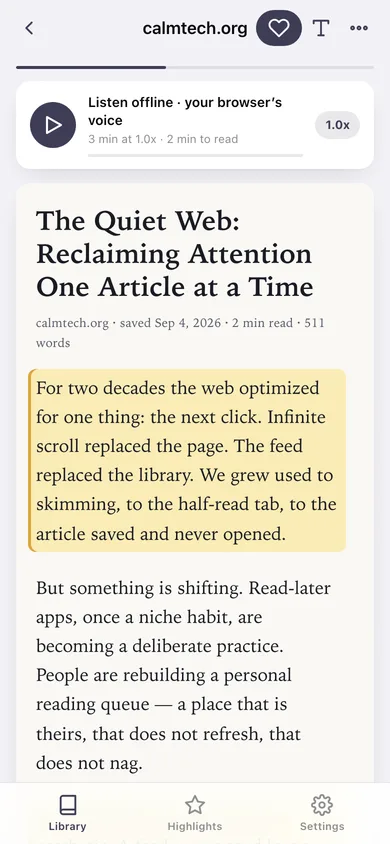
Light, sepia or dark paper, serif or sans, 14–28 pt — the article, and nothing else. Scrolling quietly tracks how far you got, the way the iPhone reader does.
Listen paragraph by paragraph
Your browser's own voice narrates the article at 0.5x–2x, highlighting the paragraph it is on, and reading progress moves with it. Tap any paragraph to start from there.
Highlight with notes
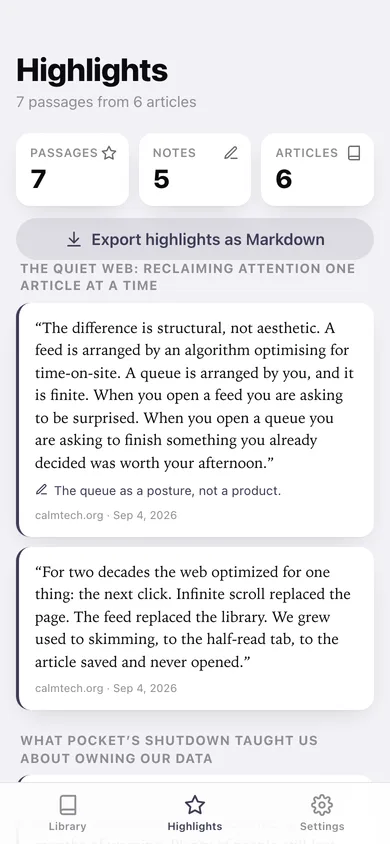
Tap a passage to keep it, add a note, and find every highlight grouped by article — export the lot as Markdown.
All / Unread / Favorites / Archived
The same four filters as the iPhone app, plus full-text search across titles, sources and the complete article text.
Free, and yours
No paywalled text-to-speech, no ads, no account. Export your library as JSON or CSV whenever you want it back.
Screens
Every screen, rebuilt for the browser
-
1
Library
Unread queue hero, continue-reading card, search, the four filters and the article ribbon with read progress.
-
2
Reader
The article on warm paper with the listen player, tap-to-highlight paragraphs and a reading-progress bar.
-
3
Highlights
Every kept passage grouped by article, with notes and a Markdown export.
-
4
Save a link
Queue a URL with its headline and text; word count, read time and excerpt are computed on save.
-
5
Edit article
Fix the headline, source, excerpt or paste in the article text you couldn't get before.
-
6
Settings
Reader theme, typeface and size, playback speed, archive-when-finished, library counts, backup and erase.
Try it with sample data: Loads twelve saved articles from the last four weeks — some part-read, one archived, three favorited — plus seven highlights with notes. You can start fresh at any time.
Ready? It's free.
No account, no install, no subscription. Everything you do stays in this browser.
Your say
What should Linger do? Tell us before we build it.
Tell us what to build next.
Comments need a free Google sign-in, so every one is from a real person.
Sign in with Google to commentNo comments yet — be the first to say what this app should do next.
Questions
Is the web version of Linger free?+
Yes. Every screen is free to use: no subscription, no in-app purchases, no account.
Do I need an account?+
No. Open Linger and start using it right away. Sign in with Google only if you want to upvote an app, save it to your list, or leave a comment.
Where is my data stored?+
Only in this browser's local storage. Nothing you enter is sent to our servers, so we can't see it, back it up, or restore it. Clearing site data, a private window, or another device starts empty. Export a backup from the in-app menu to keep it.
Is there a Linger app for iPhone or Android?+
Not yet. Linger is a community proposal: the browser version is complete, and we build the iPhone and Android app once 100 people upvote it. Upvoters get one email when it ships.