
Lifestyle
Lifefile: end-of-life planning
What your family needs to find.
No account, no install. What you do stays in your browser.
This app is a community proposal.
Try the full browser version now. We build the iPhone and Android app once 100 people upvote it.
We'll email you once, when it ships. Unsubscribe anytime.
| Price | Free, no subscription |
|---|---|
| Account | None needed to try |
| Works offline | Yes |
| Data | On your device, never on our servers |
| Platforms | Browser |
| Status | Community proposal (built for phones at 100 upvotes) |
| Last updated | 2026-05-07 |
Accessibility: Larger Text · iPad layout · Browser version How we checked →
 Try it live
The full Lifefile, right here in your browser.
No account and no install. What you enter is saved in this browser only, never on our servers.
Open Lifefile →
Try it live
The full Lifefile, right here in your browser.
No account and no install. What you enter is saved in this browser only, never on our servers.
Open Lifefile →


About this app
What Lifefile does
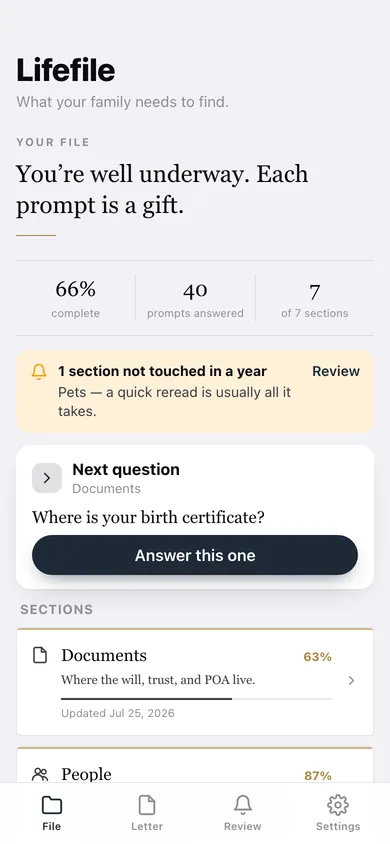
Lifefile is the offline document where you write down — once — what your family will need to know if something happens to you. Where the will is. Who the attorney is. Funeral preferences. Important phone numbers. Account inventory (just the names, never the passwords). It's the conversation you keep meaning to have, made into a checklist you can finish in one sitting. And unlike Everplans or Myend, it never leaves your phone. What ships in v1: — Sections by life-domain: Documents (where the will/trust/POA lives), People (attorney, doctor, executor, next of kin with phone), Accounts (banks, brokerage, retirement — names of institutions and account-purpose, never credentials), Insurance (life/health/property — policy numbers and contacts), Wishes (funeral preferences, organ donation, faith tradition, music, who-not-to-invite), Digital (what to do with email/social — instructions, not passwords), Pets (vet, daily routine, who takes them). — Guided prompts. Each section has plain-language questions so you fill it in like a conversation. — Face ID app lock. Sensitive content stays sensitive. — Family-letter PDF. One-tap export to a clean, formatted PDF — give a sealed printout to your executor and tell them where it is. The point is to be findable on paper. — Last-updated banner. Gentle reminder if a section hasn't been touched in 12 months. — No account, no ads, no subscription, no cloud. Your wishes never sit on a vendor's server. For the millions of US adults who know they should write this down but haven't. Especially the parents of young children, the recently-bereaved, and anyone over 50.
Features
Built to be useful, not noisy.
Sections
Documents / People / Accounts / Insurance / Wishes / Digital / Pets
Prompts
Plain-language questions per section, answer at your pace
App lock
Face ID / passcode on the whole document
Family-letter PDF
One-tap export — clean, printable, sealable
Reminders
Last-updated banner; nudge to review annually
Why it exists
The problem
Adults know they should document where the will is, who the executor is, and their final wishes — but the cloud services (Everplans, Myend, Life Safe Legacy) require trusting a vendor with the most sensitive document a household keeps, and they often have subscription pricing on top.
What's different
How Lifefile stands out
Lifefile is the only iOS end-of-life document that keeps everything 100% on-device with Face ID lock and exports a clean family-letter PDF — by design, never on a vendor's server — Everplans is a 'digital vault' cloud-account service, Myend offers cloud + in-app messaging (subscription), Life Safe Legacy gives 'truste…
You might also like
All apps →
Auraboard
Lifestyle
Your daily aesthetic vibe, as a shareable aura card.

Ins & Outs
Lifestyle
Make shareable editorial list cards

Weekdots: Life in Weeks
Lifestyle
See your life in weeks

Receiptd
Lifestyle
Turn your day into a retro receipt

Blind Box Vault
Lifestyle
Collect, complete, trade your figures

AptBook
Lifestyle
Tour, compare, see true rent
FAQ
Questions about Lifefile
How much does Lifefile cost?▾
Lifefile is free. All features are included from day one — no subscription, no in-app purchases, no paid tiers. Everything you see in this listing works the moment you install it.
Where does Lifefile store my data?▾
On your device. Lifefile is built privacy-first: no account is required, no analytics SDKs, no third-party trackers. Nothing is uploaded to a server we control — the app works without one.
What platforms does Lifefile support?▾
iOS, on iPhone and iPad. You can find the latest availability on this page.
How do I get support for Lifefile?▾
Use the Support link on this page, or email support@allthingsn.com. We answer every message and keep responses on the same thread.
Related guide
Best iPhone apps with no subscription (one-time purchase & free), 2026
More baby, family & home apps with no subscription →
More in Lifestyle

