
Web app · Finance
LeaseCheck
See exactly which service charge line jumped — then challenge it
A leaseholder's ledger, statutory red-flag checker, Section 20 deadline tracker, s.21 / s.22 / dispute letters and a tribunal evidence binder for England and Wales. Free, nothing shared with your agent.
Stored in your browser only. Nothing you do in the web version is sent to our servers. Clear your browser data and it's gone — so export a backup from the in-app menu if you want to keep it.
This app is a community proposal.
Try the full browser version now. We build the iPhone and Android app once 100 people upvote it.
We'll email you once, when it ships. Unsubscribe anytime.
In your browser
What you can do in LeaseCheck on the web
Line-item charge ledger
Enter each year's demand line by line — management fee, insurance, cleaning, repairs, reserve fund — and see the year-on-year rise per item, per category and in total.
Statutory red-flag checker
The real four checks: Section 20 consultation on works over £250, the s.20B 18-month rule, the s.21B summary of rights, and Sch.11 admin charges. Answers are pre-filled from the dates in your ledger and each finding cites its statute.
Section 20 consultation tracker
Notice of Intention, estimates stage, award — with the 30-day observation deadline counted for each stage so you never lose a right by missing a date.
Letter library with response clocks
Section 21 summary-of-costs, Section 22 inspection, follow-up-after-silence and formal dispute letters, generated with your details, dated, logged, and tracked against the statutory reply deadline.
Tribunal evidence binder
Numbered, dated exhibits with an auto-generated ledger summary, correspondence log and findings list, exported as a First-tier Tribunal binder with cover page and exhibit index.
Plain-English rights reference
All nine rights — s.19 reasonableness, s.20, s.20B, s.21, s.22, s.21B, ss.47–48, s.27A and Sch.11 admin charges — with what the law says, what it means, and the practical move.
Screens
Every screen, rebuilt for the browser
-
1
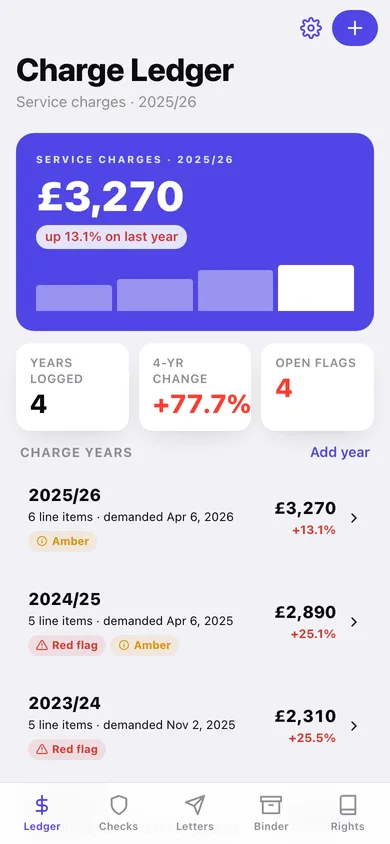
Charge Ledger
This year's total with the rise on last year, a four-year sparkline, open flag count and every logged charge year.
-
2
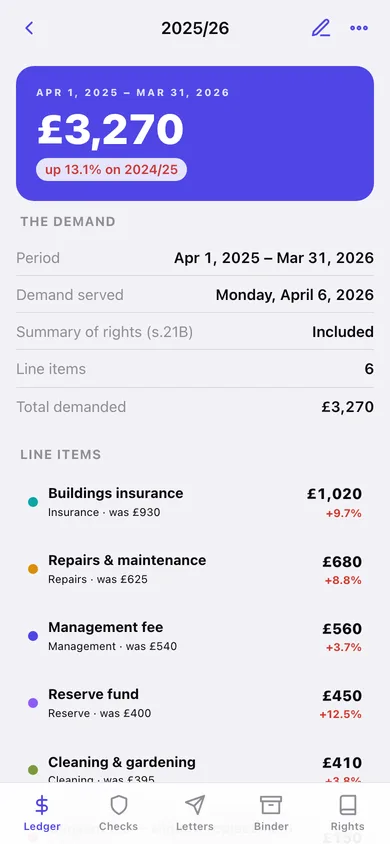
Charge year
One year's demand: total and year-on-year change, every line item with its own delta, a category donut, and the statutory findings for that year.
-
3
Charge year editor
Period, demand date, summary-of-rights tick and the line items with their categories and amounts.
-
4
Line item trend
One category across every logged year as bars, with the total change since your first year.
-
5
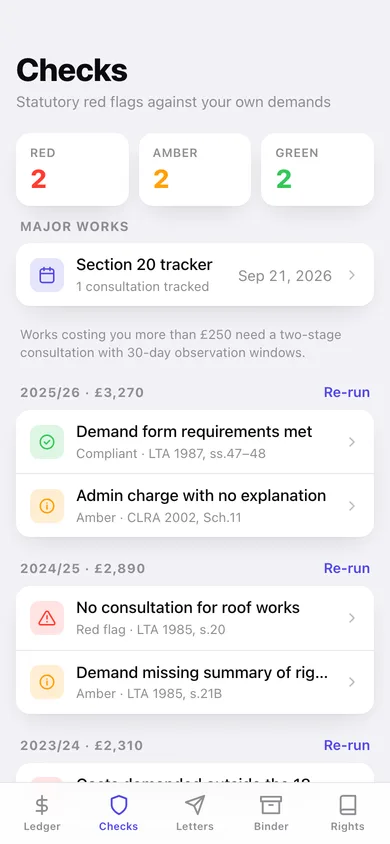
Checks
Red, amber and green counts, the Section 20 tracker, every year's findings, and what LeaseCheck tests.
-
6
Run the checks
The four statutory questions for one year, pre-answered from your ledger dates, each answer explaining its consequence.
-
7
Finding
What LeaseCheck found, what the rule says, and the next move — dispute it, request the costs, or file it as an exhibit.
-
8
Section 20 tracker
Major-works consultations stage by stage with the 30-day observation deadlines and whether you sent observations.
-
9
Letters
The four templates grouped by requests, follow-ups and disputes, plus every letter you have sent with its live status.
-
10
Write a letter
Pick a template, fill in your details and the year, and watch the statutory wording assemble in a live preview.
-
11
Sent letter
One logged letter: its response deadline, live status, the deadline rule, and the full text you sent.
-
12
Evidence Binder
Numbered exhibits, one-tap auto-exhibits from the ledger, letters and findings, and the whole binder for export.
-
13
Your rights
The nine-entry rights guide with its law-current-as-of stamp.
-
14
Right detail
What the statute says, what it means for you, the practical move, and the letter that acts on it.
-
15
Settings
Your name and property, the managing agent's details, your file totals, plus ledger CSV, backup, sample data and erase.
Try it with sample data: Loads four service charge years from a London flat (total up 70%), six statutory findings including a missed Section 20 consultation and a demand served outside the 18-month window, a live roof-renewal consultation, three sent letters and five tribunal exhibits. You can start fresh at any time.
Ready? It's free.
No account, no install, no subscription. Everything you do stays in this browser.
Your say
What should LeaseCheck do? Tell us before we build it.
Tell us what to build next.
Comments need a free Google sign-in, so every one is from a real person.
Sign in with Google to commentNo comments yet — be the first to say what this app should do next.
Questions
Is the web version of LeaseCheck free?+
Yes. Every screen is free to use: no subscription, no in-app purchases, no account.
Do I need an account?+
No. Open LeaseCheck and start using it right away. Sign in with Google only if you want to upvote an app, save it to your list, or leave a comment.
Where is my data stored?+
Only in this browser's local storage. Nothing you enter is sent to our servers, so we can't see it, back it up, or restore it. Clearing site data, a private window, or another device starts empty. Export a backup from the in-app menu to keep it.
Is there a LeaseCheck app for iPhone or Android?+
Not yet. LeaseCheck is a community proposal: the browser version is complete, and we build the iPhone and Android app once 100 people upvote it. Upvoters get one email when it ships.