
Web app · Finance
LayoffKit
Every layoff deadline on one calm screen — in your browser, offline
Enter your termination date and the dates on your packet, and LayoffKit builds the whole clock wall: severance sign-by, 7-day revocation, COBRA, 401k rollover, options, unemployment. Plus the OWBPA rules engine, a runway meter and the layoff binder. Free, no install, nothing uploaded.
Stored in your browser only. Nothing you do in the web version is sent to our servers. Clear your browser data and it's gone — so export a backup from the in-app menu if you want to keep it.
This app is a community proposal.
Try the full browser version now. We build the iPhone and Android app once 100 people upvote it.
We'll email you once, when it ships. Unsubscribe anytime.
In your browser
What you can do in LayoffKit on the web
The clock wall
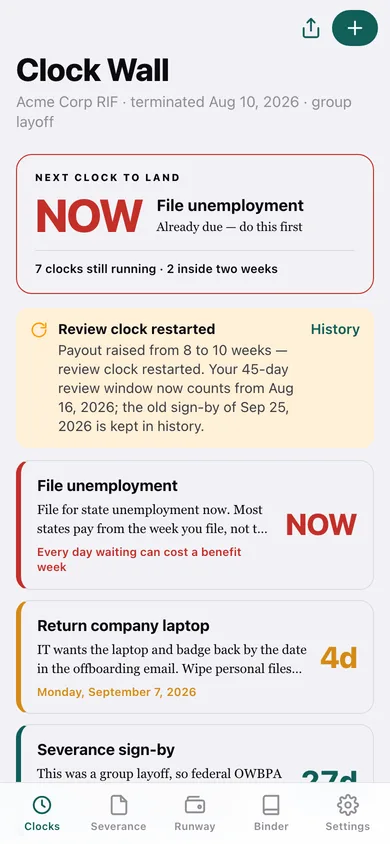
Every post-layoff deadline stacked as a live day-count — sign-by, revocation, COBRA election, 401k rollover, option exercise, non-compete expiry, unemployment file-by — sorted by urgency, tinted teal, amber inside two weeks, red inside three days, with the rule behind each date in plain language.
The OWBPA rules engine
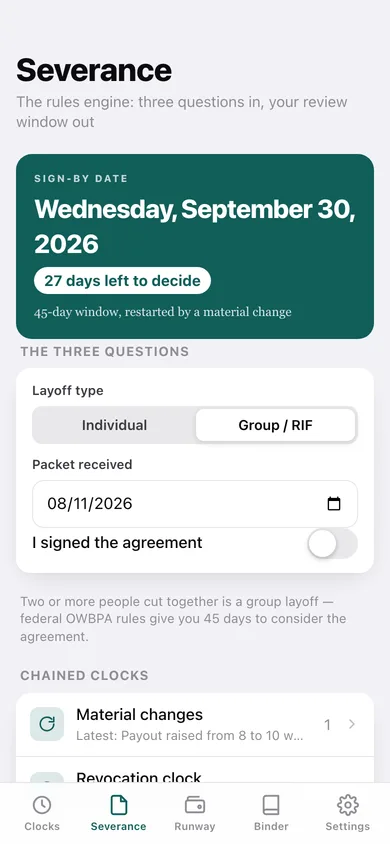
Answers three questions — individual or group layoff, packet date, any material changes — and computes the 21-or-45-day review window, restarts it from the date the offer materially changed, and chains a 7-day revocation countdown off the day you record as signed.
Runway meter
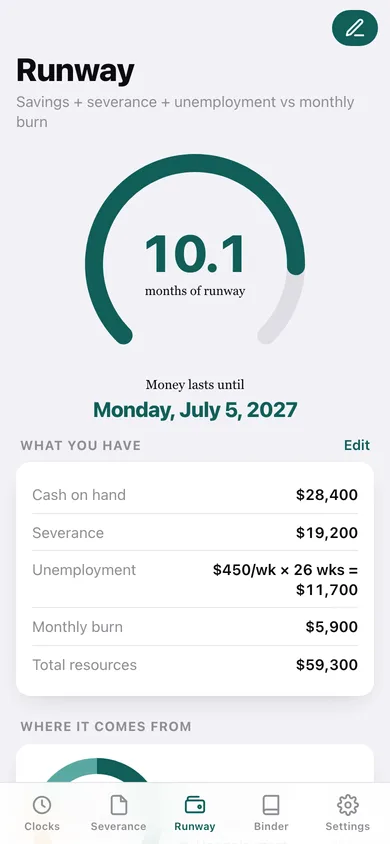
Turns cash on hand, severance, and a weekly unemployment estimate against your monthly burn into one months-of-runway dial, the date your money runs out, a source breakdown and a month-by-month coverage chart.
The layoff binder
A severance-terms worksheet (payout, health continuation, equity treatment, non-compete, references) and a benefits inventory (dental, HSA, FSA, 401k, PTO payout) that fill inline and export as one dated file for your spouse or advisor.
Clock wall share card
Renders your open clocks as a teal-on-cream card — 'Severance sign-by: 27d · COBRA: 36d · File unemployment: NOW' — with copy and share, so everyone cut in the same RIF gets on the same footing.
Prep Mode
Build the binder before anything happens: a six-step fire-drill checklist of what to save while you still have access, plus runway numbers, that converts to a live clock wall on termination day.
Screens
Every screen, rebuilt for the browser
-
1
Clock Wall
The next clock to land as a hero day-count, the material-change banner, and every deadline stacked by urgency.
-
2
Deadline detail
One clock as a 64-point countdown with the rule behind the date and per-deadline reminder offsets.
-
3
Custom deadline
Add or edit your own clock — laptop return, final paycheck — alongside the rules-engine ones.
-
4
Severance rules engine
Layoff type, packet date and signing status in; your computed sign-by date out.
-
5
Material changes
Log a sweetened or worsened offer, restart the review clock, and keep the old sign-by in history.
-
6
Revocation clock
The 7-day window that opens the moment you record a signing date.
-
7
Runway meter
The months-of-runway dial, the date the money runs out, where the money comes from and month-by-month coverage.
-
8
Runway numbers
Cash, severance, weekly unemployment benefit, benefit weeks and monthly burn, recalculating live.
-
9
Layoff binder
Completion meter across both worksheets, with export and copy.
-
10
Worksheet
Severance terms or benefits inventory as inline-editable rows that save as you type.
-
11
Prep Mode
The fire-drill checklist of what to save while you still have access, and the convert-to-live-clocks button.
-
12
Share card
Your open clocks as a teal-on-cream card sized for the group chat.
-
13
Settings
Wall options, reminder offsets, a new event, export, sample data and erase.
Try it with sample data: Loads an Acme Corp RIF terminated 24 days ago with seven live clocks, a logged material change that restarted the 45-day review window, a filled severance worksheet and benefits inventory, runway numbers, and a part-done prep draft. You can start fresh at any time.
Ready? It's free.
No account, no install, no subscription. Everything you do stays in this browser.
Your say
What should LayoffKit do? Tell us before we build it.
Tell us what to build next.
Comments need a free Google sign-in, so every one is from a real person.
Sign in with Google to commentNo comments yet — be the first to say what this app should do next.
Questions
Is the web version of LayoffKit free?+
Yes. Every screen is free to use: no subscription, no in-app purchases, no account.
Do I need an account?+
No. Open LayoffKit and start using it right away. Sign in with Google only if you want to upvote an app, save it to your list, or leave a comment.
Where is my data stored?+
Only in this browser's local storage. Nothing you enter is sent to our servers, so we can't see it, back it up, or restore it. Clearing site data, a private window, or another device starts empty. Export a backup from the in-app menu to keep it.
Is there a LayoffKit app for iPhone or Android?+
Not yet. LayoffKit is a community proposal: the browser version is complete, and we build the iPhone and Android app once 100 people upvote it. Upvoters get one email when it ships.