
Web app · Finance
Kitty
Split the trip and settle up in the fewest possible transfers
Create a group, add everyone, log who paid what — equal splits or custom shares — and Kitty collapses a week of tangled IOUs into the smallest set of person-to-person transfers that zeroes every balance. Free, no account, nothing synced anywhere.
Stored in your browser only. Nothing you do in the web version is sent to our servers. Clear your browser data and it's gone — so export a backup from the in-app menu if you want to keep it.
This app is a community proposal.
Try the full browser version now. We build the iPhone and Android app once 100 people upvote it.
We'll email you once, when it ships. Unsubscribe anytime.
In your browser
What you can do in Kitty on the web
Groups with real members
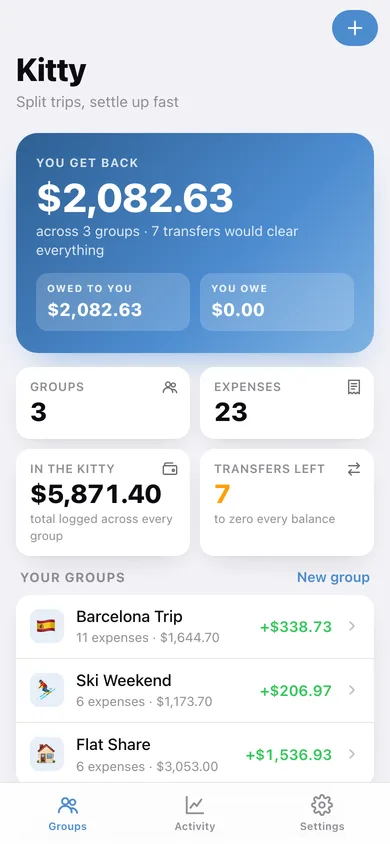
A named group with an icon, a currency and everyone splitting it — a Barcelona trip, a ski weekend, an ongoing flat share. Mark which member is you and the home screen tracks your own position.
Equal or weighted expenses
Log who paid, how much, the date, a note and exactly who shares it. Split equally, or give people weights — 2× pays twice what 1× pays — with a live share preview before you save.
Minimal-settlement engine
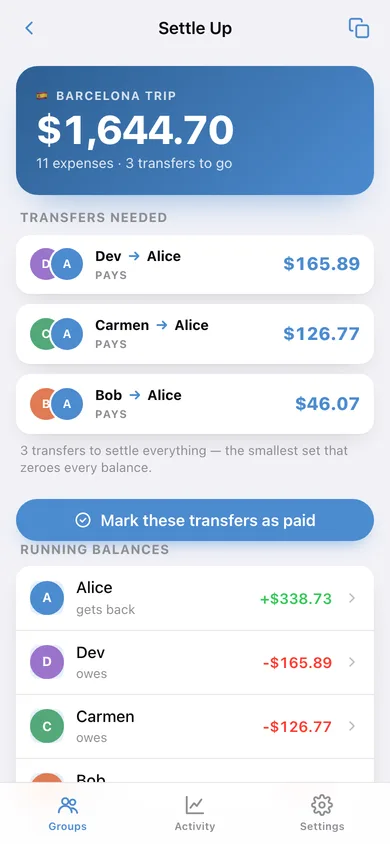
The same greedy creditor/debtor reduction the iPhone app runs: it pairs the biggest creditor with the biggest debtor until every balance is zero, producing the fewest transfers possible.
Running balances at a glance
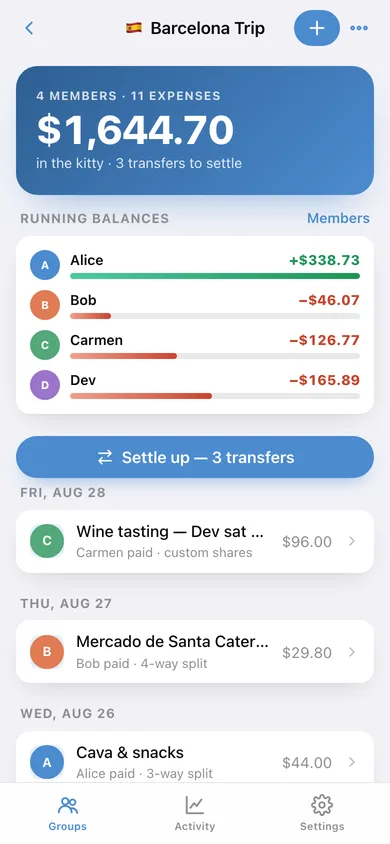
Every member's net position in the group, sorted by how far from square they are, with a bar showing who is up and who is down.
Record the payback
Once people actually pay each other, mark the transfers as paid and Kitty logs them in the ledger so every balance drops to zero without touching the original expenses.
Activity across every group
Weekly spend bars, a donut split by group, your biggest expenses, and a copy-ready settle-up summary or CSV of the whole ledger.
Screens
Every screen, rebuilt for the browser
-
1
Groups
What you get back or owe across every group, the total in the kitty, transfers still outstanding, and each group with your own balance.
-
2
Group detail
The kitty total, every member's running balance, the settle-up button and every expense grouped by day.
-
3
Settle Up
The minimal set of transfers with who pays whom, running balances, and a copy-ready summary.
-
4
Expense detail
One expense broken down into each person's resolved share, the payer, the split mode and the note.
-
5
Add or edit an expense
Title, amount, date, note, payer, who shares it, equal or custom weights — with a live share preview and validation.
-
6
Member
One person's net balance, what they paid out, their own share, and every expense they are involved in.
-
7
Group editor
Name, icon, currency and the member list — plus marking which member is you.
-
8
Activity
Weekly spend bars, the split by group, biggest expenses and the most recent activity across every group.
-
9
Settings
Default currency and split, your groups, CSV and JSON export, sample data and erase.
Try it with sample data: Loads three groups — a Barcelona trip, a ski weekend and an ongoing flat share — with fourteen members' worth of expenses over the last five weeks, including two custom-share bills so the balances and settle-up are genuinely non-trivial. You can start fresh at any time.
Ready? It's free.
No account, no install, no subscription. Everything you do stays in this browser.
Your say
What should Kitty do? Tell us before we build it.
Tell us what to build next.
Comments need a free Google sign-in, so every one is from a real person.
Sign in with Google to commentNo comments yet — be the first to say what this app should do next.
Questions
Is the web version of Kitty free?+
Yes. Every screen is free to use: no subscription, no in-app purchases, no account.
Do I need an account?+
No. Open Kitty and start using it right away. Sign in with Google only if you want to upvote an app, save it to your list, or leave a comment.
Where is my data stored?+
Only in this browser's local storage. Nothing you enter is sent to our servers, so we can't see it, back it up, or restore it. Clearing site data, a private window, or another device starts empty. Export a backup from the in-app menu to keep it.
Is there a Kitty app for iPhone or Android?+
Not yet. Kitty is a community proposal: the browser version is complete, and we build the iPhone and Android app once 100 people upvote it. Upvoters get one email when it ships.