
Web app · Finance
Kilowatch
Rate hike or usage? Type two numbers off your bill and know
Kilowatch computes the true all-in cents per kWh your bill never prints, then splits every dollar of movement into a usage component and a rate component and says plainly which one did it. Multi-year charts, seasonal comparison, bundled EIA state baselines. Free, no install, no login.
Stored in your browser only. Nothing you do in the web version is sent to our servers. Clear your browser data and it's gone — so export a backup from the in-app menu if you want to keep it.
This app is a community proposal.
Try the full browser version now. We build the iPhone and Android app once 100 people upvote it.
We'll email you once, when it ships. Unsubscribe anytime.
In your browser
What you can do in Kilowatch on the web
Ten-second bill entry
Type the kWh and the total off the paper or PDF bill and pick the month. No bank link, no utility login, no eleven-field form.
True effective rate
Total ÷ usage, with every rider, delivery charge and fuel adjustment already folded in — the one number your utility buries. Rendered in cents for electricity, dollars for gas, water and propane.
The verdict card
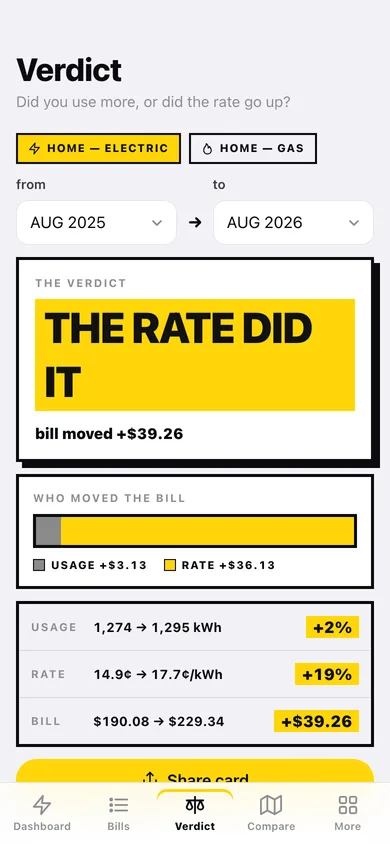
ΔBill = (usage change × old rate) + (rate change × new usage). Whichever component is at least 66% of the movement wins, and the card says it: SAME HOUSE. USED 4% LESS. BILL +$31. THE RATE DID IT.
Multi-year rate and usage charts
A stepped rate line beside usage bars over 1 year, 3 years or everything, with the biggest rate steps called out by month — because rate cases land as steps, not slopes.
Seasonal grid and state baselines
A 12-month × 3-year grid that compares July to last July so a heat wave never reads as a rate hike, plus bundled EIA residential baselines for all 50 states and DC to show whether you are being outpaced.
Multi-utility accounts and CSV export
Track gas, water and propane alongside electric, each with its own unit and state, and export any account's full history as CSV for a landlord dispute or a rate-case comment.
Screens
Every screen, rebuilt for the browser
-
1
Dashboard
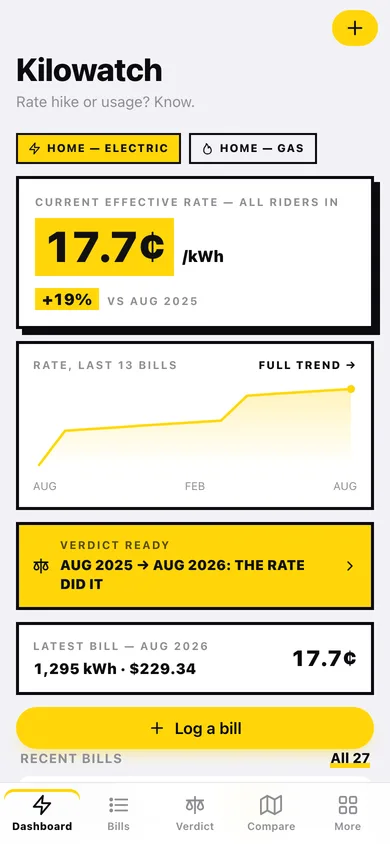
Your current effective rate, the change against the same month last year, a rate sparkline, the ready verdict and the latest bill.
-
2
Bill log
Every bill grouped by year with its effective rate and a year-over-year marker on each row.
-
3
Bill detail
One bill's rate, usage and total, plus vs-last-month and vs-same-month-last-year comparisons.
-
4
Log a bill
Month, year, usage and total, with the effective rate appearing live as you type.
-
5
Verdict
Pick any two periods and see the dollar change split into usage and rate, with the plain-English ruling.
-
6
Share card
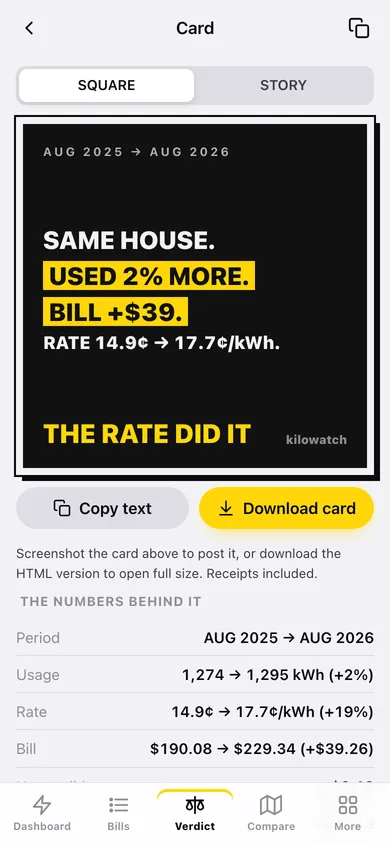
The brutalist square or story card built to be screenshotted, plus the numbers behind it.
-
7
Rate trend
Multi-year stepped rate line over usage bars, with the biggest rate steps listed by month.
-
8
State compare
Your yearly average rate against your state's bundled EIA residential baseline, year by year.
-
9
Seasonal grid
Twelve months across three years, with yellow marking whichever of rate or usage moved more.
-
10
Accounts
Every electric, gas, water and propane account with its current rate and bill count.
-
11
Account editor
Name, utility company, type (which sets the unit), home state and notes.
-
12
Export
Pick an account and a range, preview the rows, then copy or download the CSV.
-
13
More
Tools, home state, bill cadence, privacy, backup, sample data and erase.
Try it with sample data: Loads a Virginia household: an electric account with 27 monthly bills whose rate creeps from 14.1¢ to about 17.9¢ with two visible step-ups, plus a gas account with 14 winter-heavy bills. You can start fresh at any time.
Ready? It's free.
No account, no install, no subscription. Everything you do stays in this browser.
Your say
What should Kilowatch do? Tell us before we build it.
Tell us what to build next.
Comments need a free Google sign-in, so every one is from a real person.
Sign in with Google to commentNo comments yet — be the first to say what this app should do next.
Questions
Is the web version of Kilowatch free?+
Yes. Every screen is free to use: no subscription, no in-app purchases, no account.
Do I need an account?+
No. Open Kilowatch and start using it right away. Sign in with Google only if you want to upvote an app, save it to your list, or leave a comment.
Where is my data stored?+
Only in this browser's local storage. Nothing you enter is sent to our servers, so we can't see it, back it up, or restore it. Clearing site data, a private window, or another device starts empty. Export a backup from the in-app menu to keep it.
Is there a Kilowatch app for iPhone or Android?+
Not yet. Kilowatch is a community proposal: the browser version is complete, and we build the iPhone and Android app once 100 people upvote it. Upvoters get one email when it ships.