What I'd like to see
Garima
1 month, 2 weeks ago
This is a really good app, but if you could add a feature where I can change the currency, that will be helpful! Thank you!

Web app · Finance
Ghar Kharcha
Tap a category, punch the amount on a big numpad, done. Envelope budgets for sabzi, dudh, transport, recharge, school and bills fill up as you write, a day-by-day bahi diary keeps every page, and month close rules the book off into the archive. Free, offline, no account.
Stored in your browser only. Nothing you do in the web version is sent to our servers. Clear your browser data and it's gone — so export a backup from the in-app menu if you want to keep it.
Try the full browser version now. We build the iPhone and Android app once 100 people upvote it.
We'll email you once, when it ships. Unsubscribe anytime.
In your browser
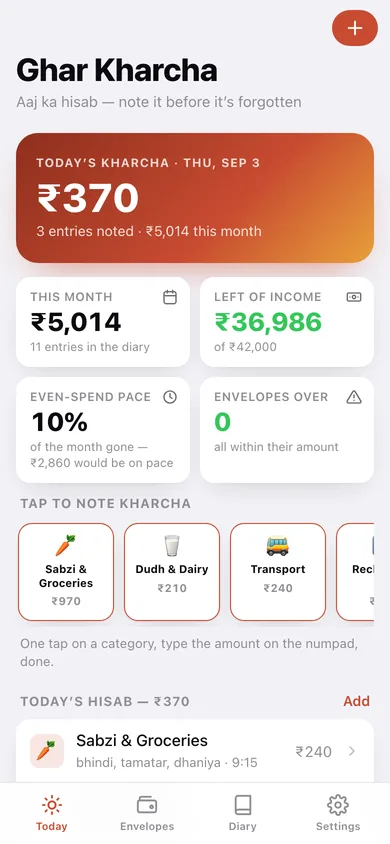
One tap on a category chip, the amount on a big thumb-friendly numpad, and today's kharcha is written down — no ten-field form, no bank linking, no SMS permissions.
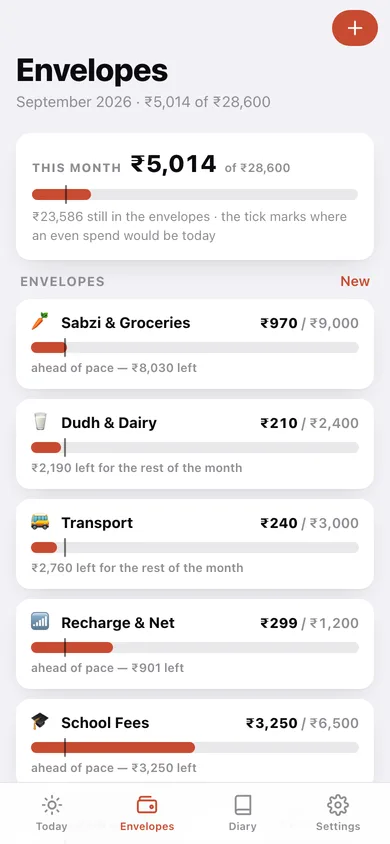
Allot a monthly amount to each envelope and watch it fill: the bar turns amber at 80% of the allotment and red the moment it is overspent.
Every bar carries a tick showing where an even spend would be today, so by the 18th you can see whether the grocery money will stretch to the 30th — before it runs out, not after.
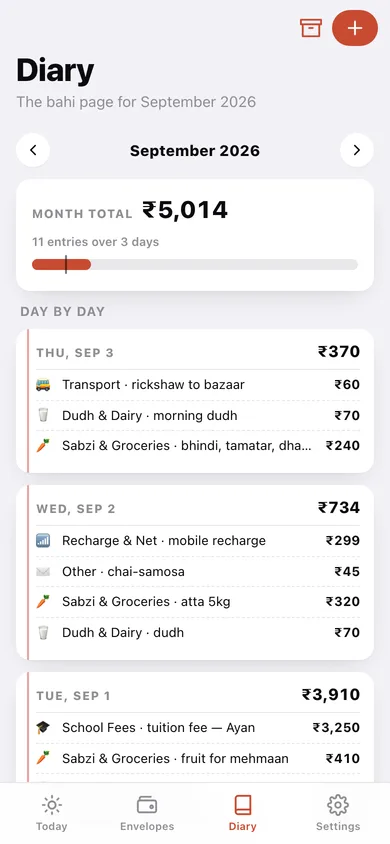
A lined page for every day of the month with its entries and total, exactly like a paper kharcha diary. Any past day is editable, and you can flip back through earlier months.
Rule off the book: total spent, over or under for every envelope, the biggest spending days, and an archived page you can compare against next Diwali or next fee quarter.
Set the money the house runs on each month and the Today screen shows what's actually left, instead of only what the envelopes allow.
Screens
Today
Today's kharcha, what's left of the income, the even-spend pace, one-tap category chips and today's hisab with its running total.
Note kharcha
The big rupee numpad, the envelope picker, a note and the date — the five-second entry screen.
Envelopes
Every envelope's spent-versus-allotted bar with the amber and red thresholds and the pace mark.
Envelope detail
One envelope's month: spent of allotted, daily spend bars and every entry noted against it.
Envelope editor
Name, monthly amount and symbol for a new or existing envelope.
Diary
The month's bahi pages day by day, with a month switcher, the running total and the route to closing the book.
A day's page
Every entry noted on one day, its total, and the split by envelope.
Close the Month
The month's totals, over or under for every envelope, the biggest spending days, and the button that rules off the page.
Archive
Every closed month as a bar chart and a list of ruled-off books.
Closed month
One archived page: totals, biggest day, and the frozen envelope hisab.
Settings
Household income, envelope management, CSV and JSON export, sample data and erase.
Try it with sample data: Loads the seven default envelopes, six weeks of a real household's daily kharcha — dudh every morning, weekly sabzi mandi, tuition fees, electricity, recharges and shagun — plus two ruled-off months in the archive and a ₹42,000 household income. You can start fresh at any time.
No account, no install, no subscription. Everything you do stays in this browser.
Your say
Tell us what to build next.
Comments need a free Google sign-in, so every one is from a real person.
Sign in with Google to commentThis is a really good app, but if you could add a feature where I can change the currency, that will be helpful! Thank you!
Yes. Every screen is free to use: no subscription, no in-app purchases, no account.
No. Open Ghar Kharcha and start using it right away. Sign in with Google only if you want to upvote an app, save it to your list, or leave a comment.
Only in this browser's local storage. Nothing you enter is sent to our servers, so we can't see it, back it up, or restore it. Clearing site data, a private window, or another device starts empty. Export a backup from the in-app menu to keep it.
Not yet. Ghar Kharcha is a community proposal: the browser version is complete, and we build the iPhone and Android app once 100 people upvote it. Upvoters get one email when it ships.
All Things AI
Free, takes a couple of seconds, and there is no password to remember.
Google sign-in only. By continuing you agree to our Terms and Privacy Policy.