
Web app · Business
Jobslate
Track jobs and send clean invoices and quotes — no subscription, right in your browser
The job and invoice tracker for one-person trades. Keep a client book, log each job with materials, labor hours and tax, flip it between unpaid, sent and paid, print a branded invoice or quote, and watch income roll up by week, month and client. Free, no install, no account.
Stored in your browser only. Nothing you do in the web version is sent to our servers. Clear your browser data and it's gone — so export a backup from the in-app menu if you want to keep it.
This app is a community proposal.
Try the full browser version now. We build the iPhone and Android app once 100 people upvote it.
We'll email you once, when it ships. Unsubscribe anytime.
In your browser
What you can do in Jobslate on the web
Client book with recurring clients
Name, address, phone, email, notes and a per-client default labor rate. Star recurring clients to pin them and rebook a new job pre-filled in one tap.
Jobs with live totals
Materials (item × qty × unit price), labor hours × rate and a tax rate — the running total updates as you type, exactly like the iPhone app.
Quotes that become invoices
Build a quote, send it, then convert the accepted quote into an invoice with every line item carried over.
Unpaid, sent, paid
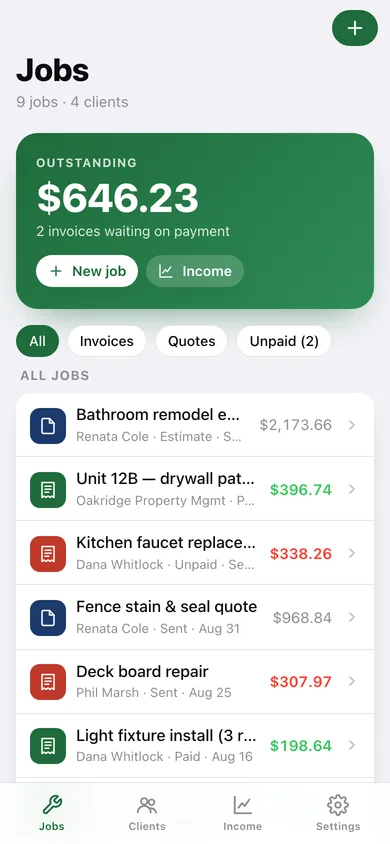
One segmented control per invoice; the home screen leads with the total outstanding across every client and an Unpaid filter.
Printable branded invoice
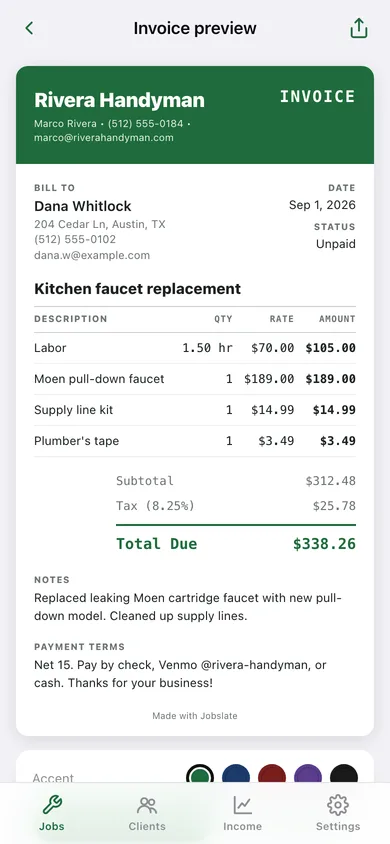
A ruled invoice or quote with your business name, bill-to block, line-item table, subtotal, tax and total due — pick one of five accent colours, print or save as PDF, or copy it as text.
Income by week, month and client
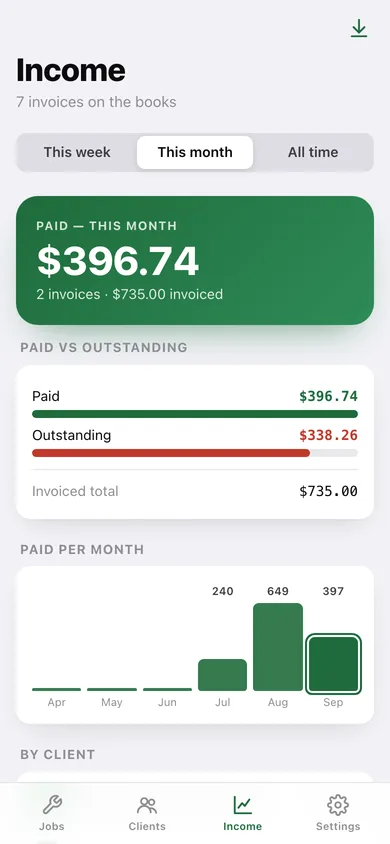
Paid vs outstanding bars, paid-per-month chart for the last six months, per-client totals and a one-tap CSV export.
Screens
Every screen, rebuilt for the browser
-
1
Jobs
Outstanding balance up top, All / Invoices / Quotes / Unpaid filters, and every job with its client, status and total.
-
2
Job detail
Total due, billing status, line items, notes, and the Make invoice / Convert to invoice actions.
-
3
New / edit job
Title, client, date, status, invoice-or-quote, materials editor, labor, tax and notes with a live total.
-
4
Invoice preview
The printable invoice or quote with accent picker, print / save PDF, copy-as-text and mark-as-sent.
-
5
Clients
Searchable client book with recurring clients pinned and outstanding balances per client.
-
6
Client detail
Billed to date, outstanding, contact card, recurring toggle and every job for this client with Rebook.
-
7
New / edit client
Contact details, recurring flag, default labor rate and notes.
-
8
Income
Paid this week / month / all time, paid vs outstanding, paid per month chart, by-client totals and CSV export.
-
9
Settings
Business profile, invoice accent, backup, sample data and erase.
-
10
Business profile
Business name, your name, contact, default labor and tax rates, payment terms — auto-filled onto every invoice.
Try it with sample data: Loads Rivera Handyman's business profile, four clients (two recurring) and nine jobs over six weeks — paid, sent and unpaid invoices plus two open quotes. You can start fresh at any time.
Ready? It's free.
No account, no install, no subscription. Everything you do stays in this browser.
Your say
What should Jobslate do? Tell us before we build it.
Tell us what to build next.
Comments need a free Google sign-in, so every one is from a real person.
Sign in with Google to commentNo comments yet — be the first to say what this app should do next.
Questions
Is the web version of Jobslate free?+
Yes. Every screen is free to use: no subscription, no in-app purchases, no account.
Do I need an account?+
No. Open Jobslate and start using it right away. Sign in with Google only if you want to upvote an app, save it to your list, or leave a comment.
Where is my data stored?+
Only in this browser's local storage. Nothing you enter is sent to our servers, so we can't see it, back it up, or restore it. Clearing site data, a private window, or another device starts empty. Export a backup from the in-app menu to keep it.
Is there a Jobslate app for iPhone or Android?+
Not yet. Jobslate is a community proposal: the browser version is complete, and we build the iPhone and Android app once 100 people upvote it. Upvoters get one email when it ships.