
Web app · Health And Fitness
Ironlog
Log every set, know the number to beat — a strength logbook in your browser
Start a workout, log weight × reps in two taps with last session's numbers in front of you, and Ironlog tracks your top set, Epley estimated 1RM and best volume automatically. Plate calculator and templates included. Free, no account, no subscription.
Stored in your browser only. Nothing you do in the web version is sent to our servers. Clear your browser data and it's gone — so export a backup from the in-app menu if you want to keep it.
This app is a community proposal.
Try the full browser version now. We build the iPhone and Android app once 100 people upvote it.
We'll email you once, when it ships. Unsubscribe anytime.
In your browser
What you can do in Ironlog on the web
Live workout logging
Start a workout, add lifts from a 30-exercise library, and log each set with the previous session's weight and reps shown right above the entry.
Automatic personal records
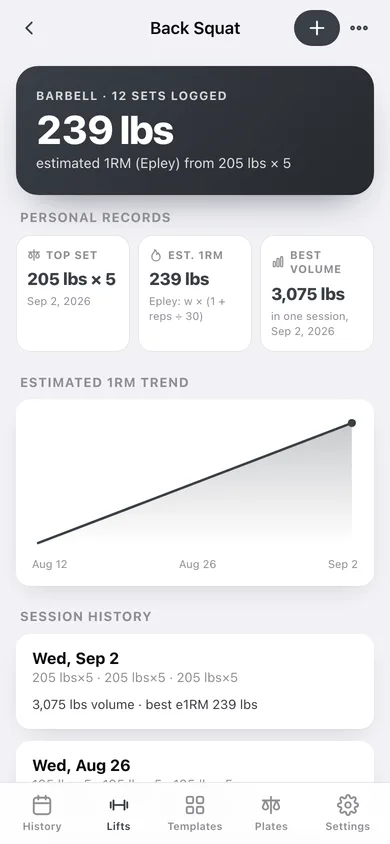
Every lift gets a top set, an estimated 1RM using the Epley formula (weight × (1 + reps ÷ 30)) and a best single-session volume — plus a 1RM trend line across your last twelve sessions.
Plate calculator with a real barbell
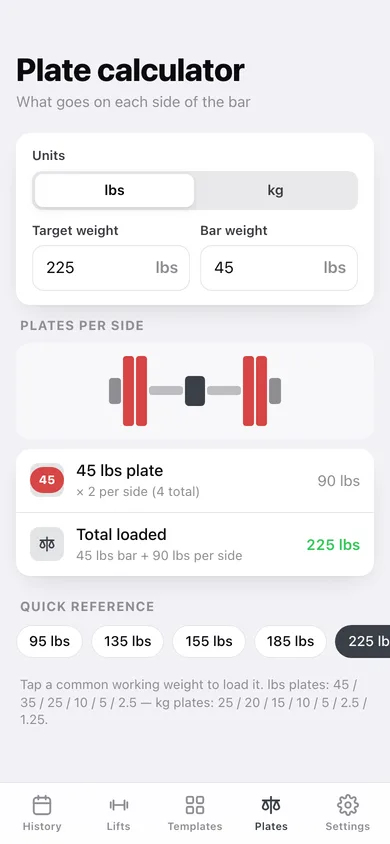
Type a target and a bar weight and see the exact stack per side, drawn as a loaded barbell, in lbs (45/35/25/10/5/2.5) or kg (25/20/15/10/5/2.5/1.25), with the closest loadable weight when the number is not exact.
Templates for your program
Push A, Pull A, Legs and 5×5 Full Body are one tap away, or build your own running order with sets and reps and start a workout straight from it.
History that stays honest
Every finished workout keeps its duration, template, total volume and each set — open one to see the whole session, or a lift to see all of it across time.
Yours, in this browser
No account and no sync: export every set as CSV or the whole logbook as a JSON backup whenever you want.
Screens
Every screen, rebuilt for the browser
-
1
History
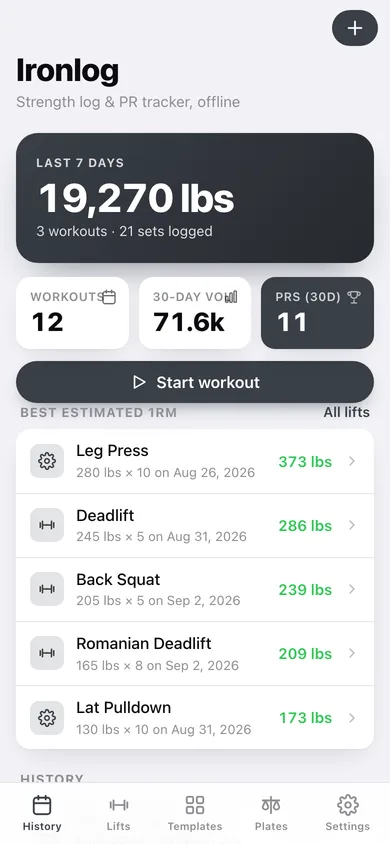
Last-7-day tonnage, fresh PR count, your best estimated 1RMs and every workout you have logged.
-
2
Live workout
Running clock, per-lift set blocks with last session's numbers, and a plate-aware set sheet.
-
3
Workout detail
One session: volume, duration, best e1RM and every set grouped by lift.
-
4
Lift library
All 30 starter lifts plus your own, grouped by barbell, dumbbell, machine, cable and bodyweight.
-
5
Lift detail
Top set, estimated 1RM, best volume, the 1RM trend chart and every session on that lift.
-
6
Templates
Your saved running orders and the classic Push/Pull/Legs and 5×5 programs.
-
7
Template editor
Name a template, set the lifts with sets and reps, and start a workout from it.
-
8
Plate calculator
Target and bar weight in, a drawn barbell and the plate stack per side out.
-
9
Settings
Weight unit, default bar, rest timer, CSV export, backup, sample data and erase.
Try it with sample data: Loads a four-week Push A / Pull A / Legs block — twelve workouts, progressing bench, squat, deadlift and rows — plus the four classic templates. You can start fresh at any time.
Ready? It's free.
No account, no install, no subscription. Everything you do stays in this browser.
Your say
What should Ironlog do? Tell us before we build it.
Tell us what to build next.
Comments need a free Google sign-in, so every one is from a real person.
Sign in with Google to commentNo comments yet — be the first to say what this app should do next.
Questions
Is the web version of Ironlog free?+
Yes. Every screen is free to use: no subscription, no in-app purchases, no account.
Do I need an account?+
No. Open Ironlog and start using it right away. Sign in with Google only if you want to upvote an app, save it to your list, or leave a comment.
Where is my data stored?+
Only in this browser's local storage. Nothing you enter is sent to our servers, so we can't see it, back it up, or restore it. Clearing site data, a private window, or another device starts empty. Export a backup from the in-app menu to keep it.
Is there a Ironlog app for iPhone or Android?+
Not yet. Ironlog is a community proposal: the browser version is complete, and we build the iPhone and Android app once 100 people upvote it. Upvoters get one email when it ships.