
Web app · Business
InkLot
The tattoo client book, consent signature and ink lot trail — in your browser
Keep every client's file in one place: on-glass consent signed with a finger, sessions logged with placement, needle grouping and the exact ink brand, colour, lot and batch pulled from your shelf, deposits tracked, and a dated file you can hand an inspector. Free, no install.
Stored in your browser only. Nothing you do in the web version is sent to our servers. Clear your browser data and it's gone — so export a backup from the in-app menu if you want to keep it.
This app is a community proposal.
Try the full browser version now. We build the iPhone and Android app once 100 people upvote it.
We'll email you once, when it ships. Unsubscribe anytime.
In your browser
What you can do in InkLot on the web
Client book that stays searchable
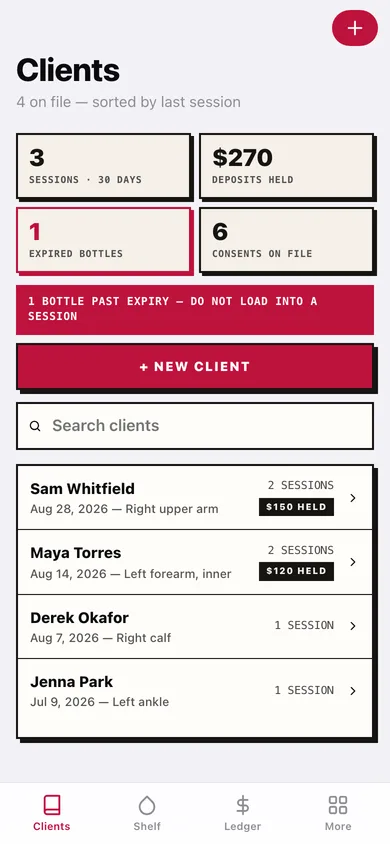
Unlimited clients with contact details, ID-checked note, allergy and healing notes, sorted by last session — with every consent, session, ink and deposit hanging off the one file.
On-glass consent, signed with a finger
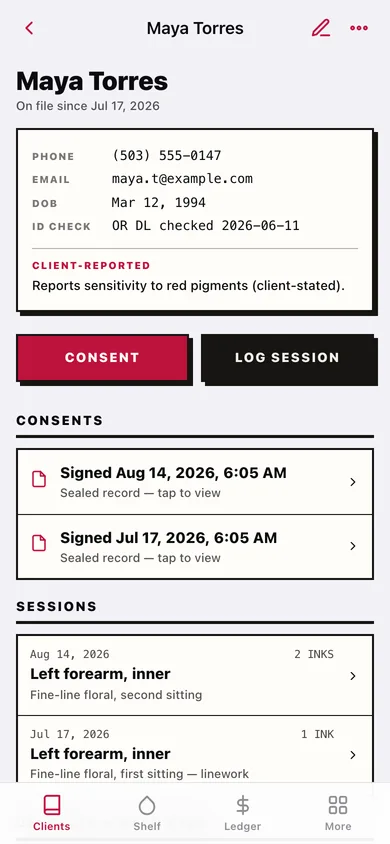
Hand over the device: the client reads your consent template, initials the health questions and signs on the glass. The signature is sealed with a date and locked to that client.
Ink traceability down to the lot
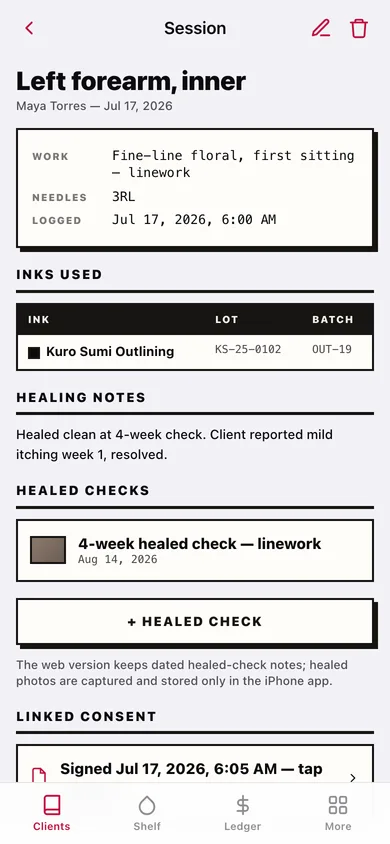
Pick inks from your shelf and the session snapshots brand, colour, lot and batch — so a reaction three months later has a paper trail instead of a guess.
Ink shelf with expiry warnings
Your physical bottles digitised once: brand, colour, lot, batch, opened and expiry dates. Expired or archived bottles are flagged before they land in a session record.
Deposit ledger per client
Deposits taken, applied to a session, forfeited on a no-show or refunded — each one dated, so the awkward conversation is a screen and not a DM thread.
Inspection export and retention clock
Build a client's complete dated file — consents, sessions, inks, deposits, notes — and watch each record's age against the retention period you set for your state.
Screens
Every screen, rebuilt for the browser
-
1
Client book
Every client sorted by last session, with consent and retention warnings up top.
-
2
Client file
One client's consents, sessions, inks used and deposit balance in a single file.
-
3
Sign consent
The consent template with health questions and a finger-signature pad.
-
4
Signed consent
A sealed, dated consent with the client's signature.
-
5
Session record
Placement, style, needle grouping, machine notes and every ink lot used.
-
6
Log a session
Record the session and tap inks straight off your shelf.
-
7
Inspection export
Assemble a client's dated file for a board inspector or shop owner.
-
8
Ink shelf
Every bottle with lot, batch, opened and expiry dates, expired ones flagged.
-
9
Bottle
One bottle's lot and batch numbers, dates and the sessions it appears in.
-
10
Deposit ledger
Deposits taken, applied, forfeited and refunded across every client.
-
11
Retention clock
Record ages against the retention period your state requires.
-
12
Consent template
Edit the consent wording and health questions clients sign.
-
13
More
Studio name, retention period, export, sample data and erase.
Try it with sample data: Adds a studio's worth of work: several clients with signed consents, a few weeks of sessions with real ink lots, a stocked ink shelf including an expired bottle, and deposits at each stage. You can start fresh at any time.
Ready? It's free.
No account, no install, no subscription. Everything you do stays in this browser.
Your say
What should InkLot do? Tell us before we build it.
Tell us what to build next.
Comments need a free Google sign-in, so every one is from a real person.
Sign in with Google to commentNo comments yet — be the first to say what this app should do next.
Questions
Is the web version of InkLot free?+
Yes. Every screen is free to use: no subscription, no in-app purchases, no account.
Do I need an account?+
No. Open InkLot and start using it right away. Sign in with Google only if you want to upvote an app, save it to your list, or leave a comment.
Where is my data stored?+
Only in this browser's local storage. Nothing you enter is sent to our servers, so we can't see it, back it up, or restore it. Clearing site data, a private window, or another device starts empty. Export a backup from the in-app menu to keep it.
Is there a InkLot app for iPhone or Android?+
Not yet. InkLot is a community proposal: the browser version is complete, and we build the iPhone and Android app once 100 people upvote it. Upvoters get one email when it ships.