
Web app · Business
Hunted
Your job hunt as a pipeline, a STAR bank and a salary notebook — off the cloud, in any browser
Move applications Saved → Applied → Phone → Onsite → Offer → Closed on a kanban board, keep recruiter contacts and a timestamped conversation log per company, index STAR stories by competency, commit to floor / target / walk-away per role, and schedule follow-up nudges. Free, no account, no install.
Stored in your browser only. Nothing you do in the web version is sent to our servers. Clear your browser data and it's gone — so export a backup from the in-app menu if you want to keep it.
This app is a community proposal.
Try the full browser version now. We build the iPhone and Android app once 100 people upvote it.
We'll email you once, when it ships. Unsubscribe anytime.
In your browser
What you can do in Hunted on the web
Six-stage pipeline board
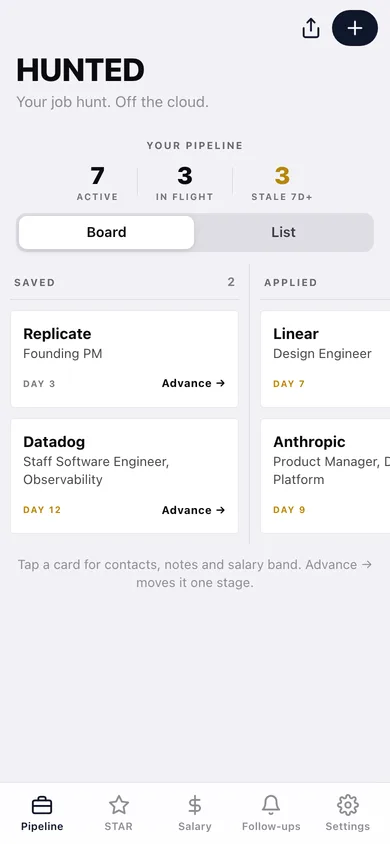
Cards per company with the role, days in the current stage (stale at 7+), and a one-tap Advance → across Saved, Applied, Phone, Onsite, Offer and Closed.
Per-application file
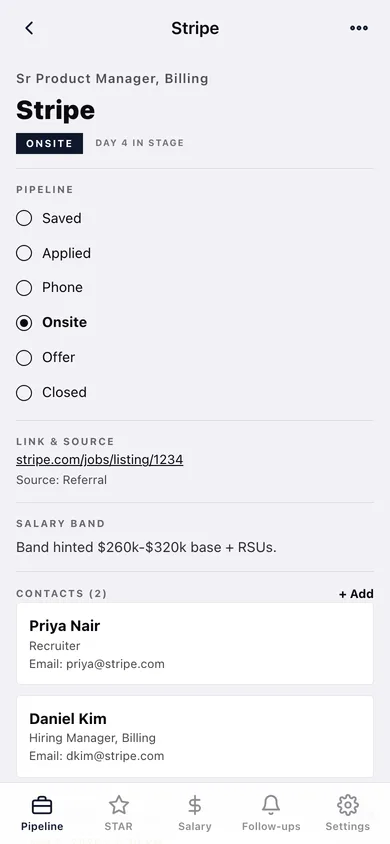
Link and source, the salary band you've heard, recruiter / hiring-manager / referrer contacts, a timestamped conversation log and a close-out reason.
STAR bank
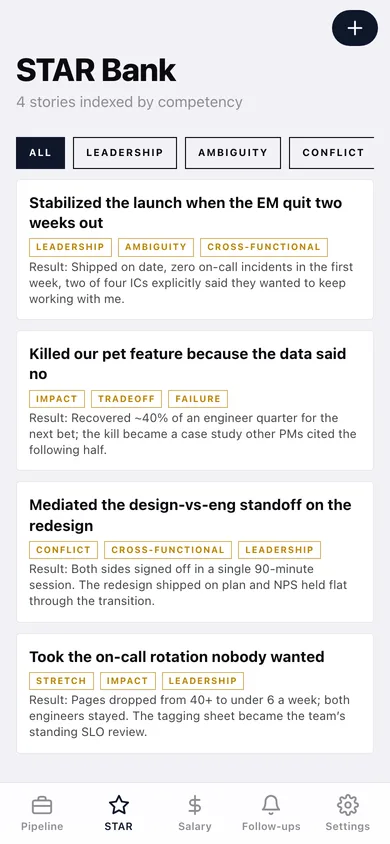
Situation / Task / Action / Result stories tagged Leadership, Ambiguity, Conflict, Impact, Failure, Cross-functional, Stretch or Tradeoff, with a quick-access read view before the call.
Salary research
Floor, target and walk-away per role plus your comp-data notes from levels.fyi, peers and recruiters.
Follow-ups
Referrer pings, thank-you notes, recruiter check-ins, polite nudges and decision deadlines — each downloadable as a calendar (.ics) event.
Export
The whole pipeline as Markdown or CSV, or copied to the clipboard, for offline reference or backup.
Screens
Every screen, rebuilt for the browser
-
1
Pipeline
Active / in-flight / stale counts and the six-column board (or list view).
-
2
Application
Stage picker, link and source, salary band, contacts, conversation log and close reason.
-
3
New / edit application
Company, role, stage, link, source and salary band notes.
-
4
STAR Bank
Stories filtered by competency tag.
-
5
Story
Quick-access S / T / A / R read view with tags.
-
6
New / edit story
Title, Situation, Task, Action, Result and competency tags.
-
7
Salary Research
Floor / target / walk-away per role with comp-data notes.
-
8
Follow-ups
Pending and done nudges with Add-to-calendar, Mark done and delete.
-
9
Export
Download the pipeline as Markdown or CSV, or copy it.
-
10
Settings
Record counts, export, backup, sample data and erase.
Try it with sample data: Adds nine applications across every stage (Stripe, Notion, Linear, Vercel, Replicate, Figma, Anthropic, Ramp, Datadog) with contacts and notes, four STAR stories, three salary records and five follow-ups. You can start fresh at any time.
Ready? It's free.
No account, no install, no subscription. Everything you do stays in this browser.
Your say
What should Hunted do? Tell us before we build it.
Tell us what to build next.
Comments need a free Google sign-in, so every one is from a real person.
Sign in with Google to commentNo comments yet — be the first to say what this app should do next.
Questions
Is the web version of Hunted free?+
Yes. Every screen is free to use: no subscription, no in-app purchases, no account.
Do I need an account?+
No. Open Hunted and start using it right away. Sign in with Google only if you want to upvote an app, save it to your list, or leave a comment.
Where is my data stored?+
Only in this browser's local storage. Nothing you enter is sent to our servers, so we can't see it, back it up, or restore it. Clearing site data, a private window, or another device starts empty. Export a backup from the in-app menu to keep it.
Is there a Hunted app for iPhone or Android?+
Not yet. Hunted is a community proposal: the browser version is complete, and we build the iPhone and Android app once 100 people upvote it. Upvoters get one email when it ships.