
Web app · Food And Drink
Hotsauce
Your fiery sauce shelf — heat-sorted, ranked, and kept offline
Log every bottle with maker, dominant pepper, Scoville estimate, heat band, your star rating and tasting notes. Browse a shelf grid that runs mild to reaper, mark a bottle finished without losing its history, build a personal ranked top list, and check the built-in Scoville reference. Free, no account.
Stored in your browser only. Nothing you do in the web version is sent to our servers. Clear your browser data and it's gone — so export a backup from the in-app menu if you want to keep it.
This app is a community proposal.
Try the full browser version now. We build the iPhone and Android app once 100 people upvote it.
We'll email you once, when it ships. Unsubscribe anytime.
In your browser
What you can do in Hotsauce on the web
A shelf grid that runs mild → reaper
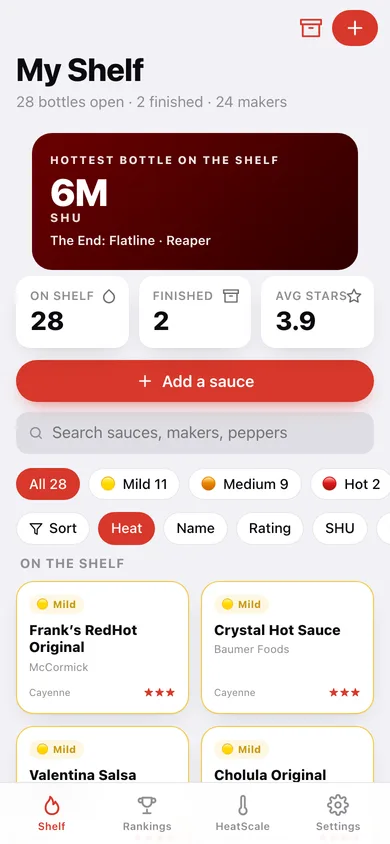
Every bottle is a card colour-coded by its heat band, filterable by band and searchable across name, maker and pepper, sortable by heat, name, rating, Scoville or date added.
The fields collectors actually keep
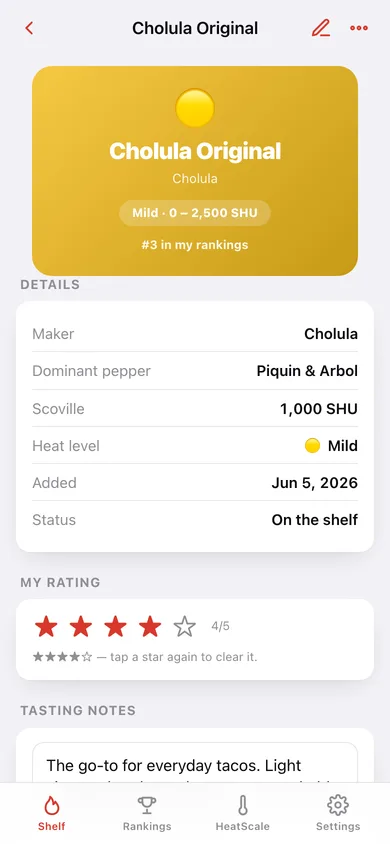
Name, maker, dominant pepper, Scoville estimate in SHU, heat band, a 1–5 star rating and freeform tasting notes — with the hottest bottle on your shelf as the home headline.
Set the band from the Scoville figure
Type the SHU and one tap puts the bottle in the right band using the same cut-points as the HeatScale reference: mild under 2,500, reaper above 350,000.
Finished bottles keep their history
Mark a bottle finished and it leaves the shelf but keeps its rating and notes — flip the shelf over to browse everything you've emptied.
A personal ranked top list
Promote bottles from the shelf and move them up or down until the order is honest. Deliberate comparison beats a pile of five-star ratings.
HeatScale reference
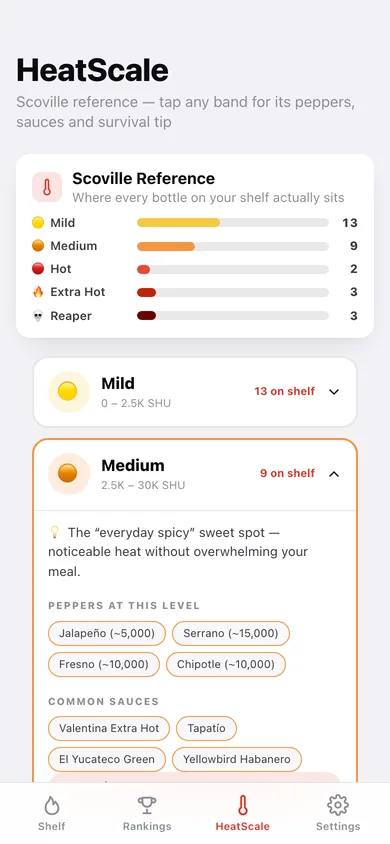
Five Scoville bands with the peppers that live there, the sauces you'd recognise, a survival tip each, and a ladder showing how your own shelf is distributed.
Screens
Every screen, rebuilt for the browser
-
1
My Shelf
Hottest bottle, shelf counts, band filters and the heat-sorted grid.
-
2
Sauce
Heat-coloured hero, details, star rating, tasting notes and where it sits on the scale.
-
3
HeatScale
Five Scoville bands, expandable, with peppers, sauces, tips and your own distribution.
-
4
Rankings
Your ordered top list with move-up, move-down and remove, plus candidates from the shelf.
-
5
New sauce
Name, maker, pepper, Scoville, heat band, stars and notes — with band-from-SHU.
-
6
Settings
Default sort, collection counts, CSV export, backup, sample data and erase.
Try it with sample data: Stocks the shelf with thirty real bottles from Frank's RedHot at 450 SHU to The End: Flatline at 6,000,000 — with makers, peppers, star ratings, tasting notes, two finished bottles and a ranked top ten. You can start fresh at any time.
Ready? It's free.
No account, no install, no subscription. Everything you do stays in this browser.
Your say
What should Hotsauce do? Tell us before we build it.
Tell us what to build next.
Comments need a free Google sign-in, so every one is from a real person.
Sign in with Google to commentNo comments yet — be the first to say what this app should do next.
Questions
Is the web version of Hotsauce free?+
Yes. Every screen is free to use: no subscription, no in-app purchases, no account.
Do I need an account?+
No. Open Hotsauce and start using it right away. Sign in with Google only if you want to upvote an app, save it to your list, or leave a comment.
Where is my data stored?+
Only in this browser's local storage. Nothing you enter is sent to our servers, so we can't see it, back it up, or restore it. Clearing site data, a private window, or another device starts empty. Export a backup from the in-app menu to keep it.
Is there a Hotsauce app for iPhone or Android?+
Not yet. Hotsauce is a community proposal: the browser version is complete, and we build the iPhone and Android app once 100 people upvote it. Upvoters get one email when it ships.