
Web app · Health And Fitness
HoldStrong
The scale can't tell you if you're losing muscle. This can.
A five-minute, equipment-free strength battery for anyone on a GLP-1: timed sit-to-stand and single-leg balance, a grip self-check and a waist tape, every result plotted against your own baseline with decline flags and plain-language coaching. Everything unlocked, free.
Stored in your browser only. Nothing you do in the web version is sent to our servers. Clear your browser data and it's gone — so export a backup from the in-app menu if you want to keep it.
This app is a community proposal.
Try the full browser version now. We build the iPhone and Android app once 100 people upvote it.
We'll email you once, when it ships. Unsubscribe anytime.
In your browser
What you can do in HoldStrong on the web
The five-minute home battery
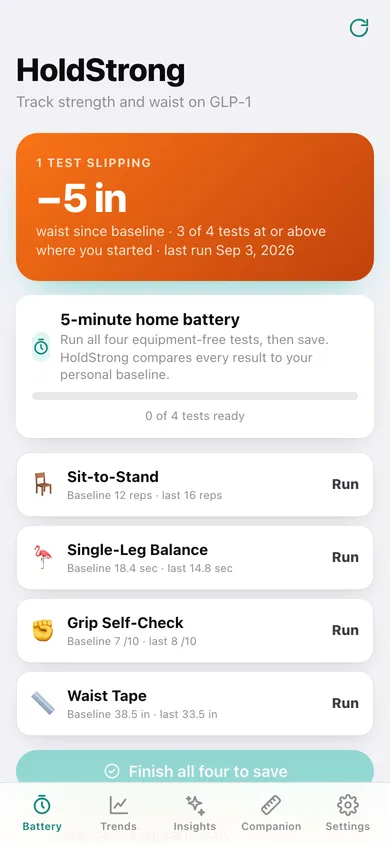
Four tests you can run on the living-room floor — a 30-second sit-to-stand counter, a timed single-leg balance hold, a grip self-check and a waist tape. The page counts and times them for you.
Personal-baseline trends
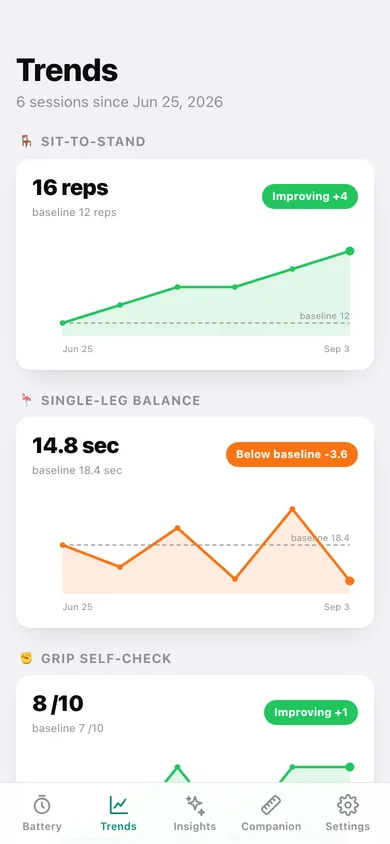
Every test is charted against your first session, with the baseline drawn as a dashed line, so progress and regression are obvious at a glance instead of buried in numbers.
Decline detection
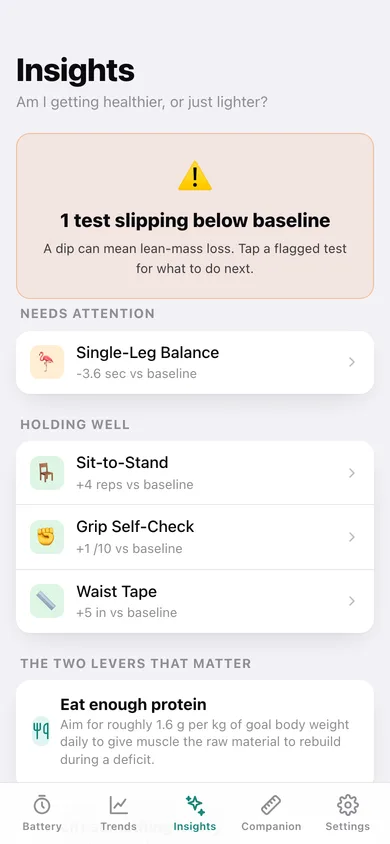
Anything more than 3% worse than your baseline is flagged — honouring direction, so a shrinking waist counts as progress while a shorter balance hold counts as a warning.
Plain-language coaching
Tap a flagged test and get what to do this week, always pointing at the two evidence-backed levers for lean-mass retention: enough daily protein and two to three short resistance sessions.
Waist and protein companion
A waist timeline, a daily protein ring against your target, and fourteen days of intake bars — so fat loss without muscle loss is visible in one screen. No Pro tier here; it's all included.
A CSV for your clinician
Every test, waist measurement and protein day exported as one CSV you can download or copy, plus a full JSON backup. Nothing ever leaves your browser unless you export it.
Screens
Every screen, rebuilt for the browser
-
1
Battery
Waist lost since baseline, the four test cards with their baselines, and your recent sessions.
-
2
Sit-to-Stand
A 30-second countdown ring and a big tap-to-count button, with beeps at start and finish.
-
3
Single-Leg Balance
A stopwatch ring counting up to the 60-second target — tap Stop the moment you wobble.
-
4
Session detail
All four results from one battery run against baseline, with a note you can edit.
-
5
Trends
A baseline chart for each of the four tests with its holding, improving or below-baseline badge.
-
6
Test detail
One test in full: its chart against baseline, what it measures, and every reading you have logged.
-
7
Insights
What is slipping, what is holding, and the two levers that keep lean mass during a deficit.
-
8
Coaching
What to do this week for one specific test, tailored to whether it is dipping or holding.
-
9
Companion
Waist trend, today's protein ring against your target, fourteen days of intake and both logs.
-
10
Export
A single CSV of every test, waist measurement and protein day, with a preview.
-
11
Settings
Record counts, CSV and JSON export, sample data, clearing an in-progress battery and erase.
Try it with sample data: Loads a ten-week GLP-1 journey: six battery sessions two weeks apart with the waist falling from 38.5 to 33.5 inches, sit-to-stand climbing 12 to 16 reps, grip holding — and single-leg balance slipping below baseline so the decline flag and its coaching are live. You can start fresh at any time.
Ready? It's free.
No account, no install, no subscription. Everything you do stays in this browser.
Your say
What should HoldStrong do? Tell us before we build it.
Tell us what to build next.
Comments need a free Google sign-in, so every one is from a real person.
Sign in with Google to commentNo comments yet — be the first to say what this app should do next.
Questions
Is the web version of HoldStrong free?+
Yes. Every screen is free to use: no subscription, no in-app purchases, no account.
Do I need an account?+
No. Open HoldStrong and start using it right away. Sign in with Google only if you want to upvote an app, save it to your list, or leave a comment.
Where is my data stored?+
Only in this browser's local storage. Nothing you enter is sent to our servers, so we can't see it, back it up, or restore it. Clearing site data, a private window, or another device starts empty. Export a backup from the in-app menu to keep it.
Is there a HoldStrong app for iPhone or Android?+
Not yet. HoldStrong is a community proposal: the browser version is complete, and we build the iPhone and Android app once 100 people upvote it. Upvoters get one email when it ships.