
Web app · Productivity
HOA File
The HOA owns the enforcement portal. This is the homeowner's side of the record.
Log every violation notice with its cure window and hearing-request deadline, count down to both, prove the fix with dated records, build the selective-enforcement comparables log attorneys ask for, reconcile the fine ledger, and assemble a hearing-ready appeal packet. Free, private to this browser, not legal advice.
Stored in your browser only. Nothing you do in the web version is sent to our servers. Clear your browser data and it's gone — so export a backup from the in-app menu if you want to keep it.
This app is a community proposal.
Try the full browser version now. We build the iPhone and Android app once 100 people upvote it.
We'll email you once, when it ships. Unsubscribe anytime.
In your browser
What you can do in HOA File on the web
Violation case files with live countdowns
Violation type, the CC&R section cited, the notice date, the cure window and the hearing-request deadline buried in paragraph four — each counted down in days so a fine never stands just because a date slipped past.
Dated compliance proof
Record what you corrected and the date you corrected it, so saying you fixed it that weekend becomes a timestamped entry in your own record rather than a claim the management company can wave away.
Selective-enforcement comparables log
The defence attorneys actually raise: location, condition, the rule section it would break and the date observed — grouped by rule so the pattern against §4.2 is visible at a glance.
Fine ledger with a running balance
Every assessment, late fee and payment per case, so what the association claims you owe is always reconciled against what you have actually paid — exportable as CSV.
Correspondence timeline
Notice received, letter sent, email sent, call made, hearing held, decision received — every date-stamped, because the responses keep disappearing on the management company's end.
Letter templates and the appeal packet
Hearing request, written dispute and proof-of-cure cover letter, each filled in from the case; then the whole binder assembled in date order as a hearing-ready packet you can download or hand to your attorney.
Screens
Every screen, rebuilt for the browser
-
1
Cases
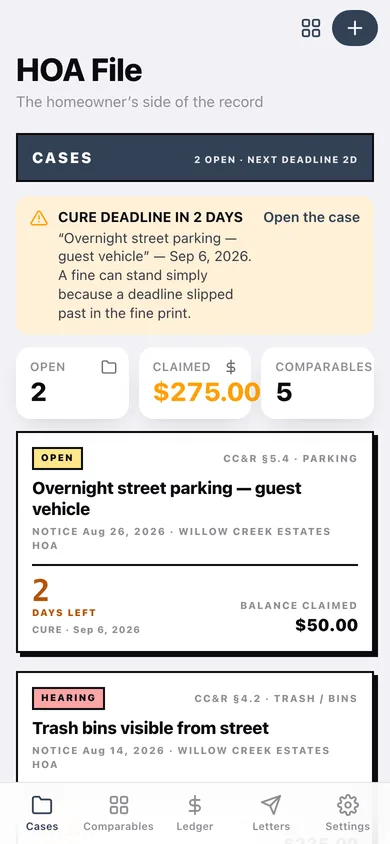
Every notice with its status, countdown to the next deadline and the balance claimed.
-
2
Case file
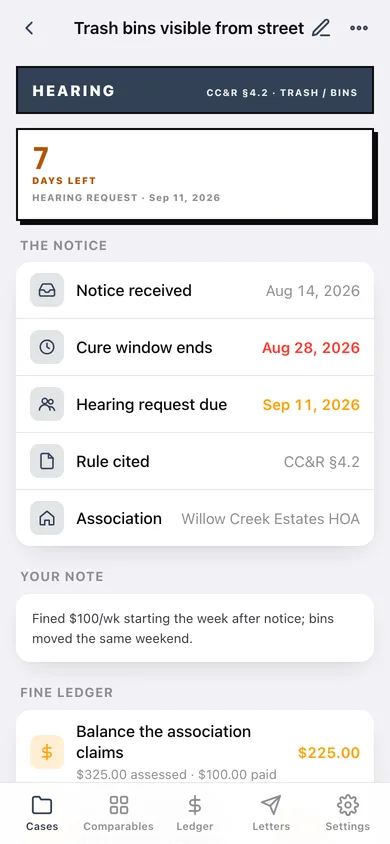
The notice details, deadline countdown, fine ledger, compliance proof, correspondence and comparables cited.
-
3
Log a notice
Violation type, CC&R section, notice date, cure window, hearing-request deadline and status.
-
4
Correspondence
Every letter, email, call, hearing and decision on one date-stamped spine.
-
5
Comparables
The selective-enforcement log grouped by rule section, searchable, with the strongest pattern surfaced.
-
6
Log a comparable
Location, condition, rule section, date observed and the case it supports.
-
7
Fine ledger
Assessed against paid across every case, with a per-case balance chart and CSV export.
-
8
Letters
Three templates that fill themselves in from the case, plus your saved drafts.
-
9
Draft
The full letter text, editable, copyable and downloadable.
-
10
Appeal packet
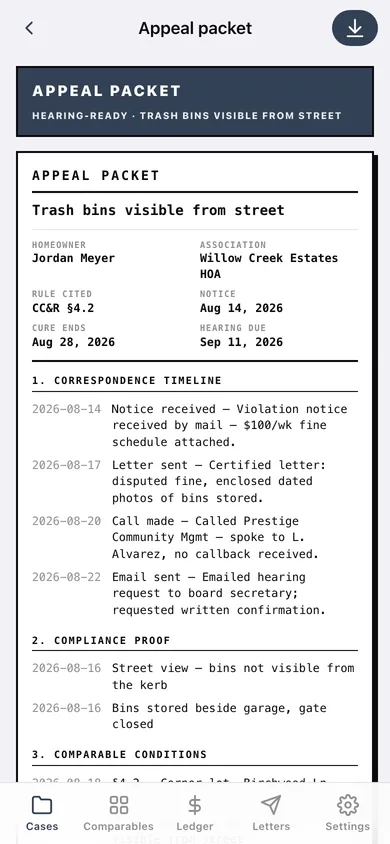
Notice details, timeline, compliance proof, comparables and ledger assembled in date order.
-
11
Settings
Property profile for the letters, deadline lead time, CSV exports, backup, sample data and erase.
Try it with sample data: Loads a four-case binder for one household: a live bin dispute at $100 a week with a hearing seven days out, a cured lawn notice, an open parking notice and one already won at hearing — with ten correspondence entries, four compliance records, five comparables and six ledger lines. You can start fresh at any time.
Ready? It's free.
No account, no install, no subscription. Everything you do stays in this browser.
Your say
What should HOA File do? Tell us before we build it.
Tell us what to build next.
Comments need a free Google sign-in, so every one is from a real person.
Sign in with Google to commentNo comments yet — be the first to say what this app should do next.
Questions
Is the web version of HOA File free?+
Yes. Every screen is free to use: no subscription, no in-app purchases, no account.
Do I need an account?+
No. Open HOA File and start using it right away. Sign in with Google only if you want to upvote an app, save it to your list, or leave a comment.
Where is my data stored?+
Only in this browser's local storage. Nothing you enter is sent to our servers, so we can't see it, back it up, or restore it. Clearing site data, a private window, or another device starts empty. Export a backup from the in-app menu to keep it.
Is there a HOA File app for iPhone or Android?+
Not yet. HOA File is a community proposal: the browser version is complete, and we build the iPhone and Android app once 100 people upvote it. Upvoters get one email when it ships.