
Web app · Finance
Hedgerow
Work out what hedging your wedding would actually cost — in the browser
Log the life event you'd hedge, name the dollars at risk, pick the correlated prediction market, and Hedgerow sizes the contracts, the premium and both ways it can go. Eight worked templates, a plain-English primer, an honest "no hedge exists" verdict. Free, no install, educational only.
Stored in your browser only. Nothing you do in the web version is sent to our servers. Clear your browser data and it's gone — so export a backup from the in-app menu if you want to keep it.
This app is a community proposal.
Try the full browser version now. We build the iPhone and Android app once 100 people upvote it.
We'll email you once, when it ships. Unsubscribe anytime.
In your browser
What you can do in Hedgerow on the web
Log the events you'd hedge
Title, date, category and the one number that matters — the dollars you actually lose if it goes against you. Not the wedding budget: the size of the hole.
Contracts, premium, coverage
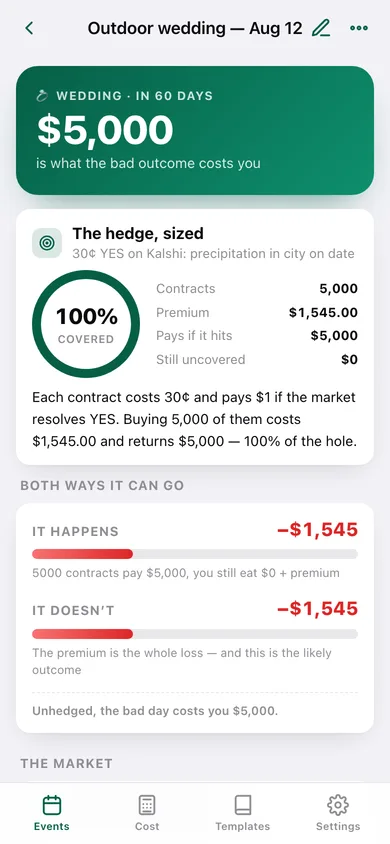
Type the market price in cents and Hedgerow converts it to an implied probability, sizes the contracts, and shows the premium, the payout and how much of the hole is still uncovered.
Both ways it can go
A payoff panel for every event: net if it happens, net if it doesn't, and the reminder that losing the premium is the normal outcome.
The eight hand-written templates
Wedding rain, baby due-date, playoff travel, hurricane, RSU cliff, election, energy bill, concert resale — including the three where the honest answer is that no liquid hedge exists. Tap one to start an event from it.
Interactive cost calculator
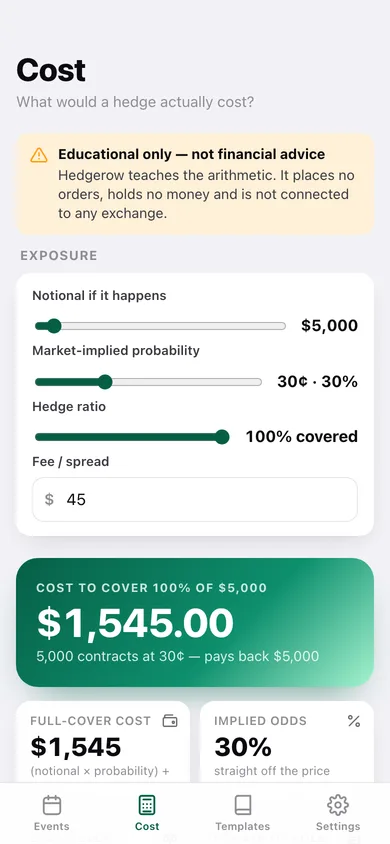
Slide notional, market probability, hedge ratio and fee and watch the cost to fully hedge move — the same (notional × probability) + fee arithmetic the iPhone app runs, spelled out in words.
Primer and glossary
Three lessons before you size anything, plus plain-English definitions of YES/NO contracts, notional, hedge ratio, basis risk, liquidity and premium.
Screens
Every screen, rebuilt for the browser
-
1
Events
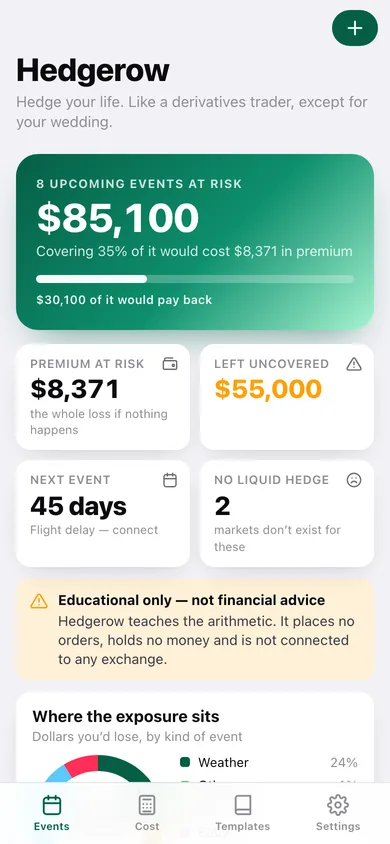
Total exposure across upcoming events, what covering it would cost, where the exposure sits by category, and every event you'd hedge.
-
2
Event detail
One event sized end to end: contracts, premium, coverage ring, the payoff panel, the market and its basis risk.
-
3
Event editor
Title, category, date, exposure, correlated market, side, market price, hedge ratio and fee — with validation.
-
4
Cost calculator
Slide notional, probability, hedge ratio and fee to see the premium, the break-even odds and both outcomes.
-
5
Templates
All eight worked examples, split into the ones with a market and the ones without.
-
6
Template detail
One template's market, reasoning and a sized-out payoff you can turn into your own event.
-
7
The primer
Three lessons, a plain-English glossary and the whole method in five lines.
-
8
Settings
Currency, default hedge ratio, fee allowance, CSV and JSON export, sample data and erase.
Try it with sample data: Loads nine worked events across the next year — a wedding rain hedge, a nonrefundable Super Bowl trip, a hurricane-season beach house, a winter gas bill, an election-year tax exposure, a flight delay, a settled orchard frost, plus two where no liquid hedge exists. You can start fresh at any time.
Ready? It's free.
No account, no install, no subscription. Everything you do stays in this browser.
Your say
What should Hedgerow do? Tell us before we build it.
Tell us what to build next.
Comments need a free Google sign-in, so every one is from a real person.
Sign in with Google to commentNo comments yet — be the first to say what this app should do next.
Questions
Is the web version of Hedgerow free?+
Yes. Every screen is free to use: no subscription, no in-app purchases, no account.
Do I need an account?+
No. Open Hedgerow and start using it right away. Sign in with Google only if you want to upvote an app, save it to your list, or leave a comment.
Where is my data stored?+
Only in this browser's local storage. Nothing you enter is sent to our servers, so we can't see it, back it up, or restore it. Clearing site data, a private window, or another device starts empty. Export a backup from the in-app menu to keep it.
Is there a Hedgerow app for iPhone or Android?+
Not yet. Hedgerow is a community proposal: the browser version is complete, and we build the iPhone and Android app once 100 people upvote it. Upvoters get one email when it ships.