
Web app · Education
Handsign
Learn ASL fingerspelling and everyday signs — in any browser, no video needed
All 26 letters plus 26 everyday signs (greetings, numbers, colors, family, food) with handshape descriptions and memory tips, an adaptive quiz that surfaces your weak spots, per-sign mastery, a fingerspelling sequencer and a progress dashboard. Free, no install, no account.
Stored in your browser only. Nothing you do in the web version is sent to our servers. Clear your browser data and it's gone — so export a backup from the in-app menu if you want to keep it.
This app is a community proposal.
Try the full browser version now. We build the iPhone and Android app once 100 people upvote it.
We'll email you once, when it ships. Unsubscribe anytime.
In your browser
What you can do in Handsign on the web
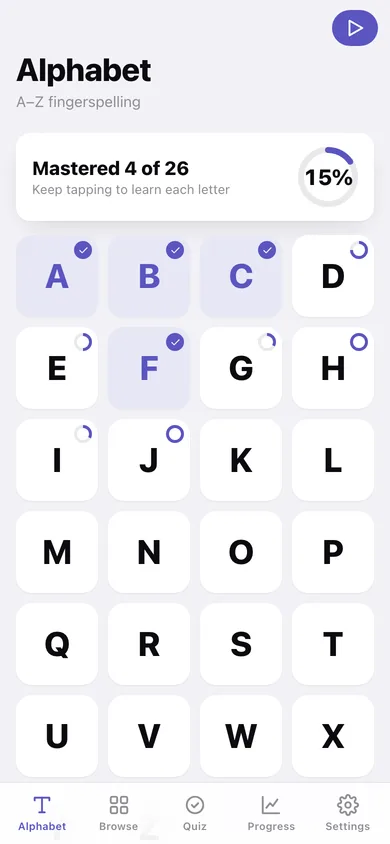
A–Z alphabet grid
Every letter as a tappable tile with a mini mastery ring; tap for the handshape description, memory tip and your attempt history.
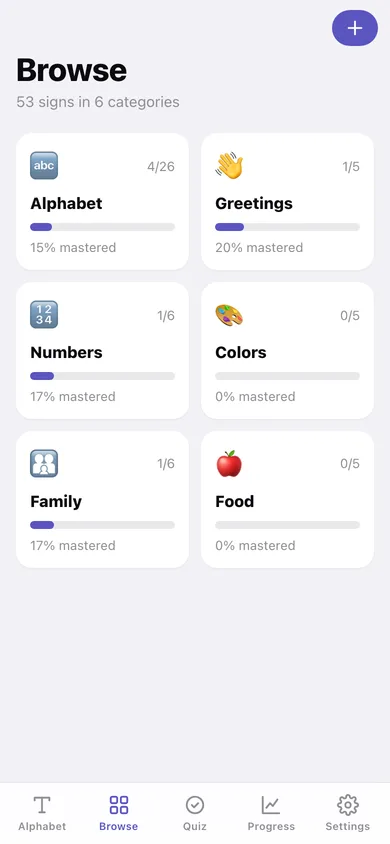
26 everyday signs in 5 categories
Greetings, numbers, colors, family and food — each category card shows count and mastery percentage.
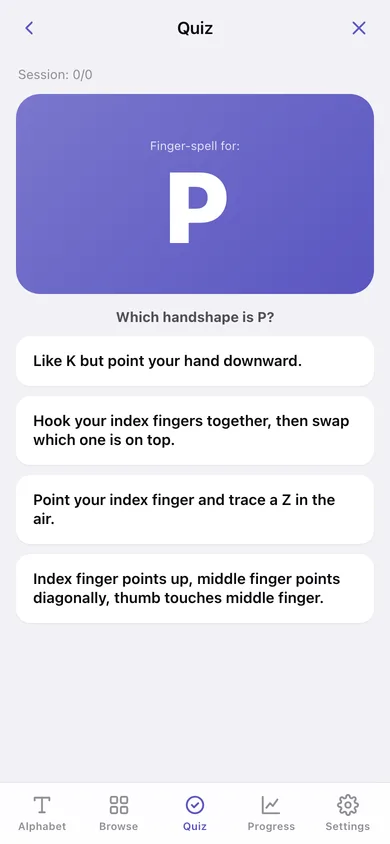
Adaptive quiz
Four-choice questions weighted toward the signs you get wrong; every answer is recorded so mastery (3+ attempts at 80%) builds sign by sign.
Fingerspell any word
Type a word or name and see it as an ordered sequence of letter handshape cards.
Your own signs
Add signs you learn elsewhere with a description and tip — they join the browser and the quiz.
Progress dashboard
Mastered / in progress / not started, per-category bars, an 8-week practice heatmap, recent mastery wins and the signs that need work.
Screens
Every screen, rebuilt for the browser
-
1
Alphabet
Mastered X of 26 banner and the A–Z grid with mastery rings.
-
2
Sign
Big handshape card, how to sign it, memory tip and your progress on one sign.
-
3
Browse
Six category cards with mastery bars.
-
4
Category
Every sign in one category with its mastery.
-
5
Quiz
Adaptive four-choice quiz with session score and streak.
-
6
Progress
Mastery ring, per-category bars, practice heatmap, wins and needs-work lists.
-
7
Fingerspell
Any word as a sequence of letter handshape cards.
-
8
Add sign
Word, category, how to sign it and a memory tip for your own sign.
-
9
Settings
Sounds, backup, printable reference CSV, sample data, reset progress and erase.
Try it with sample data: Adds two weeks of quiz attempts across the first ten letters and a handful of word signs, plus one custom sign, so rings, bars and the heatmap are populated. You can start fresh at any time.
Ready? It's free.
No account, no install, no subscription. Everything you do stays in this browser.
Your say
What should Handsign do? Tell us before we build it.
Tell us what to build next.
Comments need a free Google sign-in, so every one is from a real person.
Sign in with Google to commentNo comments yet — be the first to say what this app should do next.
Questions
Is the web version of Handsign free?+
Yes. Every screen is free to use: no subscription, no in-app purchases, no account.
Do I need an account?+
No. Open Handsign and start using it right away. Sign in with Google only if you want to upvote an app, save it to your list, or leave a comment.
Where is my data stored?+
Only in this browser's local storage. Nothing you enter is sent to our servers, so we can't see it, back it up, or restore it. Clearing site data, a private window, or another device starts empty. Export a backup from the in-app menu to keep it.
Is there a Handsign app for iPhone or Android?+
Not yet. Handsign is a community proposal: the browser version is complete, and we build the iPhone and Android app once 100 people upvote it. Upvoters get one email when it ships.