
Web app · Games
Opening Trainer
Turn your own opening lines into a spaced-repetition deck you drill on a real board
Build repertoires for White and Black move by move on an interactive board, and every move you are responsible for becomes an SM-2 drill card. Play the move to answer; miss it and it comes back today. Free, in the browser, nothing uploaded.
Stored in your browser only. Nothing you do in the web version is sent to our servers. Clear your browser data and it's gone — so export a backup from the in-app menu if you want to keep it.
This app is a community proposal.
Try the full browser version now. We build the iPhone and Android app once 100 people upvote it.
We'll email you once, when it ships. Unsubscribe anytime.
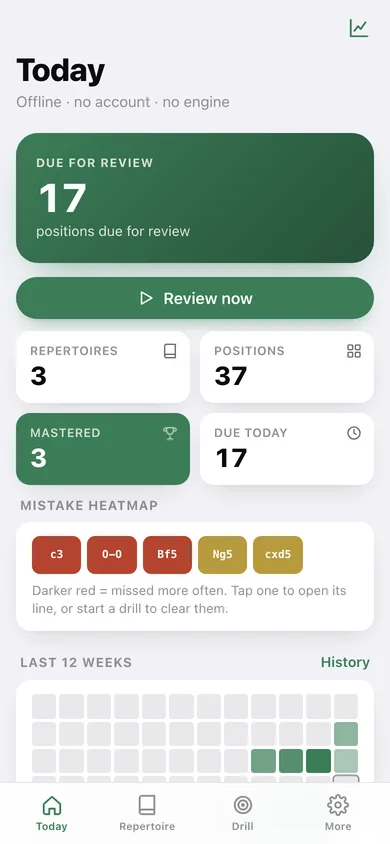
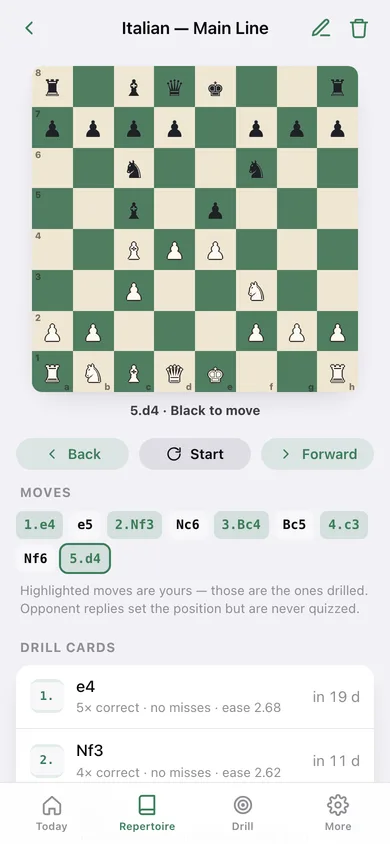
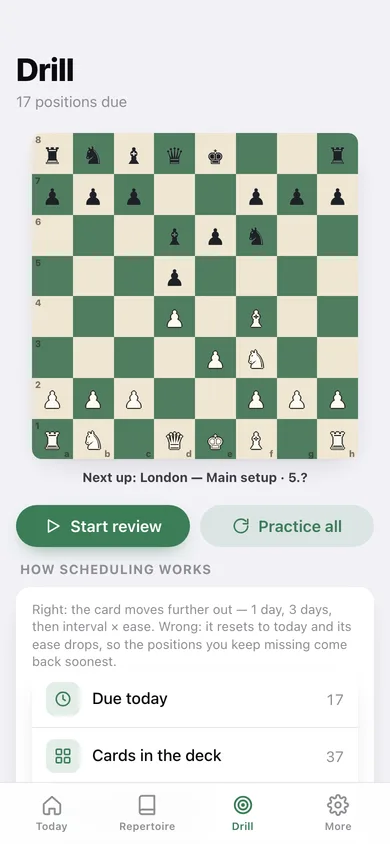
In your browser
What you can do in Opening Trainer on the web
A real board with real rules
Legal move generation, castling, en passant, promotion, check and SAN in and out — the same engine logic as the iPhone app, so you build lines by playing them, not by typing notation.
A card for every move you own
Save a named line with the opponent's replies included and the app creates a drill card for each of your moves, storing the exact position before it.
SM-2 spaced repetition
Right: 1 day, 3 days, then interval × ease, with ease creeping up. Wrong: back to today, ease down 0.2. The positions you keep missing come back soonest.
Drill by playing the move
You are shown the position and play your move on the board. Instant right/wrong, the continuation, and exactly when the card returns.
Repertoire tree and mistake heatmap
Every line in a repertoire merged into one move tree with weak nodes flagged, plus a heatmap of the positions you miss most.
Review history
Reviews per week, a 12-week heatmap and your recall rate, so you can see the deck settling down.
Screens
Every screen, rebuilt for the browser
-
1
Today
How many positions are due, deck stats, the mistake heatmap and every repertoire.
-
2
Repertoire
Your White and Black repertoires with line counts and what is due.
-
3
Repertoire detail
Due count, line list, weak positions, and the way in to the tree and the line builder.
-
4
Line
Step through the line on the board move by move, with its drill cards and their schedule.
-
5
Line builder
Play the moves on the board to build a line — main line, sidelines and the opponent's replies.
-
6
Repertoire tree
All the lines in a repertoire merged into one move tree with weak nodes flagged.
-
7
Drill
The due queue: play the correct move on the board, get graded, see when the card returns.
-
8
Review history
Reviews per week, a 12-week heatmap, recall rate and a day-by-day log.
-
9
New repertoire
Name a repertoire and pick the side you play.
-
10
More
Board flip, sound, reset scheduling, deck counts, export, sample data and erase.
Try it with sample data: Adds a Caro-Kann Defense and a London System alongside the starter Italian Game — eight named lines, their drill cards, a lapse history on the shaky positions, and four weeks of logged reviews. You can start fresh at any time.
Ready? It's free.
No account, no install, no subscription. Everything you do stays in this browser.
Your say
What should Opening Trainer do? Tell us before we build it.
Tell us what to build next.
Comments need a free Google sign-in, so every one is from a real person.
Sign in with Google to commentNo comments yet — be the first to say what this app should do next.
Questions
Is the web version of Opening Trainer free?+
Yes. Every screen is free to use: no subscription, no in-app purchases, no account.
Do I need an account?+
No. Open Opening Trainer and start using it right away. Sign in with Google only if you want to upvote an app, save it to your list, or leave a comment.
Where is my data stored?+
Only in this browser's local storage. Nothing you enter is sent to our servers, so we can't see it, back it up, or restore it. Clearing site data, a private window, or another device starts empty. Export a backup from the in-app menu to keep it.
Is there a Opening Trainer app for iPhone or Android?+
Not yet. Opening Trainer is a community proposal: the browser version is complete, and we build the iPhone and Android app once 100 people upvote it. Upvoters get one email when it ships.