
Web app · Finance
Furuwaku
Finish the furusato nozei year exactly at your limit — with every form mailed
Estimate your donation ceiling with a deliberately safe band, log every donation from every portal in one ledger, and work the one-stop exception checklist against the hard January 10 must-arrive deadline. Free, offline, no account.
Stored in your browser only. Nothing you do in the web version is sent to our servers. Clear your browser data and it's gone — so export a backup from the in-app menu if you want to keep it.
This app is a community proposal.
Try the full browser version now. We build the iPhone and Android app once 100 people upvote it.
We'll email you once, when it ships. Unsubscribe anytime.
In your browser
What you can do in Furuwaku on the web
Limit estimator with a safe band
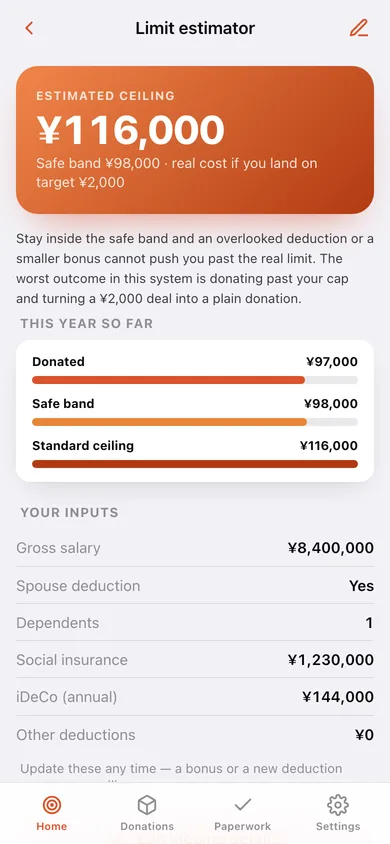
Salary, spouse, dependents, social insurance and iDeCo run through the standard resident-tax formula to produce a standard ceiling and a conservative 85% band.
One ledger above every portal
Rakuten, Furusato Choice, Satofull, Furunavi and Amazon each remember only their own orders — log them all here, grouped by municipality and filterable by portal and year.
One-stop paperwork checklists
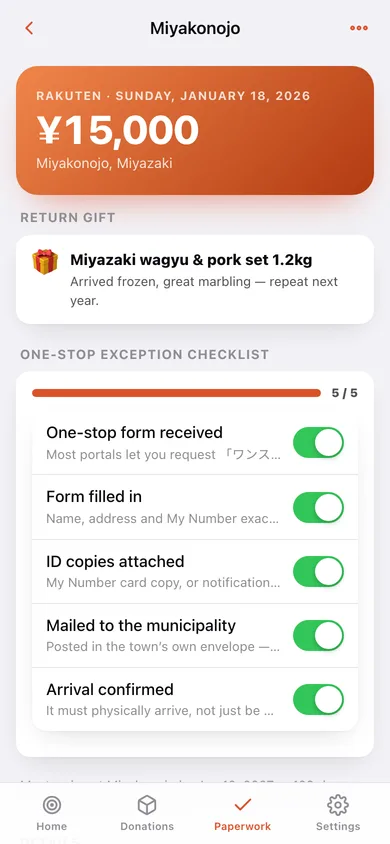
Form received, filled, ID copies attached, mailed, arrival confirmed — per donation, with the January 10 deadline and the days remaining on every card.
Five-municipality warning
A five-dot gauge that turns amber at the cap and red past it, because a sixth town silently kills one-stop for the whole year.
Year-end allowance ring
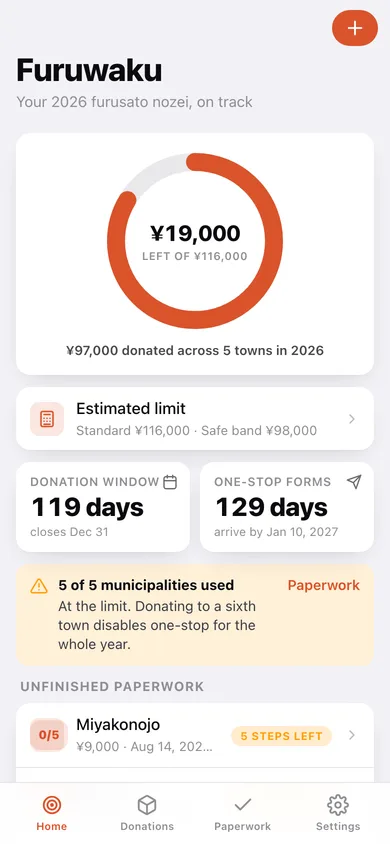
Yen remaining against your estimated ceiling, countdowns to December 31 and January 10, and every donation whose paperwork is unfinished.
Return-gift log
What arrived, what it cost in allowance and your own notes — so you never re-order a dud, and always re-order the good one.
Screens
Every screen, rebuilt for the browser
-
1
Allowance dashboard
The ring of allowance used vs remaining, both deadline countdowns, the five-town status and every donation with unfinished paperwork.
-
2
Donation & checklist
One donation's municipality, amount, portal and return gift, with its one-stop or tax-return checklist and the deadline in days.
-
3
Limit estimator
Your estimated ceiling and safe band, what you have donated against them, and every line of the calculation.
-
4
Donation ledger
Every donation for the year, grouped by town or listed flat, with a monthly bar chart and a portal filter.
-
5
Log a donation
Amount, municipality, prefecture, portal, date and the return gift you chose.
-
6
Paperwork
One-stop or tax-return mode, the five-municipality gauge, and every checklist split into in-progress and done.
-
7
Income details
Gross salary, spouse, dependents, social insurance, iDeCo and other deductions.
-
8
Return gifts
Every gift you have chosen, by year, with your notes for next season.
-
9
Settings
Filing method, income details, working year, CSV export, backup, sample data and erase.
Try it with sample data: Loads a ¥8.4M-salary profile (spouse, one dependent, iDeCo) and nine donations across Monbetsu, Miyakonojo, Yaizu, Izumisano and Kamimine on five different portals — with paperwork at every stage from untouched to fully confirmed. You can start fresh at any time.
Ready? It's free.
No account, no install, no subscription. Everything you do stays in this browser.
Your say
What should Furuwaku do? Tell us before we build it.
Tell us what to build next.
Comments need a free Google sign-in, so every one is from a real person.
Sign in with Google to commentNo comments yet — be the first to say what this app should do next.
Questions
Is the web version of Furuwaku free?+
Yes. Every screen is free to use: no subscription, no in-app purchases, no account.
Do I need an account?+
No. Open Furuwaku and start using it right away. Sign in with Google only if you want to upvote an app, save it to your list, or leave a comment.
Where is my data stored?+
Only in this browser's local storage. Nothing you enter is sent to our servers, so we can't see it, back it up, or restore it. Clearing site data, a private window, or another device starts empty. Export a backup from the in-app menu to keep it.
Is there a Furuwaku app for iPhone or Android?+
Not yet. Furuwaku is a community proposal: the browser version is complete, and we build the iPhone and Android app once 100 people upvote it. Upvoters get one email when it ships.