
Web app · Finance
FloodFolio
Your lender says flood insurance. Your elevation might say otherwise.
Compare your lowest adjacent grade against the base flood elevation, build the LOMA packet, work through FEMA's MT-EZ section by section, track the 60-day review, and hold the lender to the escrow stop. Free in your browser.
Stored in your browser only. Nothing you do in the web version is sent to our servers. Clear your browser data and it's gone — so export a backup from the in-app menu if you want to keep it.
This app is a community proposal.
Try the full browser version now. We build the iPhone and Android app once 100 people upvote it.
We'll email you once, when it ships. Unsubscribe anytime.
In your browser
What you can do in FloodFolio on the web
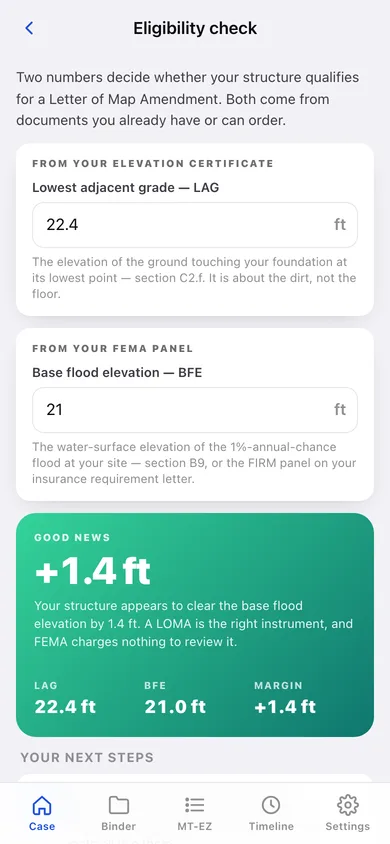
LAG vs BFE eligibility check
Type two numbers off your elevation certificate and FloodFolio shows the margin in feet, whether a LOMA or a LOMR-F is the right instrument, and what to do next.
Packet binder with missing flags
Recorded deed, plat or legal description and elevation certificate are flagged until filed — the three attachments a 316-DEF letter is usually about.
MT-EZ walkthrough
All five sections and nineteen fields of FEMA's form, each with a plain-English explanation and exactly where on the certificate to find the answer.
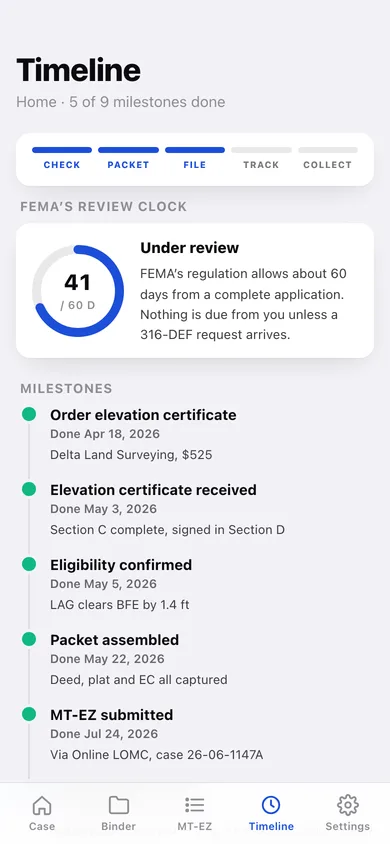
60-day review clock
Nine milestones from ordering the survey to collecting the refund, with a day-N-of-60 ring once the MT-EZ is filed and an amber flag when the window lapses.
Lender kit and refund ledger
Three ready-to-send letters — notify, stop escrow, refund force-placed coverage — plus a ledger of every premium, survey fee and refund so the savings actually land.
More than one structure
Home, rental and second home each carry their own zone, panel, elevations, binder, MT-EZ answers and timeline.
Screens
Every screen, rebuilt for the browser
-
1
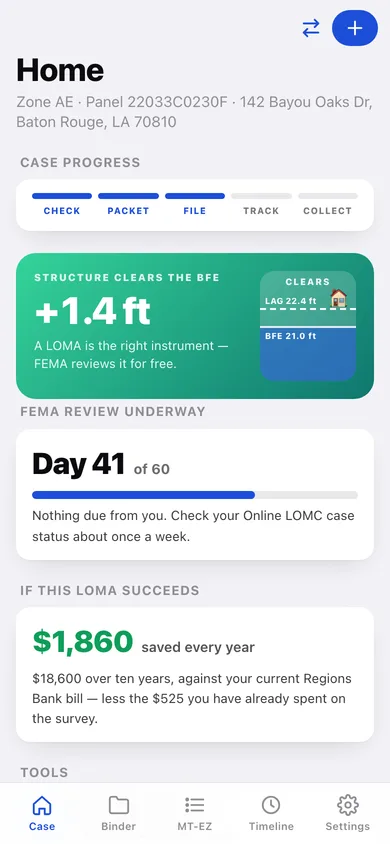
Case dashboard
The verdict with an elevation gauge, the case progress rail, FEMA's review day count and what a successful LOMA is worth every year.
-
2
Eligibility check
LAG and BFE in, margin and verdict out, with the next three steps or the LOMR-F fallback.
-
3
Case timeline
Nine milestones from ordering the elevation certificate to the refund, with FEMA's 60-day review ring.
-
4
Document binder
Every packet document by category, with required pieces flagged until they are filed.
-
5
Document
One filed document: its category, reference, filing date and why FEMA wants it.
-
6
File a document
Record what you have, where the original lives and its reference number.
-
7
MT-EZ walkthrough
A completion ring over all five sections, with a copy-all-answers button for transcribing into FEMA's portal.
-
8
MT-EZ section
One section's fields, each with what it means and where on the certificate to find it.
-
9
Milestone
One milestone's detail, status and your case notes — surveyor names, LOMC case numbers, who you spoke to.
-
10
Savings calculator
Annual bill and sunk costs over a 1, 5 or 10 year horizon, with keep-paying vs after-LOMA bars.
-
11
Lender kit
Notify, escrow-stop and force-placed-refund letters pre-filled with your property and lender.
-
12
Payment ledger
Premiums, survey costs, refunds and escrow adjustments with paid-out vs recovered totals.
-
13
Properties
Every structure you track, its clearance, and which one the tabs are focused on.
-
14
Add / edit property
Nickname, address, zone, FIRM panel, elevations, annual bill and lender.
-
15
Settings
Focused property, review flags, backup, sample data and erase.
Try it with sample data: Loads two real-shaped cases: a Baton Rouge home that clears its BFE by 1.4 ft and is on day 41 of FEMA's review, and a Charleston rental that sits 0.4 ft short and is weighing the LOMR-F path — with binder documents, milestones, MT-EZ answers and a premium ledger for each. You can start fresh at any time.
Ready? It's free.
No account, no install, no subscription. Everything you do stays in this browser.
Your say
What should FloodFolio do? Tell us before we build it.
Tell us what to build next.
Comments need a free Google sign-in, so every one is from a real person.
Sign in with Google to commentNo comments yet — be the first to say what this app should do next.
Questions
Is the web version of FloodFolio free?+
Yes. Every screen is free to use: no subscription, no in-app purchases, no account.
Do I need an account?+
No. Open FloodFolio and start using it right away. Sign in with Google only if you want to upvote an app, save it to your list, or leave a comment.
Where is my data stored?+
Only in this browser's local storage. Nothing you enter is sent to our servers, so we can't see it, back it up, or restore it. Clearing site data, a private window, or another device starts empty. Export a backup from the in-app menu to keep it.
Is there a FloodFolio app for iPhone or Android?+
Not yet. FloodFolio is a community proposal: the browser version is complete, and we build the iPhone and Android app once 100 people upvote it. Upvoters get one email when it ships.