
Web app · Health And Fitness
Flashpoint
Log a hot flash in three seconds — then find out what actually set it off
Tap for a day flash, hold for a night sweat, tag what was true that day, and Flashpoint runs the lift correlation right here in your browser to name your top three triggers. Plus a 24-hour clock heatmap and a raw CSV for your gynecologist. Free, no account.
Stored in your browser only. Nothing you do in the web version is sent to our servers. Clear your browser data and it's gone — so export a backup from the in-app menu if you want to keep it.
This app is a community proposal.
Try the full browser version now. We build the iPhone and Android app once 100 people upvote it.
We'll email you once, when it ships. Unsubscribe anytime.
In your browser
What you can do in Flashpoint on the web
Three-second logging
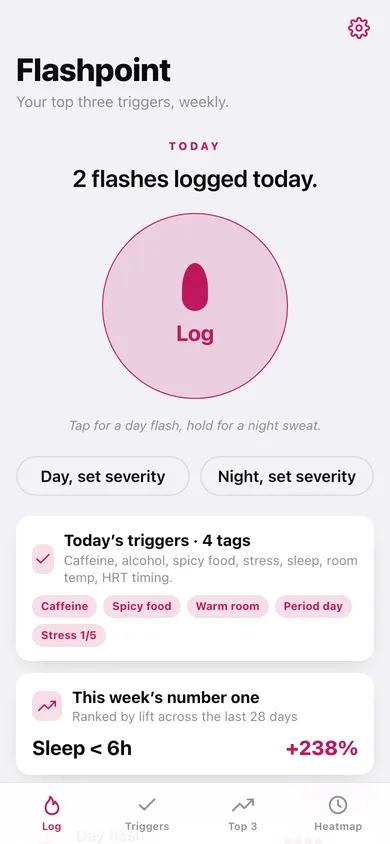
One big button: tap for a day flash, press and hold for a night sweat. Two buttons under it ask for severity 1–5 when you want to be precise.
Daily trigger tagging
Caffeine, alcohol, spicy food, sleep under six hours, warm room, HRT taken late, period day, plus a 0–5 stress score — one row saved per calendar day.
Your top three triggers
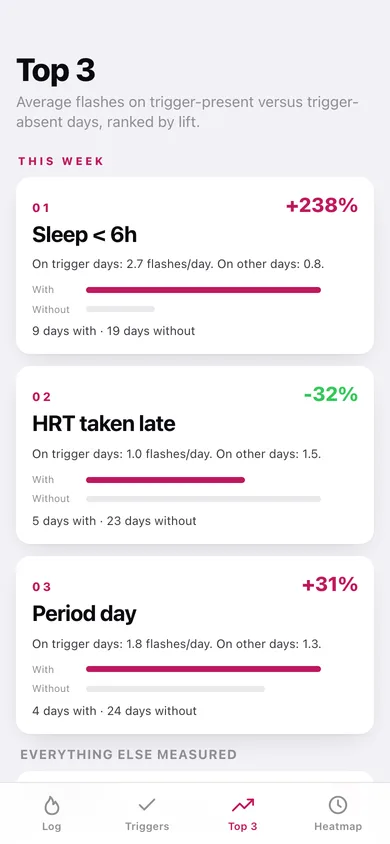
The same lift maths as the iPhone app: average flashes on trigger-present days versus trigger-absent days across 28 days, ranked by absolute lift, with the with/without bars and the day counts behind every number.
24-hour clock heatmap
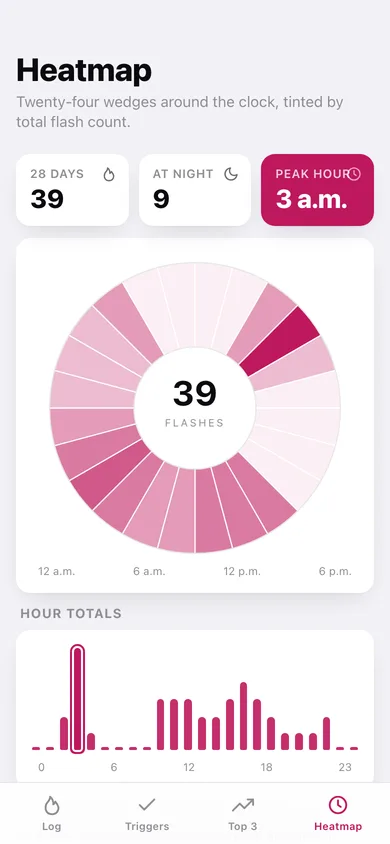
Twenty-four wedges around a clock face tinted by flash count, plus hour totals and a day-versus-night split — so a 3 a.m. cluster is impossible to miss.
Raw CSV export
Every flash and every trigger row downloads as plain CSV you can hand to your clinician. No email signup, no upload.
Nothing leaves the tab
The correlation runs in your browser and the log is stored locally — no account, no subscription, no employer paywall.
Screens
Every screen, rebuilt for the browser
-
1
Log
Today's count, the big tap-or-hold log button, today's tags and this week's number-one trigger.
-
2
Every flash
Flashes per day over 28 days plus every entry grouped by day with severity bars.
-
3
Flash detail
One entry: severity, kind, time and note, editable — with the triggers you tagged that day.
-
4
Triggers
Today's chips and stress score, then the last fourteen tagged days with their flash counts.
-
5
Trigger day
Edit what was true on a past day.
-
6
Top 3
The three highest-lift triggers with with/without averages and bars, then every other trigger measured.
-
7
Heatmap
The 24-wedge clock face, peak hour, hour totals and the day-versus-night donut.
-
8
Export
Record counts, CSV downloads for flashes and triggers, and a preview of the file.
-
9
Settings
Default severity, log beep, exports, sample data and erase.
Try it with sample data: Loads four weeks of tagged days and thirty-nine flashes — day flashes clustered after coffee and night sweats at 3 a.m. — so the Top 3, heatmap and history all have real signal. You can start fresh at any time.
Ready? It's free.
No account, no install, no subscription. Everything you do stays in this browser.
Your say
What should Flashpoint do? Tell us before we build it.
Tell us what to build next.
Comments need a free Google sign-in, so every one is from a real person.
Sign in with Google to commentNo comments yet — be the first to say what this app should do next.
Questions
Is the web version of Flashpoint free?+
Yes. Every screen is free to use: no subscription, no in-app purchases, no account.
Do I need an account?+
No. Open Flashpoint and start using it right away. Sign in with Google only if you want to upvote an app, save it to your list, or leave a comment.
Where is my data stored?+
Only in this browser's local storage. Nothing you enter is sent to our servers, so we can't see it, back it up, or restore it. Clearing site data, a private window, or another device starts empty. Export a backup from the in-app menu to keep it.
Is there a Flashpoint app for iPhone or Android?+
Not yet. Flashpoint is a community proposal: the browser version is complete, and we build the iPhone and Android app once 100 people upvote it. Upvoters get one email when it ships.