
Web app · Health And Fitness
Ferritrack
Your whole iron story on one timeline — labs, IV visits, oral courses, symptoms
Plot ferritin, hemoglobin and TSAT against your own reference range with every infusion visit and supplement course drawn on the same curve, track multi-visit IV series, score symptoms 0–10, and set the recheck window you agreed on. Free, no install, nothing leaves your browser.
Stored in your browser only. Nothing you do in the web version is sent to our servers. Clear your browser data and it's gone — so export a backup from the in-app menu if you want to keep it.
This app is a community proposal.
Try the full browser version now. We build the iPhone and Android app once 100 people upvote it.
We'll email you once, when it ships. Unsubscribe anytime.
In your browser
What you can do in Ferritrack on the web
One curve, every event
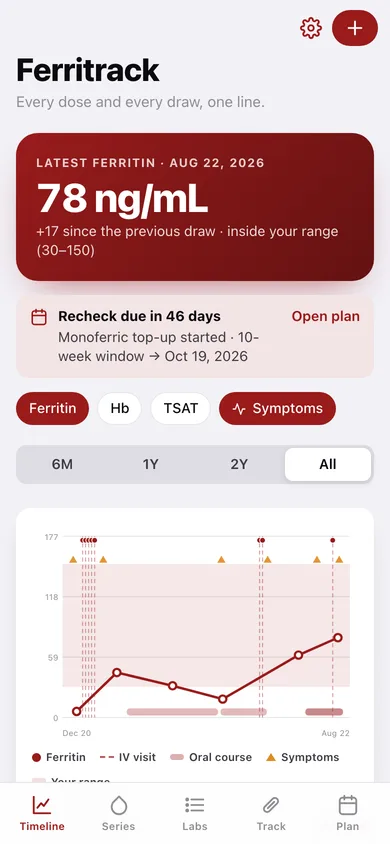
Ferritin, hemoglobin and transferrin saturation on a single chart with your reference band behind it, dashed rules for every IV visit, shaded spans for every oral course and triangles for symptom entries.
Infusion series, visit by visit
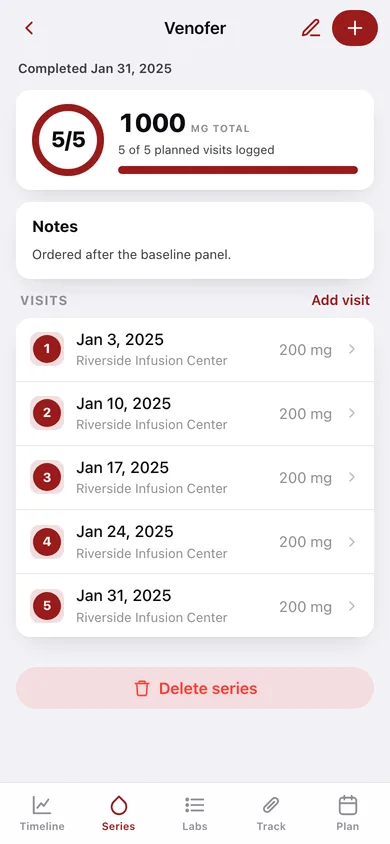
Model IV iron the way it happens: a series with planned visits, then each appointment logged with date, mg and location. The ring fills in and the total dose adds up until you mark it complete.
Labs from any portal
Manual entry means Quest, the hospital portal and your OB's office live on one list. Partial panels are fine, and each value is chipped green or red against the range you set.
Oral iron courses
Form, elemental dose, frequency, start and stop — bisglycinate, sulfate, fumarate, gluconate, polysaccharide or heme iron — so months of supplements sit under the lab curve.
Symptom scores 0–10
Rate fatigue, restless legs, hair shedding, brain fog and breathlessness, see the average per entry and watch the trend line move as the numbers do.
Recheck windows and a one-page summary
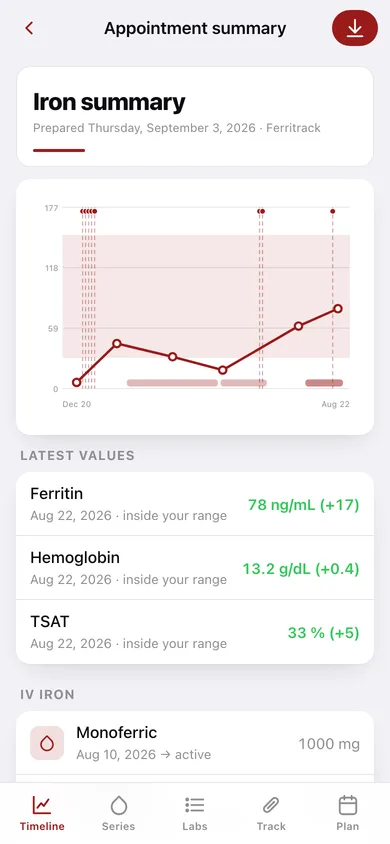
Anchor a recheck to the day a series ended, pick the 2–26 week window, and print or save an appointment summary of labs, doses and symptom trend.
Screens
Every screen, rebuilt for the browser
-
1
Timeline
Latest ferritin with its delta and range placement, the marker chart with infusions and courses drawn on it, and your next recheck.
-
2
Lab result
One draw in context: each marker against your range, the change since the previous result, and the treatment within 120 days.
-
3
Log a lab result
-
4
Lab Log
Every result grouped by year with green/red chips per marker.
-
5
Infusion Series
Progress rings for every IV iron series with visits logged, total mg and active/complete status.
-
6
Series detail
Total dose, the cumulative-dose bar, every numbered visit, and Mark series complete with a recheck prompt.
-
7
New infusion series
-
8
Log a visit
-
9
Courses & Symptoms
Oral iron courses with active/ended spans, and 0–10 symptom score cards.
-
10
Oral iron course
-
11
Log symptoms
-
12
Plan
Recheck plans with due dates, overdue counts and done state.
-
13
Recheck plan
-
14
Appointment summary
The one-page recap: mini ferritin chart, latest values, IV and oral history, symptom trend line — savable as a text file.
-
15
Settings
Your reference ranges, chart defaults, backup, sample data and erase.
Try it with sample data: Loads a two-year iron story: six lab draws from 6 to 78 ng/mL, a completed 5-visit Venofer series, a 2-visit Injectafer series, an active Monoferric top-up, four oral courses, six symptom entries and two recheck plans. You can start fresh at any time.
Ready? It's free.
No account, no install, no subscription. Everything you do stays in this browser.
Your say
What should Ferritrack do? Tell us before we build it.
Tell us what to build next.
Comments need a free Google sign-in, so every one is from a real person.
Sign in with Google to commentNo comments yet — be the first to say what this app should do next.
Questions
Is the web version of Ferritrack free?+
Yes. Every screen is free to use: no subscription, no in-app purchases, no account.
Do I need an account?+
No. Open Ferritrack and start using it right away. Sign in with Google only if you want to upvote an app, save it to your list, or leave a comment.
Where is my data stored?+
Only in this browser's local storage. Nothing you enter is sent to our servers, so we can't see it, back it up, or restore it. Clearing site data, a private window, or another device starts empty. Export a backup from the in-app menu to keep it.
Is there a Ferritrack app for iPhone or Android?+
Not yet. Ferritrack is a community proposal: the browser version is complete, and we build the iPhone and Android app once 100 people upvote it. Upvoters get one email when it ships.