
Web app · Health And Fitness
FallTrail
Finally answer “how many falls this year, and what was happening each time?”
A 20-second diary for falls and the near-falls a smartwatch never sees: room, activity, injury, dizziness, footwear. It charts where and when they cluster, keeps a room-by-room home-hazard checklist, and builds a STEADI-style report for the PT. Free, no account, no monitoring fees.
Stored in your browser only. Nothing you do in the web version is sent to our servers. Clear your browser data and it's gone — so export a backup from the in-app menu if you want to keep it.
This app is a community proposal.
Try the full browser version now. We build the iPhone and Android app once 100 people upvote it.
We'll email you once, when it ships. Unsubscribe anytime.
In your browser
What you can do in FallTrail on the web
20-second guided entry
Fall or near-fall, then all taps: room, what they were doing, injury, whether dizziness came first, what was on their feet, and a note.
Near-falls are first-class
The stumbles and grabs for the counter are the early warnings clinicians ask about, and no watch records them — FallTrail counts them alongside real falls.
Pattern dashboard
Events by room, by morning/afternoon/evening/night, a six-month frequency chart, and the falls-to-near-falls split, plus injury, dizziness and footwear counts.
Room-by-room hazard checklist
The classic culprits in seven rooms — loose rugs, night lighting, grab bars, handrails, clutter and cords — with a progress ring per room and notes on what a fix will cost.
Balance homework streak
Log the sit-to-stands, heel-toe walks, single-leg stands and tai chi a PT assigned, and keep a gentle streak with weekly minutes and a twelve-week heatmap.
STEADI-style report
Pick the person, the range and the sections, then copy or download a clean fall-history summary — totals, every event with circumstances, pattern highlights, hazard status and exercise.
One person or several
Both parents, a grandparent, yourself — each gets their own diary, checklist, balance log and report, switchable from the home screen.
Screens
Every screen, rebuilt for the browser
-
1
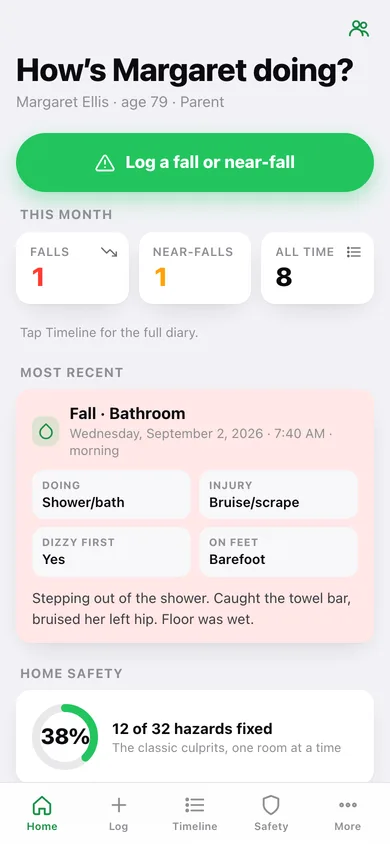
Home
This month's falls and near-falls, the most recent event in full, hazard progress and the balance streak.
-
2
Log an event
Fall or near-fall, when, room, activity, injury, dizziness, footwear and a note — all taps.
-
3
Timeline
Every event grouped by month, filterable to falls or near-falls only.
-
4
Event detail
One event's full circumstances, your note, and every other event logged in the same room.
-
5
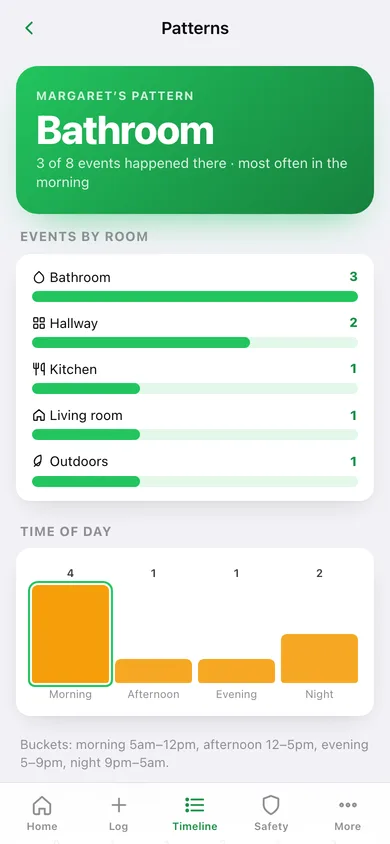
Patterns
Events by room and time of day, the six-month trend, and the falls-versus-near-falls split.
-
6
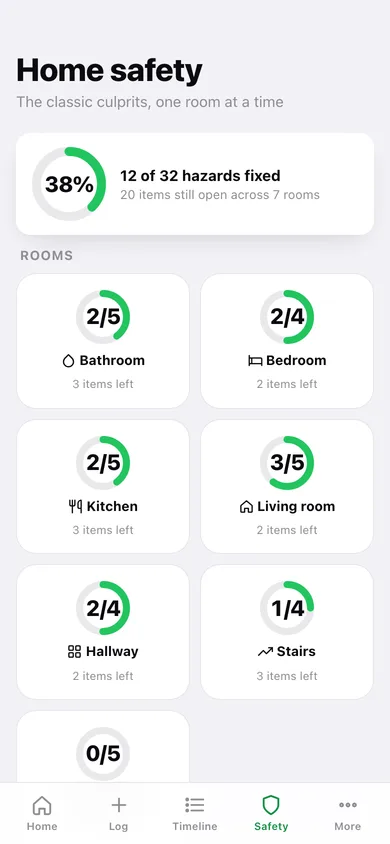
Home safety
Overall hazard progress and a card per room with its own ring.
-
7
Room checklist
One room's hazard items, what is fixed, notes, and the events logged in there.
-
8
Balance homework
Streak, weekly minutes, a twelve-week heatmap, minutes by exercise and every session.
-
9
People
Every diary you keep, with events and hazard progress, and who is active.
-
10
Fall-history report
Person, range and section pickers with a live preview to copy or download for intake.
-
11
More
The tools, defaults, backup, sample data and erase.
Try it with sample data: Loads two parents' diaries: eight events for Margaret over three months clustering in the bathroom and hallway, one overnight near-fall for Frank, both home-hazard checklists with nine items already fixed and five of her own added, and eight balance sessions. You can start fresh at any time.
Ready? It's free.
No account, no install, no subscription. Everything you do stays in this browser.
Your say
What should FallTrail do? Tell us before we build it.
Tell us what to build next.
Comments need a free Google sign-in, so every one is from a real person.
Sign in with Google to commentNo comments yet — be the first to say what this app should do next.
Questions
Is the web version of FallTrail free?+
Yes. Every screen is free to use: no subscription, no in-app purchases, no account.
Do I need an account?+
No. Open FallTrail and start using it right away. Sign in with Google only if you want to upvote an app, save it to your list, or leave a comment.
Where is my data stored?+
Only in this browser's local storage. Nothing you enter is sent to our servers, so we can't see it, back it up, or restore it. Clearing site data, a private window, or another device starts empty. Export a backup from the in-app menu to keep it.
Is there a FallTrail app for iPhone or Android?+
Not yet. FallTrail is a community proposal: the browser version is complete, and we build the iPhone and Android app once 100 people upvote it. Upvoters get one email when it ships.