
Web app · Finance
EOB Keeper
Match the EOB to the bill before you pay a cent
Log what your insurer allowed and what the provider billed. EOB Keeper pairs them by member, date and amount, flags every bill that comes in over the allowed figure, burns down each person's deductible, and counts the 120-day No Surprises Act appeal window. Free, no account, no install.
Stored in your browser only. Nothing you do in the web version is sent to our servers. Clear your browser data and it's gone — so export a backup from the in-app menu if you want to keep it.
In your browser
What you can do in EOB Keeper on the web
The matching engine
Pairs an EOB with a provider bill when they share a member, fall within 7 days of each other and sit closest on amount — the same scoring the iPhone app uses, run at the tap of Auto-pair.
Overcharge flags with the arithmetic
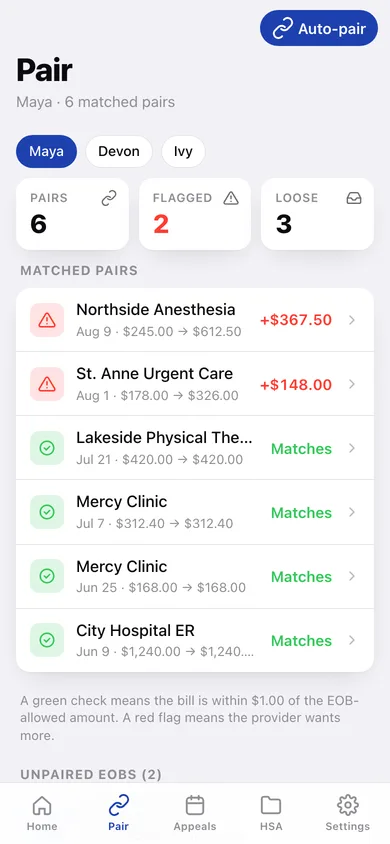
A green check when the bill is within a dollar of the allowed amount; a red flag with the exact overcharge, a side-by-side EOB versus bill card, and the figures laid out ready to read down the phone to a billing office.
Deductible and out-of-pocket gauge
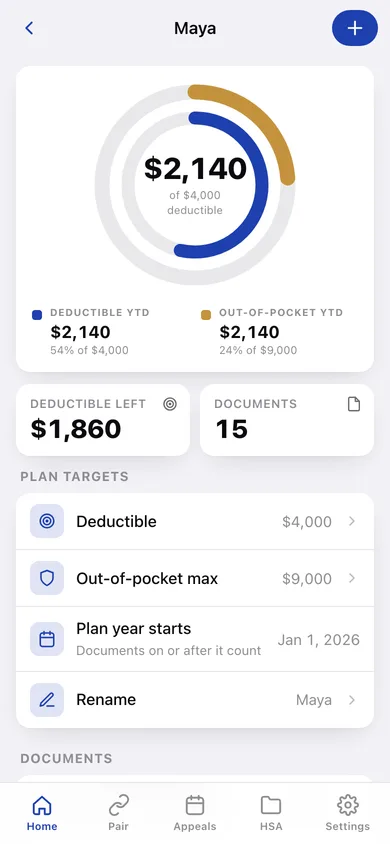
A twin-ring gauge per family member showing the deductible inside the out-of-pocket max, burning down as you mark bills paid. A paired EOB and bill count once, not twice.
120-day appeal countdown
Every EOB gets its No Surprises Act deadline computed from the date of service, sorted soonest first and banded at 90, 30 and 7 days out so nothing quietly expires.
HSA folder with CSV export
Filter this year's paid receipts by member, see the reimbursable total, and download the lot as a CSV for your HSA administrator or tax preparer.
35-code CPT reference
Look up the codes that turn up on a US statement — office visits, ER levels, labs, imaging, therapy, anesthesia, vaccines — and attach them to a document as you enter it.
Screens
Every screen, rebuilt for the browser
-
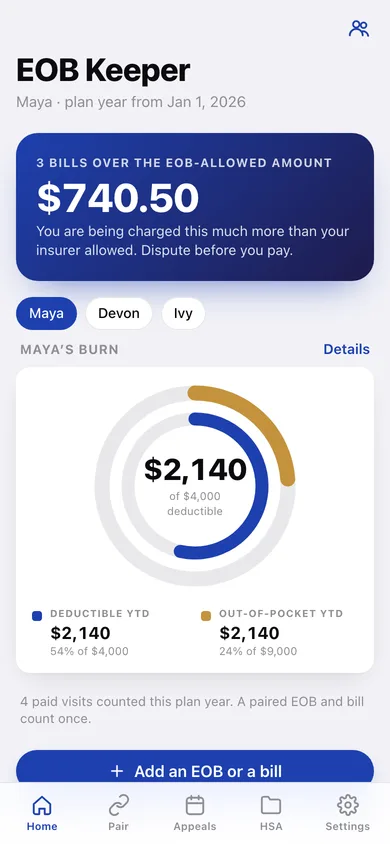
1
Home
What you are being overcharged right now, the active member's deductible gauge, unpaired EOBs and the shortcuts.
-
2
Pair
Matched pairs with green checks and red flags, plus every loose EOB and bill with its best candidate match.
-
3
Mismatch detail
EOB against bill side by side, the overcharge arithmetic, what to say on the billing call, and the appeal window.
-
4
Document
One EOB or bill: amounts, service codes with plain-English descriptions, paid toggle, appeal deadline and candidate matches.
-
5
Add a document
Enter an EOB or a provider bill by hand, attach CPT codes from the reference, and let the matcher run on save.
-
6
Family
Everyone on the plan with their deductible progress.
-
7
Member detail
Twin-ring gauge, plan targets you can edit, what is left on the deductible, and that person's documents.
-
8
Appeals
Every EOB's 120-day No Surprises Act window, soonest first, banded red under 30 days.
-
9
HSA folder
This year's paid receipts by member with a reimbursable total and CSV export.
-
10
CPT reference
Searchable list of the service codes that appear on a US EOB, grouped by kind of care.
-
11
Settings
Document counts, the matcher's thresholds, JSON backup, CSV export, sample data and erase.
Try it with sample data: Loads a three-person household — Maya, Devon and Ivy — with 24 EOBs and bills over the last three months, ten of them already paired, three bills coming in over the EOB-allowed amount, and one appeal window closing in a fortnight. You can start fresh at any time.
Ready? It's free.
No account, no install, no subscription. Everything you do stays in this browser.
Your say
Is EOB Keeper useful? Tell us what to build next.
Sign in with Google to vote.
Tell us what to build next.
Comments need a free Google sign-in, so every one is from a real person.
Sign in with Google to commentNo comments yet — be the first to say what this app should do next.
Questions
Is the web version of EOB Keeper free?+
Yes. Every screen is free to use: no subscription, no in-app purchases, no account.
Do I need an account?+
No. Open EOB Keeper and start using it right away. Sign in with Google only if you want to upvote an app, save it to your list, or leave a comment.
Where is my data stored?+
Only in this browser's local storage. Nothing you enter is sent to our servers, so we can't see it, back it up, or restore it. Clearing site data, a private window, or another device starts empty. Export a backup from the in-app menu to keep it.
How is the web version different from the EOB Keeper phone app?+
There is no camera scanning on the web: the iPhone app reads an EOB with on-device VisionKit OCR, while here you type the six fields in by hand. The matching, flagging and deadline maths are identical. A web page cannot schedule local notifications, so the 90/30/7-day appeal reminders become a countdown you check on the Appeals tab rather than an alert on your lock screen. Export is CSV and JSON rather than the iPhone app's combined PDF for HSA reimbursement. The searchable CPT/service-code reference is a web addition — the iPhone app takes codes as free text. Codes are a common-procedure aid, not a billing authority; your insurer's EOB is the source of truth. Everything is saved in this browser only — clearing site data erases it, and it does not sync to another device. Export a backup to keep it. EOB Keeper is not medical, legal or insurance advice. Verify every figure with your insurer or provider before disputing or paying.