
Web app · Health And Fitness
Ember Log
Track hot flashes and 100+ menopause symptoms — privately, in your browser
One tap logs a hot flash. A 30-second check-in rates mood, sleep, brain fog, energy and whichever symptoms you choose from a documented library of over a hundred. Trends surface the patterns, and a doctor summary gives you evidence instead of a vague feeling. Free, nothing to install.
Stored in your browser only. Nothing you do in the web version is sent to our servers. Clear your browser data and it's gone — so export a backup from the in-app menu if you want to keep it.
This app is a community proposal.
Try the full browser version now. We build the iPhone and Android app once 100 people upvote it.
We'll email you once, when it ships. Unsubscribe anytime.
In your browser
What you can do in Ember Log on the web
One-tap hot flash log
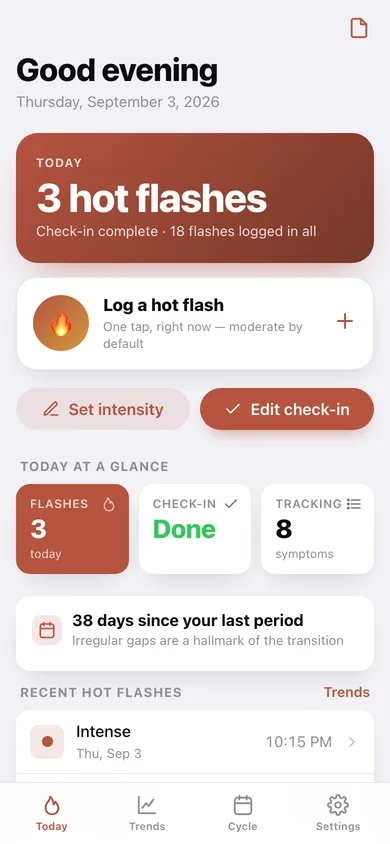
The flame on the home screen records a moderate flash the moment it hits; open it for mild/moderate/intense, an exact time and a note about what triggered it.
30-second daily check-in
Mood, sleep, brain fog and energy on 1-to-5 scales, plus a none / mild / moderate / severe dot for every symptom you track, and a line about the day.
The full symptom library
All 102 documented peri- and menopause symptoms across thirteen categories — temperature, mood, cognition, sleep, pain, heart, skin, digestion, urinary, intimacy, cycle, senses and wellbeing — searchable, plus your own.
Trends over 7, 14 or 30 days
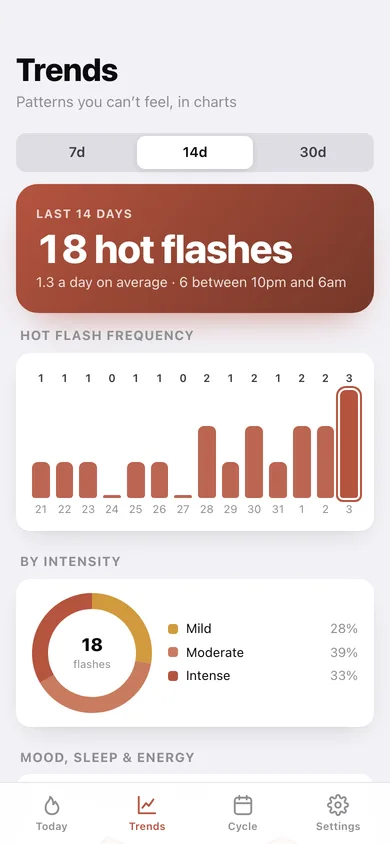
Hot flashes per day as bars, a night-time split, intensity breakdown, mood/sleep/energy lines and your heaviest symptoms ranked by total severity.
Cycle-change log
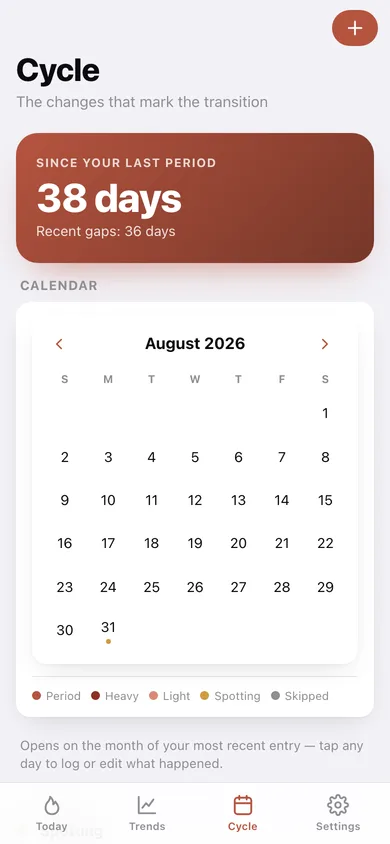
Period, heavy, light, spotting or skipped on a month calendar and a timeline, with days since your last bleed and the recent gaps between them.
Doctor visit summary
Pick one, two or three months and get a tidy summary — flash counts, averages, ranked symptoms, cycle changes and your own notes — to copy or download.
Screens
Every screen, rebuilt for the browser
-
1
Today
Today's flash count, the one-tap flame, your check-in status and the most recent flashes.
-
2
Hot flash
Mild, moderate or intense, with the exact time and an optional note.
-
3
Daily check-in
Four wellbeing scales and a severity dot for every symptom you track.
-
4
Trends
Flashes per day, intensity split, mood/sleep/energy lines and your heaviest symptoms.
-
5
Cycle
Days since your last period, a marked month calendar and the timeline of changes.
-
6
Symptom library
All 102 documented symptoms by category, searchable, with your own additions.
-
7
Doctor report
A one-to-three-month summary you can copy or download for your appointment.
-
8
Settings
Default flash intensity, the library, backup, sample data and erase.
Try it with sample data: Loads a fortnight of a real transition: eighteen hot flashes across all three intensities including night-time ones, ten daily check-ins with rated symptoms and notes, and four cycle changes from a heavier period through a skipped month to unexpected spotting. You can start fresh at any time.
Ready? It's free.
No account, no install, no subscription. Everything you do stays in this browser.
Your say
What should Ember Log do? Tell us before we build it.
Tell us what to build next.
Comments need a free Google sign-in, so every one is from a real person.
Sign in with Google to commentNo comments yet — be the first to say what this app should do next.
Questions
Is the web version of Ember Log free?+
Yes. Every screen is free to use: no subscription, no in-app purchases, no account.
Do I need an account?+
No. Open Ember Log and start using it right away. Sign in with Google only if you want to upvote an app, save it to your list, or leave a comment.
Where is my data stored?+
Only in this browser's local storage. Nothing you enter is sent to our servers, so we can't see it, back it up, or restore it. Clearing site data, a private window, or another device starts empty. Export a backup from the in-app menu to keep it.
Is there a Ember Log app for iPhone or Android?+
Not yet. Ember Log is a community proposal: the browser version is complete, and we build the iPhone and Android app once 100 people upvote it. Upvoters get one email when it ships.