
Web app · Food And Drink
Eat First
Pick a food, get a use-by date — and eat it before it goes bad
No barcode, no receipt, no typing dates. Tap a food from the built-in shelf-life table, choose pantry, fridge or freezer, and Eat First works out the use-by date. Your home screen becomes one list sorted soonest-first and colour-coded by urgency. Free, offline, no account.
Stored in your browser only. Nothing you do in the web version is sent to our servers. Clear your browser data and it's gone — so export a backup from the in-app menu if you want to keep it.
This app is a community proposal.
Try the full browser version now. We build the iPhone and Android app once 100 people upvote it.
We'll email you once, when it ships. Unsubscribe anytime.
In your browser
What you can do in Eat First on the web
115 foods with built-in shelf life
Produce, dairy, meat, seafood, bakery, pantry staples, condiments, drinks and leftovers — each with conservative pantry, fridge and freezer day counts from USDA FoodKeeper-style guidance.
The use-by date is computed, never typed
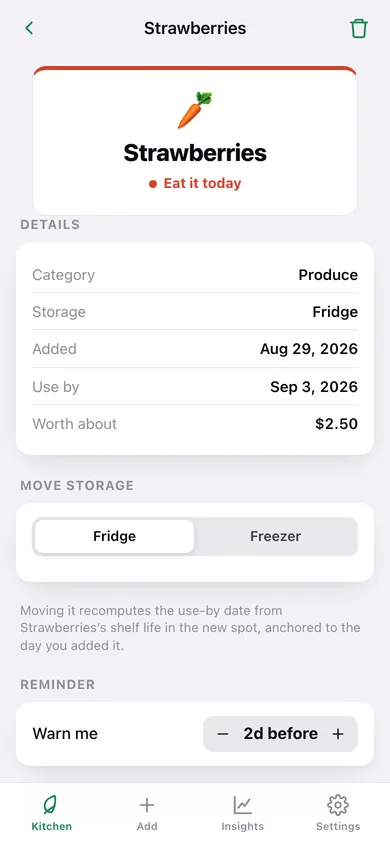
Pick the food, pick where it's kept, and the date is today plus that food's shelf life for that spot — move it to the freezer later and the date is recomputed from the day you added it.
The eat-first list
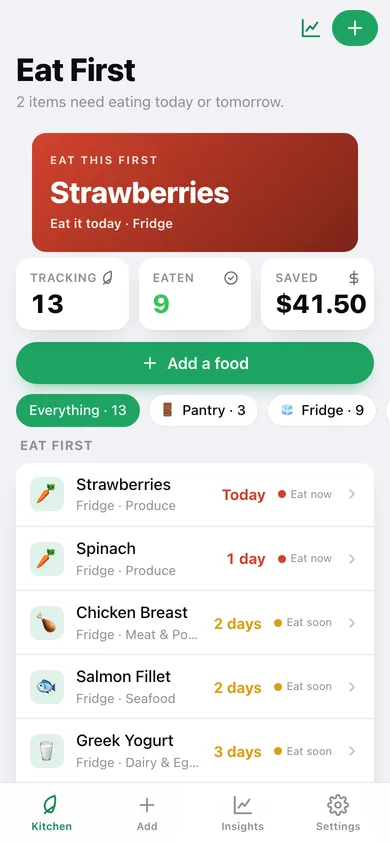
One list, soonest use-by at the top, with green / amber / red urgency: Fresh, Eat soon, Eat now, Past date — plus a header line telling you how many items need eating today or tomorrow.
Close the loop: ate it or tossed it
Every food ends as eaten or tossed, which feeds a savings figure built from a per-category retail value — $7 a salmon fillet, $2.50 a bag of produce.
Waste & savings insights
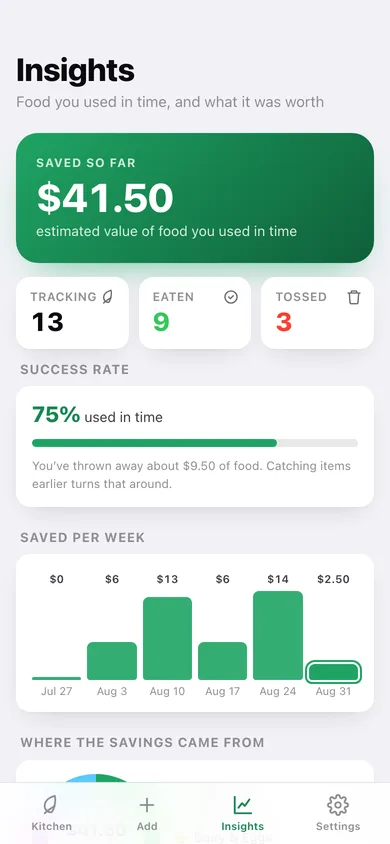
Dollars saved, success rate, dollars wasted, savings per week as a bar chart, a donut of which categories earned it, and the full eaten/tossed history you can restore from.
Your own foods and shelf-life rules
Add a custom food with your own pantry / fridge / freezer day counts and it joins the picker at the top, behaving exactly like a built-in entry.
Screens
Every screen, rebuilt for the browser
-
1
Kitchen
What to eat first, storage filters, and the whole eat-first list colour-coded by urgency.
-
2
Insights
Dollars saved, success rate, savings per week and the eaten/tossed history.
-
3
Food detail
Urgency readout, use-by, move between pantry / fridge / freezer, reminder lead, ate-it or tossed-it.
-
4
Add food
Search or browse the shelf-life table by category, then set storage and reminder in the add sheet.
-
5
Your foods
Create foods with your own pantry, fridge and freezer shelf-life rules.
-
6
Settings
Default warning lead, kitchen counts, CSV export, backup, sample data and erase.
Try it with sample data: Stocks thirteen foods across pantry, fridge and freezer so the list shows red, amber and green at once, plus twelve resolved items over the last month — nine eaten in time and three tossed — and two custom foods. You can start fresh at any time.
Ready? It's free.
No account, no install, no subscription. Everything you do stays in this browser.
Your say
What should Eat First do? Tell us before we build it.
Tell us what to build next.
Comments need a free Google sign-in, so every one is from a real person.
Sign in with Google to commentNo comments yet — be the first to say what this app should do next.
Questions
Is the web version of Eat First free?+
Yes. Every screen is free to use: no subscription, no in-app purchases, no account.
Do I need an account?+
No. Open Eat First and start using it right away. Sign in with Google only if you want to upvote an app, save it to your list, or leave a comment.
Where is my data stored?+
Only in this browser's local storage. Nothing you enter is sent to our servers, so we can't see it, back it up, or restore it. Clearing site data, a private window, or another device starts empty. Export a backup from the in-app menu to keep it.
Is there a Eat First app for iPhone or Android?+
Not yet. Eat First is a community proposal: the browser version is complete, and we build the iPhone and Android app once 100 people upvote it. Upvoters get one email when it ships.