
Web app · Health And Fitness
Earkeep
Every hearing-aid part changed on time — any brand, prescription or OTC
Per-ear profiles with their own wax-guard, dome, receiver, tubing and drying intervals; one-tap dated change logging; the offline dead-aid triage a clinic walks; a supply bin that counts itself down; and a warranty, repair and battery ledger. Free, no account.
Stored in your browser only. Nothing you do in the web version is sent to our servers. Clear your browser data and it's gone — so export a backup from the in-app menu if you want to keep it.
This app is a community proposal.
Try the full browser version now. We build the iPhone and Android app once 100 people upvote it.
We'll email you once, when it ships. Unsubscribe anytime.
In your browser
What you can do in Earkeep on the web
Per-ear device profiles
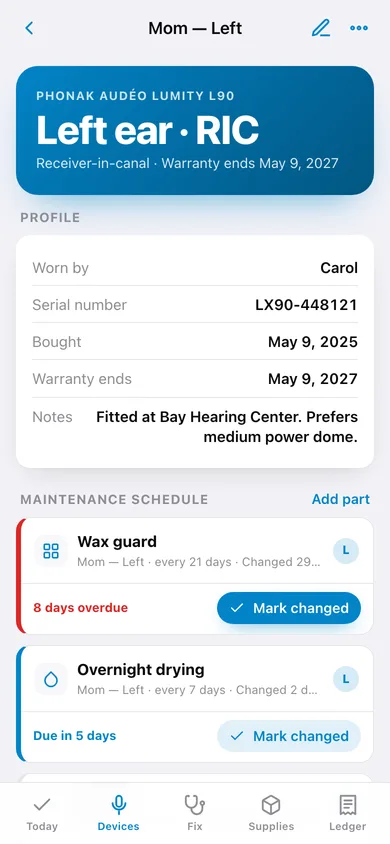
Brand, model, style (RIC, BTE, ITE or OTC), ear, serial number, purchase date and warranty end — mixed-brand and over-the-counter households are first-class.
One due-this-week list
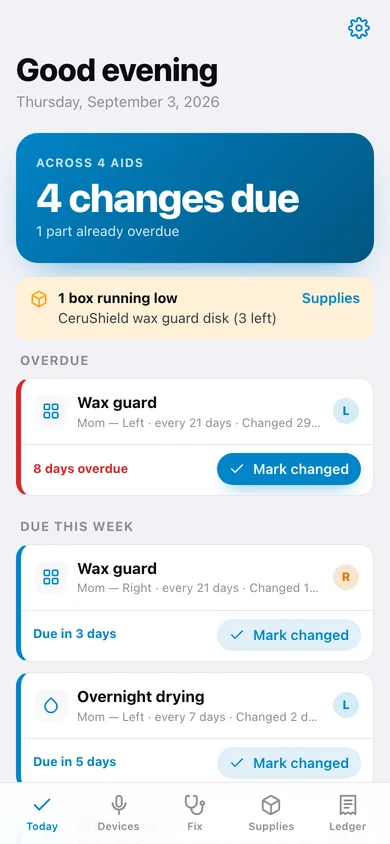
Every part on every aid rolled into Overdue, Due this week and Coming up, with the days-overdue count on each row and a Mark changed button.
Dated change history per part
Marking a change writes a dated entry, resets the due clock, and shows your real average interval next to the planned one — so a wax guard you always leave a week too long is obvious.
Offline dead-aid triage
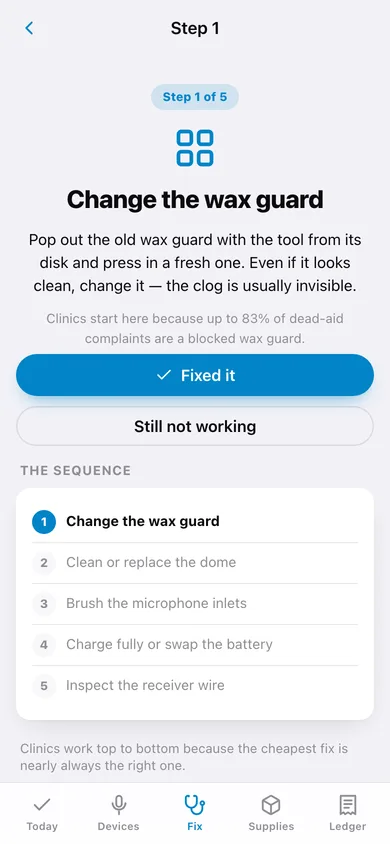
The clinic sequence in five steps — wax guard, dome, mics, power, receiver — with a symptom shortcut, a Fixed it button that logs the change, and a list to hand the audiologist if nothing worked.
Supply bin that counts down
How many guards, domes and batteries are actually in the drawer, with a warn-me-at level and automatic decrementing every time you log a change.
Warranty, repair and battery ledger
Out-of-pocket total, per-aid warranty status, every clinic visit and cost, plus a hours-per-charge log that flags a receiver losing 10% or more.
Screens
Every screen, rebuilt for the browser
-
1
Today
Everything due across every aid, sorted into overdue, due this week and coming up, with low-supply warnings.
-
2
Part detail
One part's interval, planned vs your real average, full dated change history and a Mark changed button.
-
3
Devices
Every aid grouped by the person who wears it, with warranty state and the next part due.
-
4
Aid detail
Profile, paperwork, the whole maintenance schedule, repairs and battery life for one aid.
-
5
Aid setup
Name, wearer, brand, model, ear, style and paperwork — the style seeds the right default parts.
-
6
Troubleshoot
Start the full clinic sequence, or jump in by symptom: whistling, muffled, cutting out.
-
7
Triage step
One step at a time with what to do, why clinics do it in that order, and Fixed it / Still not working.
-
8
Supply bin
What is left in the drawer, low-stock warnings and plus/minus buttons on every box.
-
9
Ledger
Out-of-pocket repair total, warranty status per aid and every logged clinic visit.
-
10
Battery life
Log hours per charge, chart the trend per aid and get a warning when a receiver starts fading.
-
11
Settings
Lead time, default wax-guard interval, backup, sample data and erase.
Try it with sample data: Loads a real household: two Phonak aids for Mom, a Jabra OTC aid, a BTE Oticon for Dad, ten parts staged so today shows overdue, due-this-week and upcoming, ten logged changes, three supply boxes, two repairs and thirteen charge logs. You can start fresh at any time.
Ready? It's free.
No account, no install, no subscription. Everything you do stays in this browser.
Your say
What should Earkeep do? Tell us before we build it.
Tell us what to build next.
Comments need a free Google sign-in, so every one is from a real person.
Sign in with Google to commentNo comments yet — be the first to say what this app should do next.
Questions
Is the web version of Earkeep free?+
Yes. Every screen is free to use: no subscription, no in-app purchases, no account.
Do I need an account?+
No. Open Earkeep and start using it right away. Sign in with Google only if you want to upvote an app, save it to your list, or leave a comment.
Where is my data stored?+
Only in this browser's local storage. Nothing you enter is sent to our servers, so we can't see it, back it up, or restore it. Clearing site data, a private window, or another device starts empty. Export a backup from the in-app menu to keep it.
Is there a Earkeep app for iPhone or Android?+
Not yet. Earkeep is a community proposal: the browser version is complete, and we build the iPhone and Android app once 100 people upvote it. Upvoters get one email when it ships.