
Web app · Health And Fitness
Duskwatch
The dementia behaviour journal your neurologist keeps asking you to keep
Capture an episode in about 30 seconds — what happened right before, the behaviour, what you tried, whether it helped — then watch the sundowning window appear in a time-of-day heatmap and walk into the appointment with a report. Free, offline, no account.
Stored in your browser only. Nothing you do in the web version is sent to our servers. Clear your browser data and it's gone — so export a backup from the in-app menu if you want to keep it.
This app is a community proposal.
Try the full browser version now. We build the iPhone and Android app once 100 people upvote it.
We'll email you once, when it ships. Unsubscribe anytime.
In your browser
What you can do in Duskwatch on the web
30-second episode capture
A four-step, tap-only flow: trigger, behaviour and intensity, what you tried, and the outcome — with the same trigger-behaviour-response structure clinicians use.
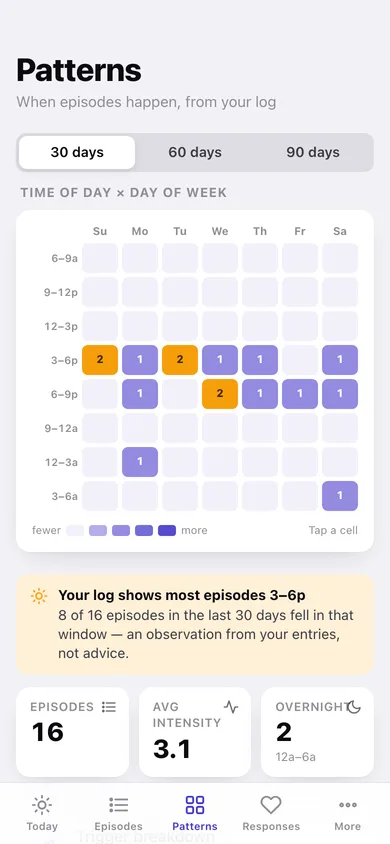
Time-of-day × day-of-week heatmap
Eight three-hour blocks across seven weekdays over 30, 60 or 90 days, so the 4:30-to-7:00 cluster stops being a feeling and becomes a grid you can tap into.
Trigger breakdown
All ten antecedents — noise, hunger, visitors, transitions, bathing, questions, TV, fatigue, pain, nothing obvious — counted and optionally weighted by severity.
Your responses, ranked
Your own library of calming responses with a helped / no change / worse tally per response, so the next episode starts from what you wrote down rather than memory.
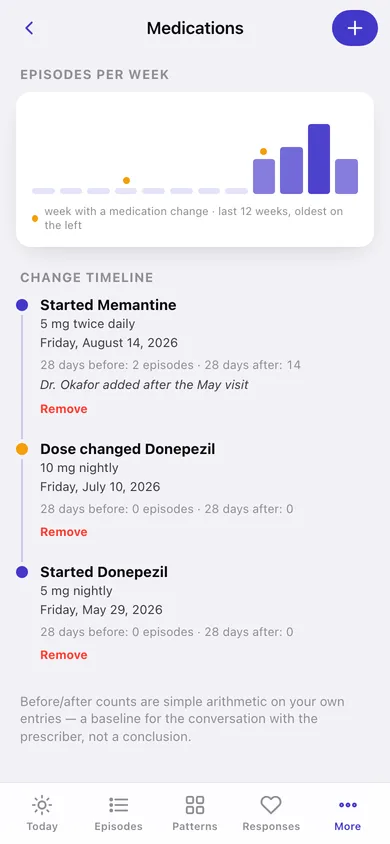
Medication timeline
Every start, stop and dose change plotted against twelve weeks of episode counts, with 28-days-before and 28-days-after totals for each change.
Visit report
Choose a range and the sections you want, then copy or download a clean summary of episodes, timing, triggers, outcomes, medications and your notes.
Screens
Every screen, rebuilt for the browser
-
1
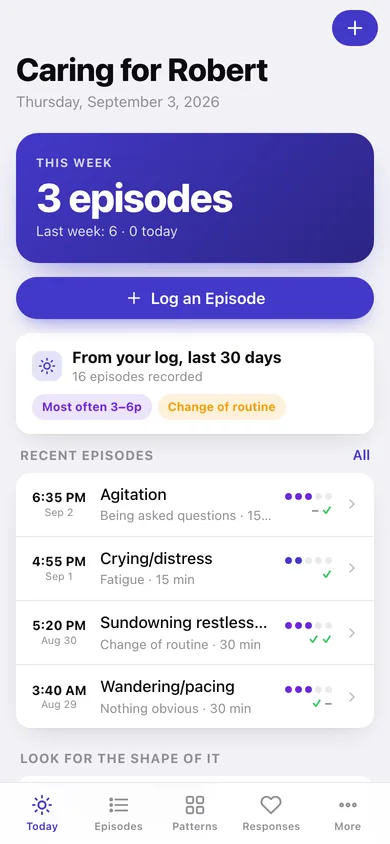
Today
This week's episode count against last week, the 30-day peak window and top trigger, and the big Log button.
-
2
Log an episode
The four-step capture: what came right before, the behaviour and intensity, what you tried, and whether it helped.
-
3
Episodes
The whole journal grouped by day, filterable by behaviour, with severity dots and outcome marks on every row.
-
4
Episode detail
One episode in full — trigger, behaviour, intensity, duration, time block, everything tried and your note.
-
5
Patterns
The time-of-day by day-of-week heatmap with a tappable cell drill-down and the peak-window callout.
-
6
Triggers
Every antecedent ranked as a bar chart, with an optional severity weighting and per-trigger episode lists.
-
7
Responses
Your calming-response library ranked by recorded outcomes with a helped/no-change/worse bar on each.
-
8
Response detail
One response's helped rate and every episode you tried it in.
-
9
Medications
Twelve weeks of episode counts with medication-change weeks marked, plus the change timeline with before/after counts.
-
10
Visit report
Range and section pickers with a live preview you can copy or download for the appointment.
-
11
More
Who you care for, the analysis screens, backup, sample data and erase.
Try it with sample data: Loads a three-and-a-half week log for a father with dementia: sixteen episodes clustered in the late-afternoon window with two overnight wandering outliers, five calming responses with recorded outcomes, and three medication changes. You can start fresh at any time.
Ready? It's free.
No account, no install, no subscription. Everything you do stays in this browser.
Your say
What should Duskwatch do? Tell us before we build it.
Tell us what to build next.
Comments need a free Google sign-in, so every one is from a real person.
Sign in with Google to commentNo comments yet — be the first to say what this app should do next.
Questions
Is the web version of Duskwatch free?+
Yes. Every screen is free to use: no subscription, no in-app purchases, no account.
Do I need an account?+
No. Open Duskwatch and start using it right away. Sign in with Google only if you want to upvote an app, save it to your list, or leave a comment.
Where is my data stored?+
Only in this browser's local storage. Nothing you enter is sent to our servers, so we can't see it, back it up, or restore it. Clearing site data, a private window, or another device starts empty. Export a backup from the in-app menu to keep it.
Is there a Duskwatch app for iPhone or Android?+
Not yet. Duskwatch is a community proposal: the browser version is complete, and we build the iPhone and Android app once 100 people upvote it. Upvoters get one email when it ships.