
Web app · Finance
DuesWatch
Your HOA dues, with receipts — every increase, assessment and vote
Log each dues change with the cause its letter cited and DuesWatch does the rest: a compounded trajectory since purchase, a dollar-weighted breakdown of what drove it, assessments amortized into your true monthly cost, and a 12-month projection against your budget. Free, no account, no install.
Stored in your browser only. Nothing you do in the web version is sent to our servers. Clear your browser data and it's gone — so export a backup from the in-app menu if you want to keep it.
In App Review — coming to the App Store
DuesWatch is with Apple now. You can use the full browser version today, and we'll email you the day the app is live.
0 waiting for launch
We'll email you once, when it ships. Unsubscribe anytime.
In your browser
What you can do in DuesWatch on the web
Dues timeline with cause tags
Every increase logged with its effective date, new amount, note, and the causes the letter cited — insurance, reserves, repairs, management, legal or other. A backfill wizard walks you year by year to reconstruct your history since purchase.
Trajectory chart and true-cost card
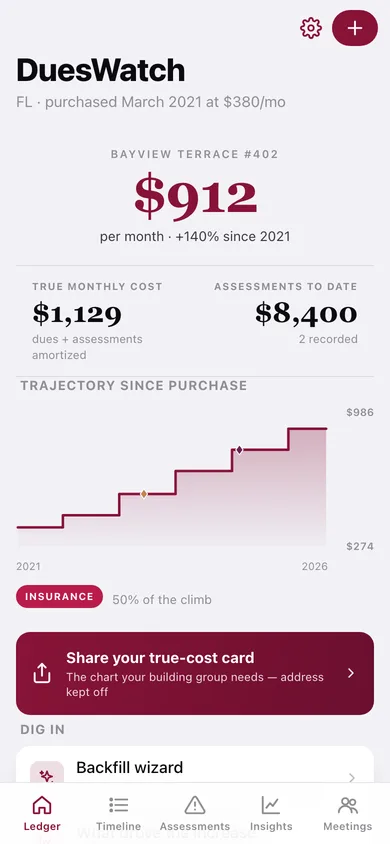
A stepped chart from what you paid at closing to what you pay now, with assessment votes marked, plus a shareable wine-dark card — $380/mo in 2021 to $912 today, +140% — that keeps your address off it.
Assessment stack, amortized
Each special assessment recorded with amount, cause, vote date and schedule. Lump sums spread over the 12 months after the vote, installments carry until the balance clears, and both fold into your true monthly cost.
Dollar-weighted cause breakdown
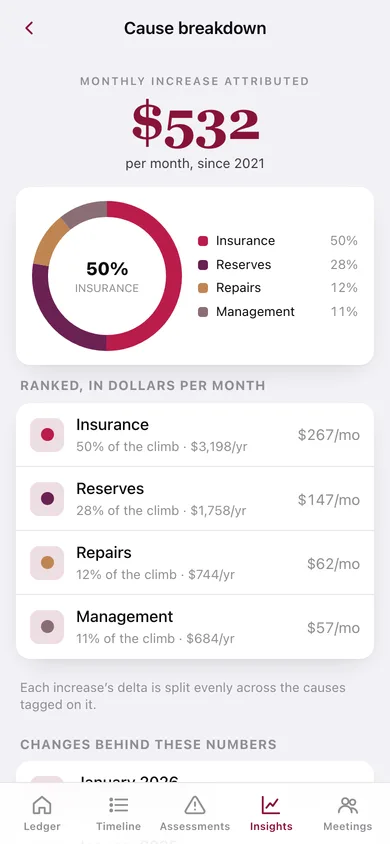
A donut and a ranked ledger showing exactly how many dollars per month each cause drove. Every change's delta is split evenly across the causes tagged on it, so the parts always sum to the whole.
12-month affordability projection
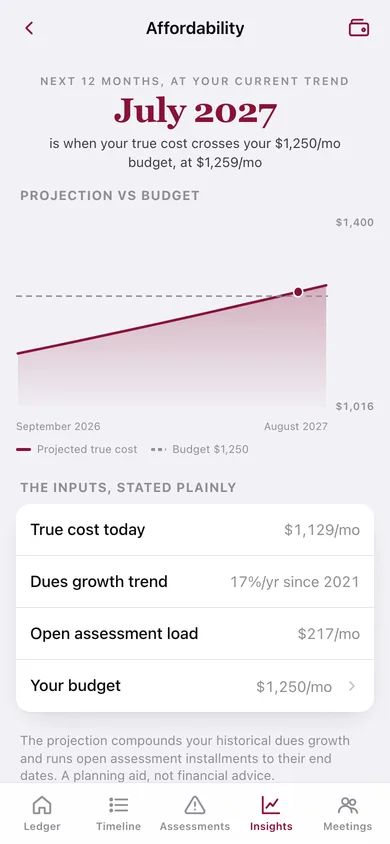
Compounds your own dues growth rate and runs open assessment installments forward against a budget you set, naming the month the line crosses it — the sell-or-stay number.
Median context and a meeting log
Bundled national and Florida, California, New York, Texas, Washington, Arizona, Colorado and Illinois median dues from 2019 to 2026, plus a date-stamped log of what the board claimed and the number each vote produced.
Screens
Every screen, rebuilt for the browser
-
1
Ledger
Current dues, true monthly cost, assessments to date, the trajectory since purchase and the cause driving most of it.
-
2
Dues Timeline
At-purchase to today, then every change newest first with its delta badge, cause chips and the note from the letter.
-
3
Dues change
One increase in full: the delta, what it costs per year, the causes tagged on it and the meeting that produced it.
-
4
Log a dues change
New amount, effective date, multi-select cause chips and the note — with validation.
-
5
Backfill wizard
Year-by-year reconstruction of your dues history since purchase, one question at a time.
-
6
Assessments
The stack: every special assessment with its cause, schedule, paid-down bar and what it adds to your monthly cost right now.
-
7
Assessment
One assessment in full — paid so far, still owed, months ahead, and the vote that approved it.
-
8
Record an assessment
Amount, vote date, cause, lump sum or installments, and how much you have paid.
-
9
Insights
The full trajectory chart with assessment votes marked, your growth trend, and the way into every analysis.
-
10
Cause breakdown
Dollar-weighted donut and ranked ledger of what actually drove your increases since purchase.
-
11
Median context
Your dues plotted against bundled national and state medians from 2019 to 2026, with a verdict on whether you are an outlier.
-
12
Affordability
Twelve months forward at your own growth rate against your budget, with the crossing month named and every input stated plainly.
-
13
True-cost card
The shareable summary — then versus now, assessments, real monthly cost and the dominant cause — with the property name off by default.
-
14
Meetings & Votes
What the board claimed, what the vote produced, and a link to the change or assessment it created.
-
15
Log a meeting
Date, type, the board's claim, the outcome, and links to the dues change or assessment it produced.
-
16
Settings
Property details, housing budget, ledger counts, JSON backup, CSV dues history, sample data and erase.
Try it with sample data: Loads a five-year Florida condo ledger — $380/mo at purchase rising to $912 today across five tagged increases, a paid-off $3,200 roof assessment and an open $5,200 structural assessment on 24 installments, plus five board meetings linked to what they produced. You can start fresh at any time.
Ready? It's free.
No account, no install, no subscription. Everything you do stays in this browser.
Your say
What should DuesWatch do? Tell us before we build it.
Tell us what to build next.
Comments need a free Google sign-in, so every one is from a real person.
Sign in with Google to commentNo comments yet — be the first to say what this app should do next.
Questions
Is the web version of DuesWatch free?+
Yes. Every screen is free to use: no subscription, no in-app purchases, no account.
Do I need an account?+
No. Open DuesWatch and start using it right away. Sign in with Google only if you want to upvote an app, save it to your list, or leave a comment.
Where is my data stored?+
Only in this browser's local storage. Nothing you enter is sent to our servers, so we can't see it, back it up, or restore it. Clearing site data, a private window, or another device starts empty. Export a backup from the in-app menu to keep it.
When is the DuesWatch iPhone app out?+
DuesWatch is in App Review with Apple now. Tap “Notify me at launch” and we'll email you once, the day it's live.