
Web app · Finance
Duedate
See exactly which bills land before your next paycheck
Add rent, power, phone, car and subscriptions, set your pay schedule, and Duedate shows the total owed before payday, a colour-coded 7-day lane, a month calendar with every due date pinned, and where the money goes by category. Free, no install, no bank link.
Stored in your browser only. Nothing you do in the web version is sent to our servers. Clear your browser data and it's gone — so export a backup from the in-app menu if you want to keep it.
This app is a community proposal.
Try the full browser version now. We build the iPhone and Android app once 100 people upvote it.
We'll email you once, when it ships. Unsubscribe anytime.
In your browser
What you can do in Duedate on the web
Due before next payday
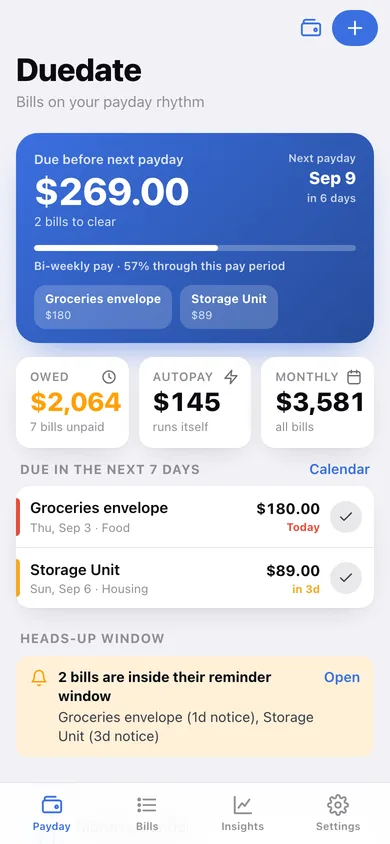
The number the whole app is built around: every unpaid bill landing before your next paycheck, totalled, with a chip for each one and a meter showing how far into the pay period you are.
Weekly, bi-weekly, semi-monthly or monthly pay
Set the pay rhythm you actually have — Duedate counts paydays forward from it, previews your next five, and marks them on the calendar.
Monthly, bi-weekly and weekly bills
Each bill carries a name, amount, due day, frequency, category and autopay flag; Duedate expands them into real due dates and works out the next one for any date.
Due-in-7-days urgency lane
A red / amber / green strip of everything landing this week, sorted by date, with a one-tap paid button on every row.
Month calendar with category dots
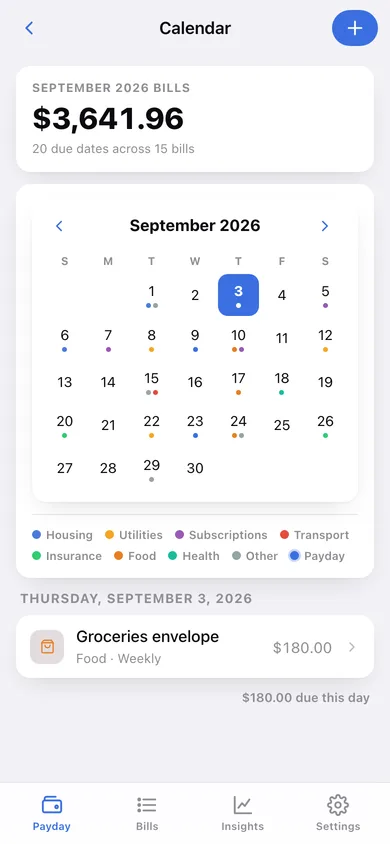
Every bill pinned to its due date with a coloured dot per category and a marker on each payday; tap a day to see what is due and what it adds up to.
Category and autopay insights
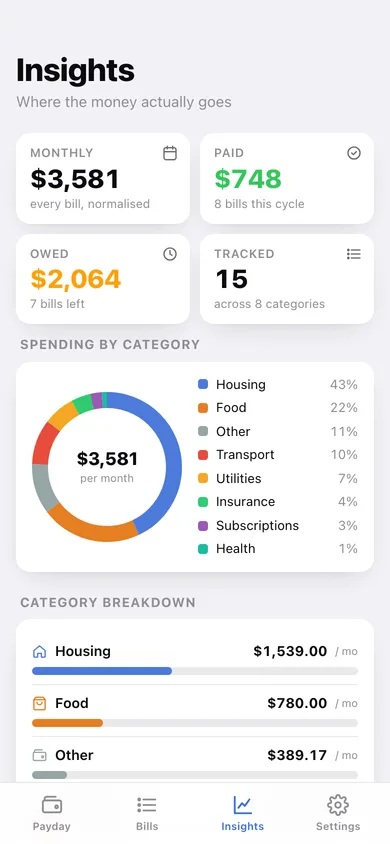
Monthly totals by the app's eight categories as a donut and ranked bars, an autopay-vs-manual split, and an eight-week view of what actually lands each week.
Screens
Every screen, rebuilt for the browser
-
1
Payday
Due-before-payday total, pay-period meter, still-owed stats and the 7-day urgency lane.
-
2
Month calendar
Every bill pinned to its due date with category dots and payday markers, plus a per-day breakdown.
-
3
Bills
Every bill grouped by category with a monthly subtotal, search, and a paid toggle on each row.
-
4
Bill detail
Amount, next due date, whether it lands before payday, reminder window and full payment history.
-
5
Add or edit a bill
Name, amount, category, frequency, due day, autopay, heads-up window and notes, with validation.
-
6
Payday setup
Pick weekly, bi-weekly, semi-monthly or monthly pay and preview your next five paydays.
-
7
Insights
Monthly total by category as a donut and bars, autopay vs manual, and the next eight weeks of due dates.
-
8
Settings
Pay schedule, autopay and paid-bill list options, default heads-up, CSV and JSON export, erase.
Try it with sample data: Loads fifteen real household bills across all eight categories — rent, power, internet, phone, car payment, insurance, streaming, gym, a weekly groceries envelope and a bi-weekly student loan — on a bi-weekly pay schedule, with three months of payment history behind them. You can start fresh at any time.
Ready? It's free.
No account, no install, no subscription. Everything you do stays in this browser.
Your say
What should Duedate do? Tell us before we build it.
Tell us what to build next.
Comments need a free Google sign-in, so every one is from a real person.
Sign in with Google to commentNo comments yet — be the first to say what this app should do next.
Questions
Is the web version of Duedate free?+
Yes. Every screen is free to use: no subscription, no in-app purchases, no account.
Do I need an account?+
No. Open Duedate and start using it right away. Sign in with Google only if you want to upvote an app, save it to your list, or leave a comment.
Where is my data stored?+
Only in this browser's local storage. Nothing you enter is sent to our servers, so we can't see it, back it up, or restore it. Clearing site data, a private window, or another device starts empty. Export a backup from the in-app menu to keep it.
Is there a Duedate app for iPhone or Android?+
Not yet. Duedate is a community proposal: the browser version is complete, and we build the iPhone and Android app once 100 people upvote it. Upvoters get one email when it ships.