
Web app · Health And Fitness
DrainTally
The JP-drain chart from your surgeon's office, with the 24-hour math done for you
Name and colour every drain, log each emptying in two taps with fluid colour and consistency, and get a true rolling 24-hour total per drain — plus the surgeon's target streak and an office-form chart to hand to the nurse. Free, nothing to install.
Stored in your browser only. Nothing you do in the web version is sent to our servers. Clear your browser data and it's gone — so export a backup from the in-app menu if you want to keep it.
This app is a community proposal.
Try the full browser version now. We build the iPhone and Android app once 100 people upvote it.
We'll email you once, when it ships. Unsubscribe anytime.
In your browser
What you can do in DrainTally on the web
One card per drain
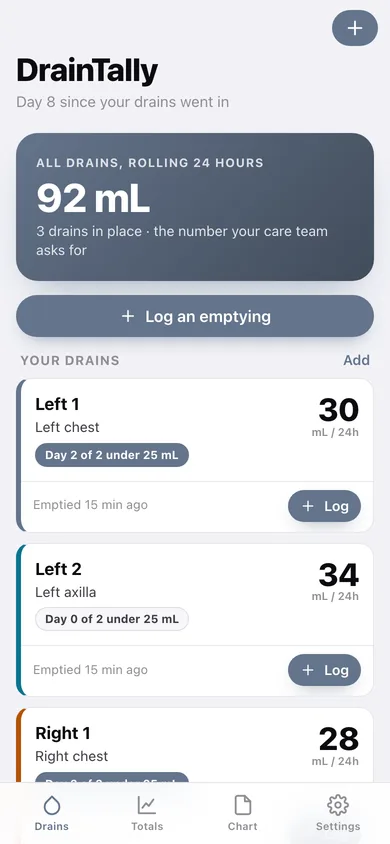
Left 1, Left 2, Right 1, Right 2 — each with its own identity colour, body site, insertion date and rolling 24-hour total in big numerals.
Two-tap emptyings
A 64-point mL dial with quick amounts (5–30 mL), the five fluid colours from bright red to clear, three consistency grades and an optional note — built for one hand at 3am.
True rolling 24-hour totals
Not a fixed 7am-to-7am window: DrainTally sums everything emptied in the last 24 hours, per drain and for all drains together, with today vs yesterday on every row.
Surgeon's target streak
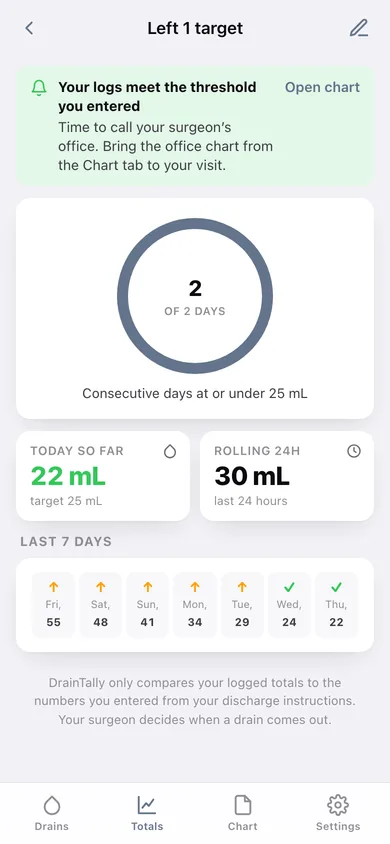
Enter the mL number and consecutive-day count from your discharge instructions and watch the streak ring, today-so-far card and a seven-day under/over strip.
Office chart and CSV
A per-drain daily table laid out like the paper form — removed drains included — that you can copy as text or download as CSV before your follow-up.
Caregiver hand-off
A one-page summary with the emptying times, every drain's current output, and the four steps a spouse or friend follows at each emptying.
Screens
Every screen, rebuilt for the browser
-
1
Drains
Combined rolling 24-hour output, a card per drain with its streak pill, and the log button.
-
2
Drain detail
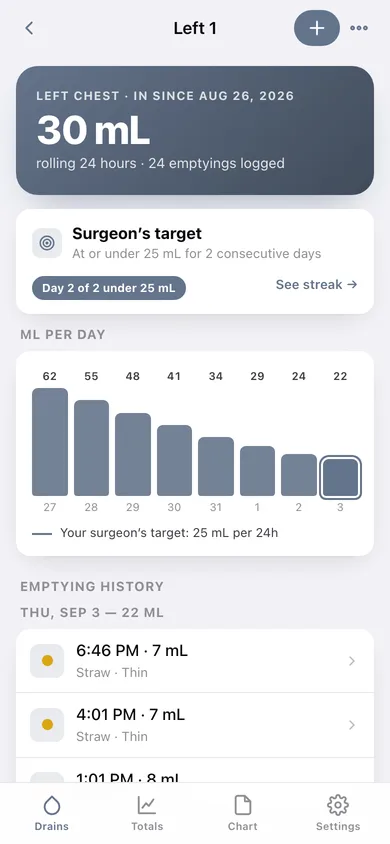
One drain's rolling total, target status, mL-per-day bars and the full emptying history grouped by day.
-
3
Log an emptying
Big mL dial, quick amounts, time, fluid colour, consistency and a note.
-
4
Drain setup
Name, body site, insertion date, identity colour and the surgeon's target numbers.
-
5
Totals
All-drains rolling 24h, per-drain rows with today vs yesterday, a weekly bar chart and every target.
-
6
Surgeon's target
Streak ring of consecutive qualifying days, today so far vs the target, and a seven-day under/over strip.
-
7
Reminders
The emptying and drain-care times you keep, per drain or for all drains.
-
8
Office chart
Per-drain daily totals as a table, your notes, and copy-as-text or CSV download.
-
9
Caregiver summary
Emptying times, every drain's current output and the four steps at each emptying.
-
10
Settings
Default amount, chart options, backup, sample data and erase.
Try it with sample data: Loads a bilateral recovery from eight days ago: four named drains (one already removed), around ninety emptyings on a falling output curve, and a morning/night emptying schedule. You can start fresh at any time.
Ready? It's free.
No account, no install, no subscription. Everything you do stays in this browser.
Your say
What should DrainTally do? Tell us before we build it.
Tell us what to build next.
Comments need a free Google sign-in, so every one is from a real person.
Sign in with Google to commentNo comments yet — be the first to say what this app should do next.
Questions
Is the web version of DrainTally free?+
Yes. Every screen is free to use: no subscription, no in-app purchases, no account.
Do I need an account?+
No. Open DrainTally and start using it right away. Sign in with Google only if you want to upvote an app, save it to your list, or leave a comment.
Where is my data stored?+
Only in this browser's local storage. Nothing you enter is sent to our servers, so we can't see it, back it up, or restore it. Clearing site data, a private window, or another device starts empty. Export a backup from the in-app menu to keep it.
Is there a DrainTally app for iPhone or Android?+
Not yet. DrainTally is a community proposal: the browser version is complete, and we build the iPhone and Android app once 100 people upvote it. Upvoters get one email when it ships.