
Web app · Business
Detailbook
The mobile detailer's logbook — jobs, quotes, clients and chemical math, in any browser
Log every detail with client, vehicle, package, quoted vs final price and duration; quote any car from package × size tier × condition; keep a client and vehicle book with service history; run dilution math off your own shelf; and see what the month actually made. Free, no install, no account.
Stored in your browser only. Nothing you do in the web version is sent to our servers. Clear your browser data and it's gone — so export a backup from the in-app menu if you want to keep it.
This app is a community proposal.
Try the full browser version now. We build the iPhone and Android app once 100 people upvote it.
We'll email you once, when it ships. Unsubscribe anytime.
In your browser
What you can do in Detailbook on the web
Job log with monthly totals
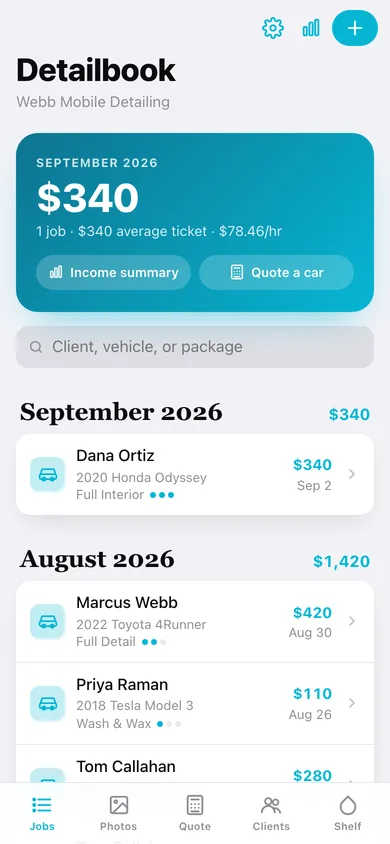
Every job as one record — client, vehicle, package, condition dots, quoted vs final, minutes and notes — grouped by month with the month's revenue on the ledger line.
Quote calculator
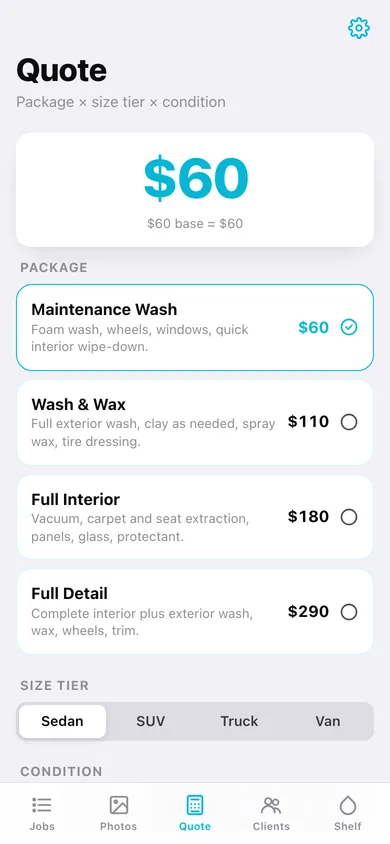
Pick a package, size tier (sedan / SUV / truck / van) and condition (light / moderate / heavy); your multipliers produce a price rounded to the nearest $5 with the math shown, then start the job from the quote.
Client & vehicle book
Clients with phone and notes, their vehicles with make, model, year, size class, color and plate, lifetime revenue and full service history.
Chemical shelf & dilution
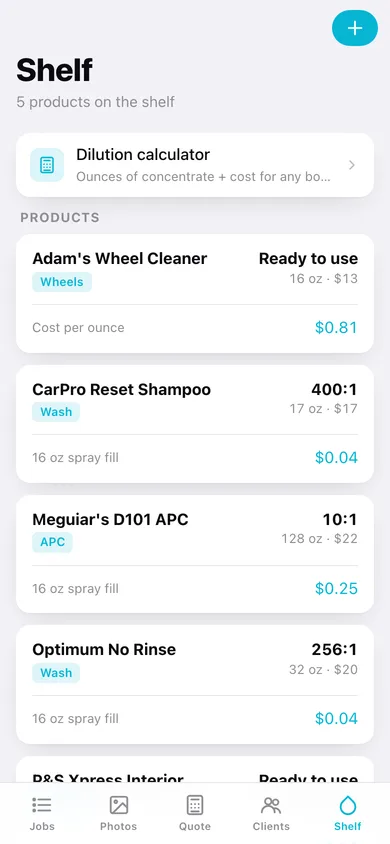
Products with bottle size, cost and ratio; the shelf shows cost per 16 oz spray fill, and the dilution calculator turns any ratio and bottle into ounces of concentrate, water and cost.
Product cost and margin per job
Log what a job used and see real product cost and margin on the job, plus monthly product cost on the income summary.
Income summary
Revenue, jobs, average ticket, product cost, effective hourly rate and time on jobs for any month, a 6-month bar chart, year-to-date and a CSV export.
Screens
Every screen, rebuilt for the browser
-
1
Jobs
This month's revenue, average ticket and hourly rate, then every job grouped by month.
-
2
Job detail
Quoted vs final, condition, products used with margin, and before/after pairs.
-
3
New / edit job
Client, vehicle, package, condition, date, duration, pricing, products used and notes.
-
4
Photos
Every before/after pair by vehicle area across all jobs.
-
5
Before / After
Drag-divider compare view with the pair's area, caption, date and job.
-
6
Quote
Package × size tier × condition with the price rounded to $5 and the math shown.
-
7
Packages
Your packages with base prices, plus size and condition multipliers.
-
8
Clients
Searchable client book with vehicles and lifetime revenue.
-
9
Client detail
Contact, vehicles and full service history.
-
10
Shelf
Your chemicals with ratio, bottle cost and 16 oz spray-fill cost.
-
11
Dilution
Ounces of concentrate and water for any ratio and bottle, with fill cost for shelf products.
-
12
Income
Monthly revenue, jobs, average ticket, product cost, effective hourly, 6-month chart and YTD.
-
13
Settings
Business name, packages, backup, CSV export, sample data and erase.
Try it with sample data: Adds four clients with five vehicles, a five-product chemical shelf, eleven jobs across the last two months with products used, and six before/after pairs. You can start fresh at any time.
Ready? It's free.
No account, no install, no subscription. Everything you do stays in this browser.
Your say
What should Detailbook do? Tell us before we build it.
Tell us what to build next.
Comments need a free Google sign-in, so every one is from a real person.
Sign in with Google to commentNo comments yet — be the first to say what this app should do next.
Questions
Is the web version of Detailbook free?+
Yes. Every screen is free to use: no subscription, no in-app purchases, no account.
Do I need an account?+
No. Open Detailbook and start using it right away. Sign in with Google only if you want to upvote an app, save it to your list, or leave a comment.
Where is my data stored?+
Only in this browser's local storage. Nothing you enter is sent to our servers, so we can't see it, back it up, or restore it. Clearing site data, a private window, or another device starts empty. Export a backup from the in-app menu to keep it.
Is there a Detailbook app for iPhone or Android?+
Not yet. Detailbook is a community proposal: the browser version is complete, and we build the iPhone and Android app once 100 people upvote it. Upvoters get one email when it ships.