
Web app · Finance
DealChase
Every brand deal you're still owed, with a chase clock on each one
Move deals through pitched → contracted → delivered → invoiced → paid, watch the net-terms countdown flip to a red days-overdue counter, accrue late fees month by month, and copy a ready-written nudge. Free, no install, no cut of your invoice.
Stored in your browser only. Nothing you do in the web version is sent to our servers. Clear your browser data and it's gone — so export a backup from the in-app menu if you want to keep it.
This app is a community proposal.
Try the full browser version now. We build the iPhone and Android app once 100 people upvote it.
We'll email you once, when it ships. Unsubscribe anytime.
In your browser
What you can do in DealChase on the web
Five-stage pipeline with dollar gravity
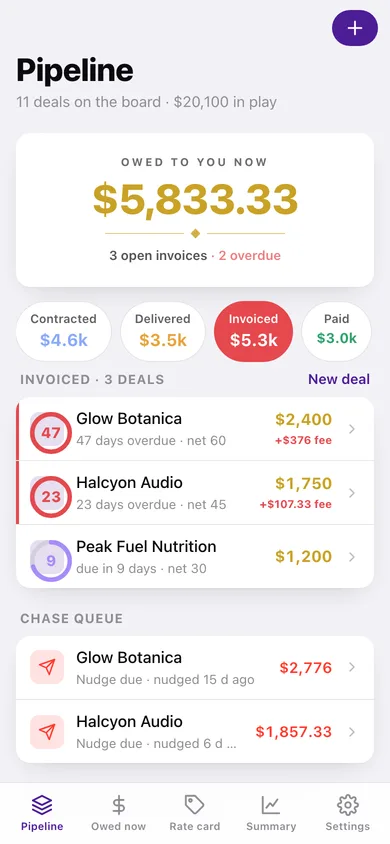
Pitched, contracted, delivered, invoiced and paid, each chip carrying its own dollar total so the whole quarter's money is one glance instead of scattered DMs.
The chase clock
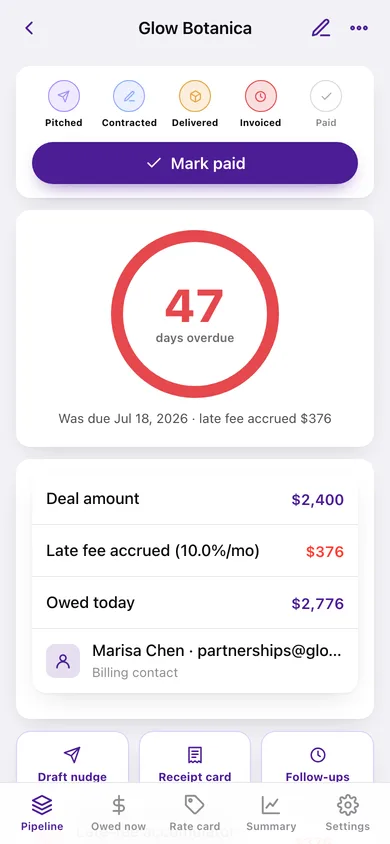
Marking a deal invoiced starts a net-15/30/45/60/90/120 countdown ring. On the due date it flips red and starts counting days overdue, and suggests the next nudge every three days.
Late-fee accumulator
Your own contract clause (default 10% per month, adjustable to any rate) accrued month by month and pro-rated by day, with the full working shown so the number you quote is defensible.
Nudge composer in three tones
Friendly, firm and final notice drafts with the amount, invoice date, net terms, days overdue and accrued fee already merged in — copy it straight into email or a DM, then log it.
Overdue receipt card
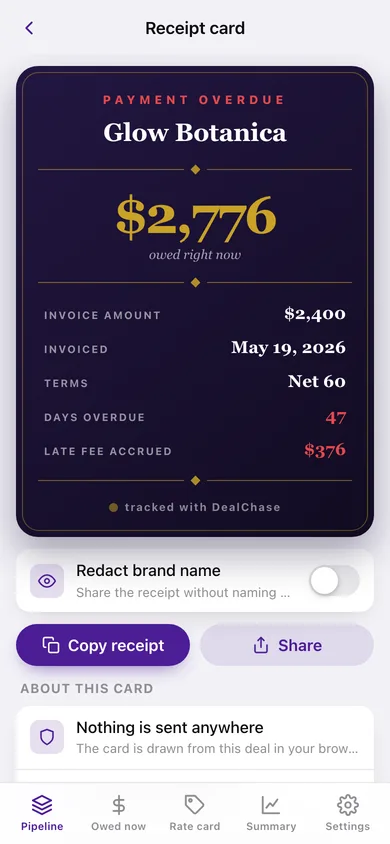
A receipt-grade card with the brand, balance, days overdue and fee accrued, with the brand name shown or redacted, plus an aggregate 'still owed to me' card across every open invoice.
Rate card and year summary
Private per-deliverable pricing that pre-fills new deals, plus a paid-versus-outstanding split, paid-by-month chart, per-brand totals and a CSV download for tax time.
Screens
Every screen, rebuilt for the browser
-
1
Pipeline
Owed-to-you-now headline, per-stage dollar totals and every deal on the board with its chase-clock ring.
-
2
Deal
Stage stepper, the big chase-clock ring, amount plus accrued fee, deliverables and the follow-up trail for one deal.
-
3
Receipt card
The shareable overdue receipt — balance, terms, days overdue and fee accrued, with the brand name redactable.
-
4
Deal editor
Brand, contact, deliverables pulled from your rate card, amount, net terms, late-fee rate, stage and notes.
-
5
Nudge composer
Friendly, firm or final-notice follow-up drafted from this deal's real numbers, ready to copy and log.
-
6
Late-fee accumulator
Month-by-month accrual table at your contract's monthly rate, pro-rated by day, with a running balance.
-
7
Follow-ups
The paper trail of every nudge sent for a deal, with the suggested next-nudge date.
-
8
Owed now
The aggregate still-owed card, overdue counts, oldest chase and every open invoice sorted oldest first.
-
9
Rate card
Your private per-deliverable prices with usage add-ons and scope notes.
-
10
Year summary
Paid versus outstanding, money still in the pipeline, paid-by-month chart, per-brand totals and CSV download.
-
11
Settings
Default net terms and late-fee rate, nudge cadence, backup, sample data and erase.
Try it with sample data: Loads eleven brand deals spread across all five stages — including one 107-day-old invoice accruing a 10%-per-month late fee — with six logged follow-ups and a five-line rate card. You can start fresh at any time.
Ready? It's free.
No account, no install, no subscription. Everything you do stays in this browser.
Your say
What should DealChase do? Tell us before we build it.
Tell us what to build next.
Comments need a free Google sign-in, so every one is from a real person.
Sign in with Google to commentNo comments yet — be the first to say what this app should do next.
Questions
Is the web version of DealChase free?+
Yes. Every screen is free to use: no subscription, no in-app purchases, no account.
Do I need an account?+
No. Open DealChase and start using it right away. Sign in with Google only if you want to upvote an app, save it to your list, or leave a comment.
Where is my data stored?+
Only in this browser's local storage. Nothing you enter is sent to our servers, so we can't see it, back it up, or restore it. Clearing site data, a private window, or another device starts empty. Export a backup from the in-app menu to keep it.
Is there a DealChase app for iPhone or Android?+
Not yet. DealChase is a community proposal: the browser version is complete, and we build the iPhone and Android app once 100 people upvote it. Upvoters get one email when it ships.