
Web app · Education
Crystalcal
Ten quick drills. Calibrate your gut — in any browser.
A daily calibration routine: ten known-answer drills (coin flips, dice, geography and science facts), you assign a probability, the app scores you with the log score and Brier score. Every session is kept, and your calibration curve tightens over weeks. Free, no install, no account.
Stored in your browser only. Nothing you do in the web version is sent to our servers. Clear your browser data and it's gone — so export a backup from the in-app menu if you want to keep it.
This app is a community proposal.
Try the full browser version now. We build the iPhone and Android app once 100 people upvote it.
We'll email you once, when it ships. Unsubscribe anytime.
In your browser
What you can do in Crystalcal on the web
Ten-drill sessions
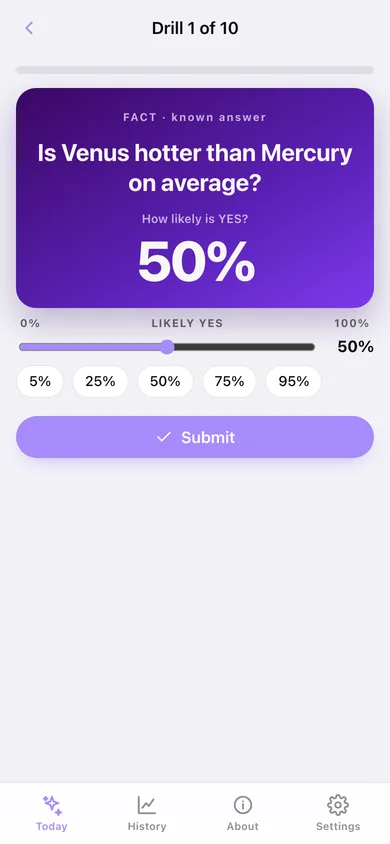
Each session draws 7 fact drills and 3 chance drills from a 50-question bank. Slide to a probability (5% or 1% steps) and submit — chance drills are resolved with a real random draw.
Log score and Brier score
Scored exactly as forecasters are: ln(p) on a YES, ln(1 − p) on a NO, averaged per session, plus the Brier score. Closer to zero is better; the coin-flip hedge scores −0.69.
Calibration curve
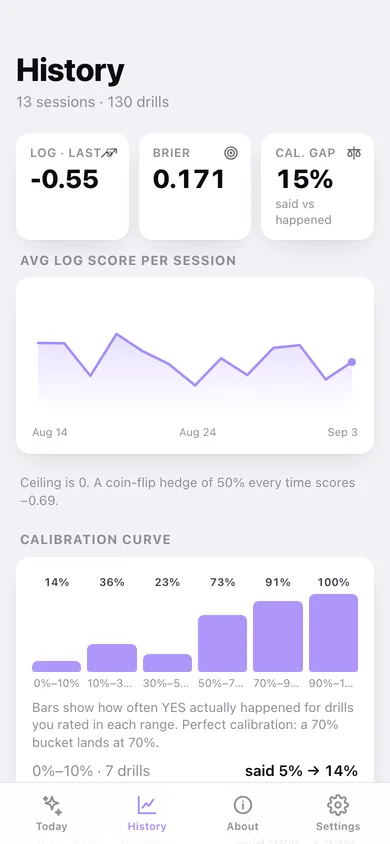
Drills are bucketed by the probability you gave, so you can see whether your 70% actually comes true 70% of the time — and your overall calibration gap.
Session history and streak
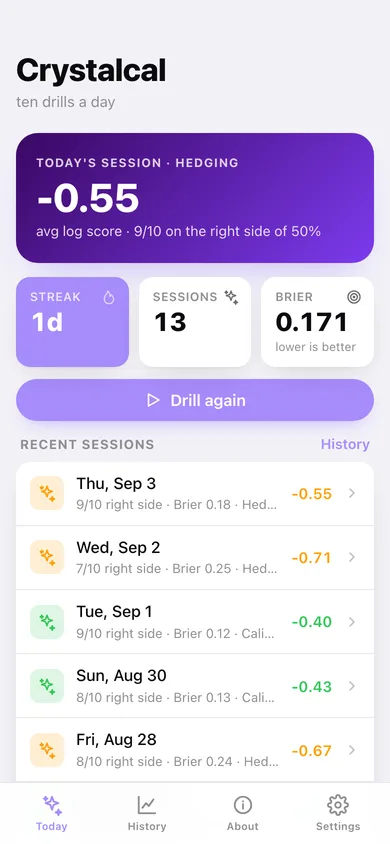
A line of average log score per session, a 12-week heatmap of drill days, and a drill-by-drill breakdown of every session you have finished.
Stays in your browser
No account, no analytics of your answers. Export a JSON backup any time.
Screens
Every screen, rebuilt for the browser
-
1
Today
Streak, recent average log score, Brier, the start button and your recent sessions.
-
2
Drill
One drill at a time with the probability slider, quick picks and the last drill's score.
-
3
Session
Average log score, Brier, right-side count and every drill with what you said and what happened.
-
4
History
Log score trend, calibration curve by probability bucket, drill-day heatmap and all sessions.
-
5
About
Why calibration training works and exactly how you are scored.
-
6
Settings
Slider step, privacy promises, backup, sample data and erase.
Try it with sample data: Adds 13 finished sessions over the last three weeks whose calibration visibly tightens, so the trend line, curve and heatmap are populated. You can start fresh at any time.
Ready? It's free.
No account, no install, no subscription. Everything you do stays in this browser.
Your say
What should Crystalcal do? Tell us before we build it.
Tell us what to build next.
Comments need a free Google sign-in, so every one is from a real person.
Sign in with Google to commentNo comments yet — be the first to say what this app should do next.
Questions
Is the web version of Crystalcal free?+
Yes. Every screen is free to use: no subscription, no in-app purchases, no account.
Do I need an account?+
No. Open Crystalcal and start using it right away. Sign in with Google only if you want to upvote an app, save it to your list, or leave a comment.
Where is my data stored?+
Only in this browser's local storage. Nothing you enter is sent to our servers, so we can't see it, back it up, or restore it. Clearing site data, a private window, or another device starts empty. Export a backup from the in-app menu to keep it.
Is there a Crystalcal app for iPhone or Android?+
Not yet. Crystalcal is a community proposal: the browser version is complete, and we build the iPhone and Android app once 100 people upvote it. Upvoters get one email when it ships.