
Web app · Food And Drink
CropJar
Write the batch down once, and know what is actually on the shelf
Log every batch you put up — recipe, water bath or pressure, jar size, jar count, processing time, headspace and your altitude adjustment — then draw the jars back down one tap at a time from a pantry shelf sorted oldest first. Free, no install.
Stored in your browser only. Nothing you do in the web version is sent to our servers. Clear your browser data and it's gone — so export a backup from the in-app menu if you want to keep it.
This app is a community proposal.
Try the full browser version now. We build the iPhone and Android app once 100 people upvote it.
We'll email you once, when it ships. Unsubscribe anytime.
In your browser
What you can do in CropJar on the web
One card per batch
Name, category, method, jar size, jar count, processing time, headspace, altitude note and the date you sealed them — browsed back through grouped by season.
Processing timer with your altitude note attached
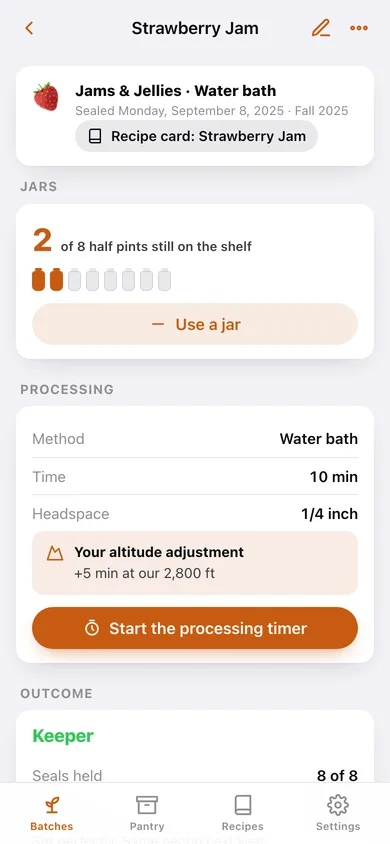
A countdown ring for water-bath and pressure batches that shows the extra minutes you wrote down once, so they never get looked up again.
Ferment day counter and check-ins
Fermentation batches get a 1-based day counter against a target instead of a timer, plus dated check-ins for brine level, smell and taste.
Pantry shelf, oldest first
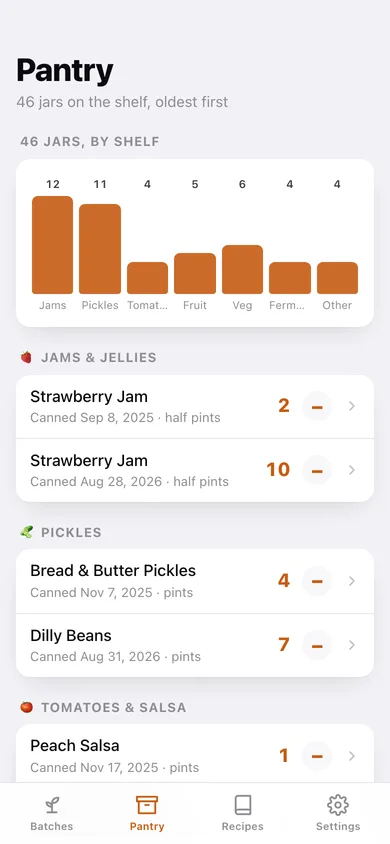
Every jar still on hand grouped by jams, pickles, tomatoes, fruit, vegetables, ferments and other, with a jars-per-shelf chart, an over-a-year-old flag, and a one-tap “use a jar” that keeps the count honest.
Recipe box with a seal rate
Reusable cards store yield, processing time, headspace and altitude note; every recorded outcome pools into a seal-rate history and a keeper count per card.
Outcomes that build next year's plan
After a batch cures, log how many lids held, a Keeper / Tweak it / Skip next year verdict, and what you'd change.
Screens
Every screen, rebuilt for the browser
-
1
Batches
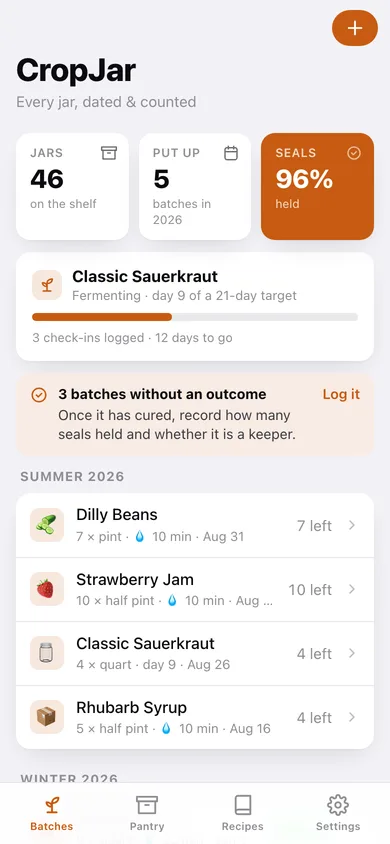
Jars on the shelf, batches this season and your seal rate, an active ferment card, and every batch grouped by season.
-
2
Batch record
Jar strip with what is left, processing details or the ferment day counter and check-ins, and the recorded outcome.
-
3
New / edit batch
Pick a recipe card to prefill, then category, method, jar size, jar count, processing time, headspace and altitude note.
-
4
Processing timer
Countdown ring for the batch's processing time with your altitude adjustment shown right under it.
-
5
Batch outcome
Lids held versus failed with a live seal rate, a taste verdict, and what to change next season.
-
6
Pantry shelf
Jars per category as a bar chart, then every stocked batch oldest first with a one-tap use-a-jar.
-
7
On the shelf
One batch from the shelf's point of view: jars left, jar size, canned-on date and shelf age.
-
8
Recipe box
Every saved card with its method, processing time, batch count and seal rate.
-
9
Recipe card
The card itself, its seal-rate history as a bar per batch, keeper count, and every batch put up from it.
-
10
Recipe card editor
Name, category, method, processing time, headspace, altitude adjustment, yield and notes.
-
11
Settings
Your altitude adjustment and default headspace, a method reference, CSV and JSON export, sample data and erase.
Try it with sample data: Adds six recipe cards, six batches from last season with outcomes and seal rates, four fresh batches including a sauerkraut on day 9 of 21 with three check-ins, and 46 jars still on the shelf. You can start fresh at any time.
Ready? It's free.
No account, no install, no subscription. Everything you do stays in this browser.
Your say
What should CropJar do? Tell us before we build it.
Tell us what to build next.
Comments need a free Google sign-in, so every one is from a real person.
Sign in with Google to commentNo comments yet — be the first to say what this app should do next.
Questions
Is the web version of CropJar free?+
Yes. Every screen is free to use: no subscription, no in-app purchases, no account.
Do I need an account?+
No. Open CropJar and start using it right away. Sign in with Google only if you want to upvote an app, save it to your list, or leave a comment.
Where is my data stored?+
Only in this browser's local storage. Nothing you enter is sent to our servers, so we can't see it, back it up, or restore it. Clearing site data, a private window, or another device starts empty. Export a backup from the in-app menu to keep it.
Is there a CropJar app for iPhone or Android?+
Not yet. CropJar is a community proposal: the browser version is complete, and we build the iPhone and Android app once 100 people upvote it. Upvoters get one email when it ships.