
Web app · Business
CraneLog
Your crane seat time, logged in seconds and counted toward the 1,000-hour recert waiver
Log a shift against a saved crane and CCO designation, watch each five-year cycle's 1,000-hour practical-exam-waiver bar and recert countdown, keep OSHA 1926.1427 evaluations, pre-shift inspections and a document vault, and export the hour summary an employer signs. Free, no install.
Stored in your browser only. Nothing you do in the web version is sent to our servers. Clear your browser data and it's gone — so export a backup from the in-app menu if you want to keep it.
This app is a community proposal.
Try the full browser version now. We build the iPhone and Android app once 100 people upvote it.
We'll email you once, when it ships. Unsubscribe anytime.
In your browser
What you can do in CraneLog on the web
Shift logging in four taps
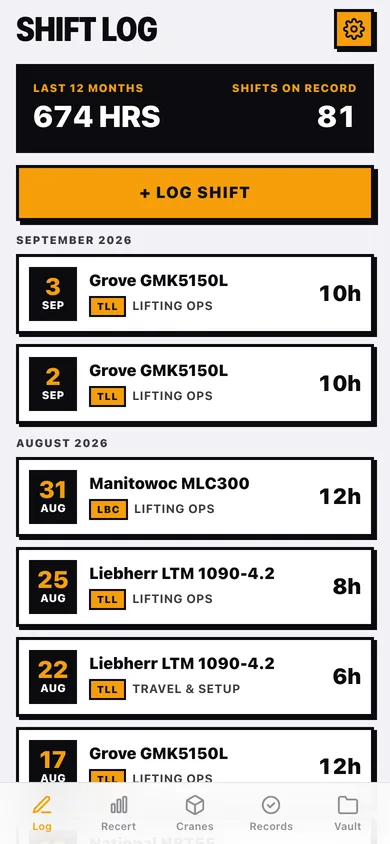
Date, saved crane, certification, duty type (Lifting Ops, Travel & Setup, Maintenance, Training), employer and hours — with 4/8/10/12 quick chips and your recent employers one tap away.
Recert dashboard per designation
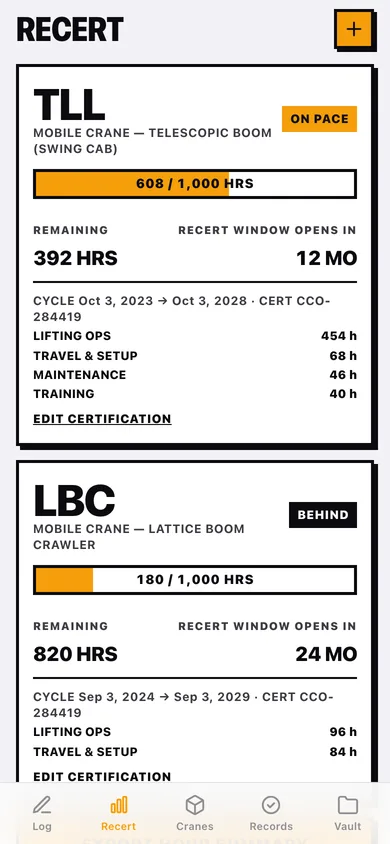
TLL, TSS, LBC, LBT, TWR, ART, BTO and DDO each get a five-year cycle, a live 1,000-hour progress bar, hours by duty type, an ON PACE / BEHIND call and the months until the recert window opens.
Crane fleet
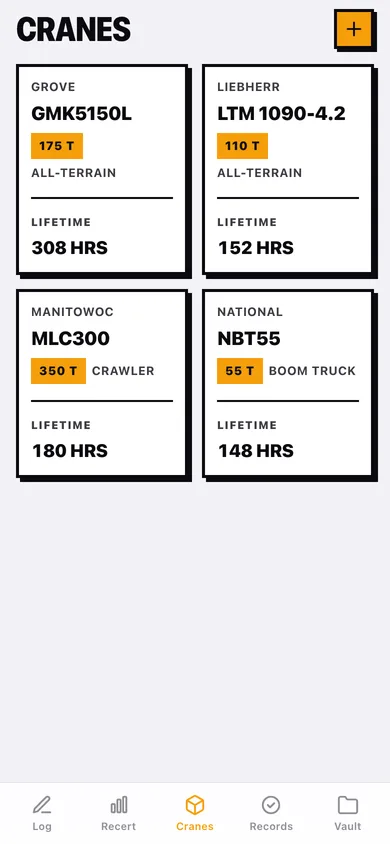
Make, model, capacity in tons, type and unit number for every machine you run, with lifetime hours, shift count and its inspection history.
Evaluations and inspections
OSHA 1926.1427 operator evaluations with evaluator, employer, configuration and outcome, plus a timestamped 12-item pre-shift checklist tied to a crane with deficiency notes.
Hour summary export
Hours grouped by crane and employer inside the cycle with signature lines — download as text for the employer sign-off NCCCO asks for, or as a CSV of every shift.
Document vault
Import photos of cert cards, sign-offs and medical cards from your device, filed by category and date, stored only in this browser.
Screens
Every screen, rebuilt for the browser
-
1
Shift Log
Last-12-month hours and shift count, + LOG SHIFT, and every shift by month with crane, designation, duty and hours.
-
2
Shift
Date, hours, crane, duty type, employer, the certification it counts toward and notes.
-
3
Log Shift
Date, crane, certification, duty type, quick-hour chips, employer with recent chips, notes.
-
4
Recert
A card per certification with the 1,000-hour bar, remaining hours, window countdown, cycle dates and duty breakdown.
-
5
Certification
Designation, cert number, cycle start (cycle end auto-set five years out), notes.
-
6
Hour Summary
Crane → employer hour groups, total documented, signature lines, and text/CSV download.
-
7
Cranes
Grid of saved machines with capacity, type and lifetime hours.
-
8
Crane
Lifetime hours, shift count, recent shifts and inspections, run an inspection.
-
9
Crane editor
Make, model, type, capacity stepper, unit number.
-
10
Records
EVALS / INSPECTIONS switch with outcome and all-clear/deficiency tags.
-
11
New Evaluation
Date, evaluator, employer, crane configuration, Qualified / Needs Re-eval, notes.
-
12
Pre-Shift Inspection
Pick the crane, tick the 12 checklist items, note deficiencies, save with a timestamp.
-
13
Vault
Category filters and a grid of stored document images.
-
14
Document
Full-size document image with title, category and date.
-
15
Settings
Default duty type and shift length, designation reference, backup, sample data and erase.
Try it with sample data: Loads two certifications (TLL on pace, LBC behind), four cranes, about 80 shifts across the last 15 months, two evaluations, three inspections and three vault cards. You can start fresh at any time.
Ready? It's free.
No account, no install, no subscription. Everything you do stays in this browser.
Your say
What should CraneLog do? Tell us before we build it.
Tell us what to build next.
Comments need a free Google sign-in, so every one is from a real person.
Sign in with Google to commentNo comments yet — be the first to say what this app should do next.
Questions
Is the web version of CraneLog free?+
Yes. Every screen is free to use: no subscription, no in-app purchases, no account.
Do I need an account?+
No. Open CraneLog and start using it right away. Sign in with Google only if you want to upvote an app, save it to your list, or leave a comment.
Where is my data stored?+
Only in this browser's local storage. Nothing you enter is sent to our servers, so we can't see it, back it up, or restore it. Clearing site data, a private window, or another device starts empty. Export a backup from the in-app menu to keep it.
Is there a CraneLog app for iPhone or Android?+
Not yet. CraneLog is a community proposal: the browser version is complete, and we build the iPhone and Android app once 100 people upvote it. Upvoters get one email when it ships.