
Web app · Business
Cordbook
The firewood seller's yard ledger — cord math, seasoning dates, moisture proof and the customer book
Measure a stack and Cordbook turns length × width × height into full and face cords, counts it down to honestly seasoned by species, logs moisture-meter readings against the 20% line, keeps every buyer and delivery by Jul–Jun season, and tells you whether the winter paid. Free, no install.
Stored in your browser only. Nothing you do in the web version is sent to our servers. Clear your browser data and it's gone — so export a backup from the in-app menu if you want to keep it.
This app is a community proposal.
Try the full browser version now. We build the iPhone and Android app once 100 people upvote it.
We'll email you once, when it ships. Unsubscribe anytime.
In your browser
What you can do in Cordbook on the web
Cord math on the spot
Type a stack's dimensions or tap a preset (8 ft rack, 4×8 face-cord rack, pallet stack, level or heaped pickup bed) and get full cords, face cords and a quote at your price.
Seasoning board by species
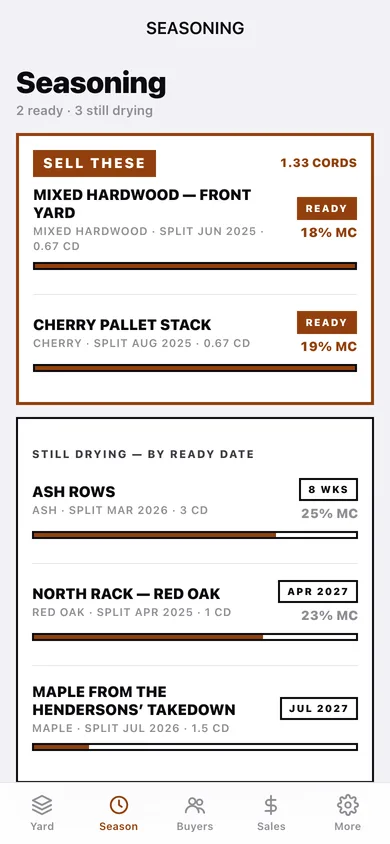
Red oak 24 months, hickory 18, maple/cherry/birch/mixed 12, ash and pine 8 — every stack gets a ready date, a progress bar and a countdown; ready stacks are pinned under SELL THESE.
Moisture log with the 20% line
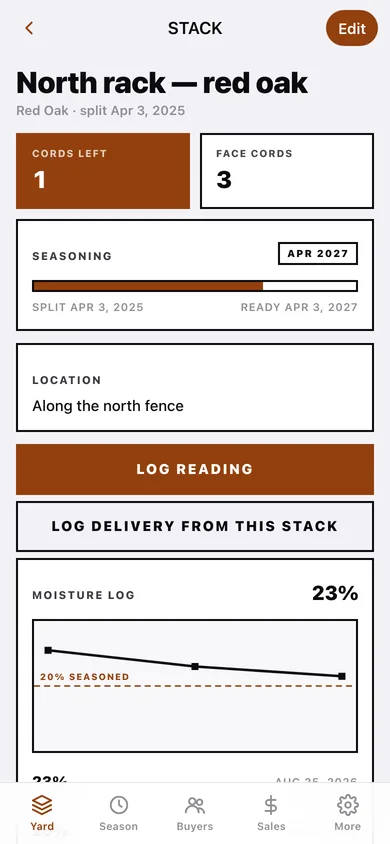
Log meter readings per stack and watch the hard-edged trend fall toward the dashed seasoned line — dated proof for a skeptical buyer.
Customer book and reorder list
Name, phone (tap to text or call), address, yard notes and full delivery history; the REORDER LIST surfaces everyone whose last load was 9–15 months ago.
Delivery ledger and receipts
Log loads in cords or face cords against a buyer and a source stack (which subtracts from the pile), track paid vs owed, and download or copy a clean receipt.
Season summary
Fuel, chains and bar oil, equipment, bought log loads and other expenses roll up with sales into cords sold, revenue, expenses and net for any July-to-June season.
Screens
Every screen, rebuilt for the browser
-
1
The Yard
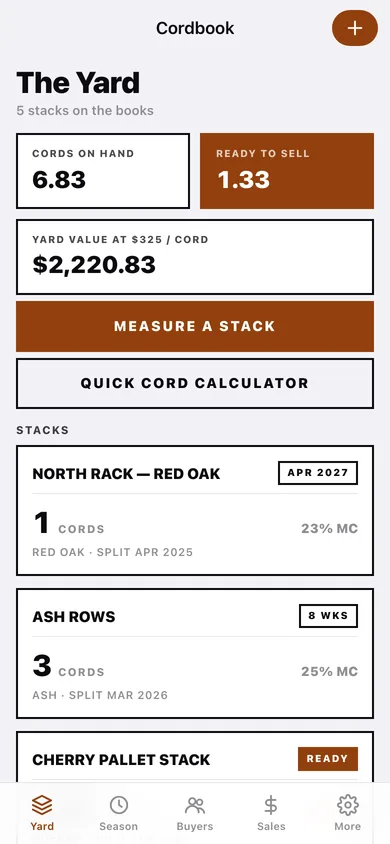
Cords on hand, ready to sell, yard value, and every stack as a card with countdown and latest moisture.
-
2
Stack
Cords left, seasoning progress with split and ready dates, moisture chart and readings, loads sold from it.
-
3
Measure a stack
Name, species, split date, location, presets, dimensions with live cord output.
-
4
Cord calculator
Presets, dimensions, full and face cords, and a quote at your price per cord.
-
5
Seasoning board
SELL THESE at the top, still-drying stacks sorted by ready date.
-
6
Buyers
The customer book with ALL and REORDER LIST filters.
-
7
Buyer
Lifetime cords and revenue, contact with text/call, yard notes, delivery history.
-
8
Buyer editor
Name, phone, address, yard notes.
-
9
Sales
Deliveries grouped by season with cords and revenue per season and paid/owed tags.
-
10
Log delivery
Buyer or quick-add, quantity, unit, source stack, auto-priced total, date, paid, note.
-
11
Receipt
Printed-ledger receipt with download, copy, mark paid/owed and delete.
-
12
Season summary
Season chips, cords sold, revenue, expenses by category, net, and the expense log.
-
13
More
Seller name for receipts, default prices, cord math reference, backup, sample data and erase.
Try it with sample data: Loads a five-stack Vermont yard (oak, ash, cherry, mixed and fresh maple) with twelve moisture readings, five buyers, eight deliveries across two seasons and seven yard expenses. You can start fresh at any time.
Ready? It's free.
No account, no install, no subscription. Everything you do stays in this browser.
Your say
What should Cordbook do? Tell us before we build it.
Tell us what to build next.
Comments need a free Google sign-in, so every one is from a real person.
Sign in with Google to commentNo comments yet — be the first to say what this app should do next.
Questions
Is the web version of Cordbook free?+
Yes. Every screen is free to use: no subscription, no in-app purchases, no account.
Do I need an account?+
No. Open Cordbook and start using it right away. Sign in with Google only if you want to upvote an app, save it to your list, or leave a comment.
Where is my data stored?+
Only in this browser's local storage. Nothing you enter is sent to our servers, so we can't see it, back it up, or restore it. Clearing site data, a private window, or another device starts empty. Export a backup from the in-app menu to keep it.
Is there a Cordbook app for iPhone or Android?+
Not yet. Cordbook is a community proposal: the browser version is complete, and we build the iPhone and Android app once 100 people upvote it. Upvoters get one email when it ships.