
Web app · Health And Fitness
Coldplunge
Time the plunge, log the temperature, watch the week add up
A big count-down or count-up timer for cold plunge, sauna and contrast rounds, then type, water temperature, feeling and notes per session — with this-week cold minutes, a streak, history by day and every Insights chart unlocked. Free, no install.
Stored in your browser only. Nothing you do in the web version is sent to our servers. Clear your browser data and it's gone — so export a backup from the in-app menu if you want to keep it.
This app is a community proposal.
Try the full browser version now. We build the iPhone and Android app once 100 people upvote it.
We'll email you once, when it ships. Unsubscribe anytime.
In your browser
What you can do in Coldplunge on the web
Big, glanceable timer
Count down to a target or count up until you get out, with a 240px progress ring, 3-2-1 beeps, a bell at zero, +30s, pause and finish — controls sized for cold, wet hands.
A real session record
Type (cold, sauna, contrast), water or room temperature from 32°F to 220°F, feeling 1-5 with the app's own faces, free-form notes, and whether it was timed or entered by hand.
This-week cold minutes and streak
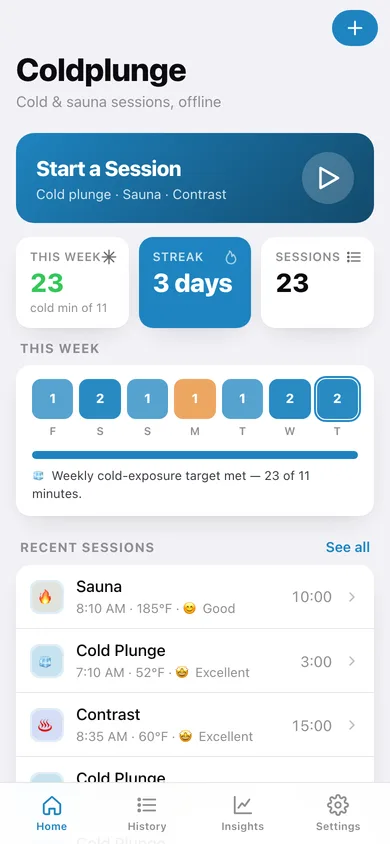
Sauna is heat, not cold, so only plunge and contrast minutes count toward the week — against a target you set — plus a seven-day strip and a day streak.
History grouped by day
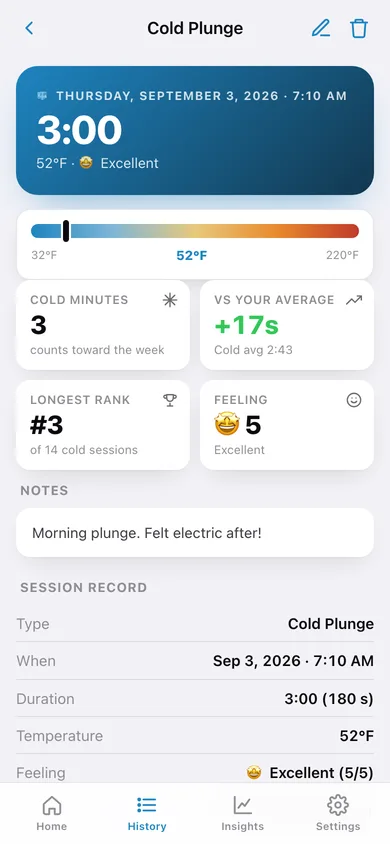
Every session under its date with the day's total minutes, filterable by type, each one opening a detail with its temperature on a cold-to-hot scale and how it ranks against your average.
All the Insights, unlocked
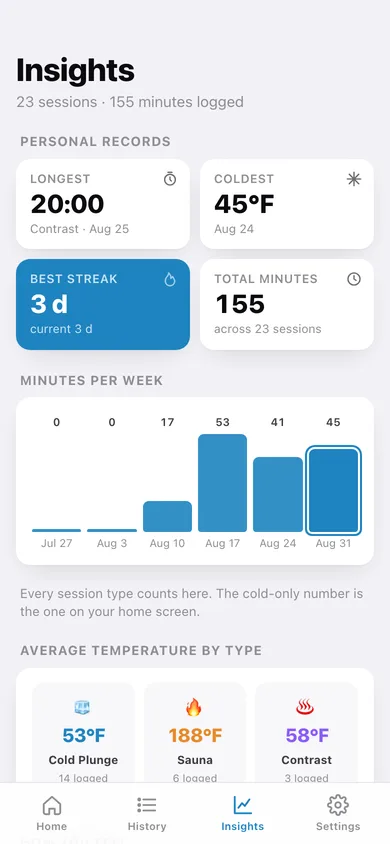
Personal records (longest, coldest, best streak, total minutes), eight weeks of minutes as bars, average temperature by type, your feeling mix as a donut and a twelve-week heatmap.
CSV export and °C
Send every session to a coach or a spreadsheet as CSV, and read temperatures in Celsius if Fahrenheit is not your unit — sessions are always stored in °F.
Screens
Every screen, rebuilt for the browser
-
1
Dashboard
Start a session, this-week cold minutes against your target, streak, the seven-day strip and your recent sessions.
-
2
Session timer
Pick the type and temperature, count down or up, then rate the feeling and save.
-
3
History
Every session grouped by day with the day's minutes, filterable by cold, sauna or contrast.
-
4
Session detail
Duration, temperature on a cold-to-hot scale, cold minutes, how it compares with your average and where it ranks.
-
5
Log a session
Type, date and time, minutes and seconds, temperature, feeling and notes — for sessions you did not time.
-
6
Insights
Personal records, minutes per week, average temperature by type, the feeling donut and a twelve-week heatmap.
-
7
Settings
Weekly cold-minute target, °C display, count-down default, cues, CSV and JSON export, sample data and erase.
Try it with sample data: Loads three weeks of the iPhone app's own sample log — 23 sessions of cold plunges, saunas and contrast rounds with temperatures from 45°F to 195°F, feelings and notes. You can start fresh at any time.
Ready? It's free.
No account, no install, no subscription. Everything you do stays in this browser.
Your say
What should Coldplunge do? Tell us before we build it.
Tell us what to build next.
Comments need a free Google sign-in, so every one is from a real person.
Sign in with Google to commentNo comments yet — be the first to say what this app should do next.
Questions
Is the web version of Coldplunge free?+
Yes. Every screen is free to use: no subscription, no in-app purchases, no account.
Do I need an account?+
No. Open Coldplunge and start using it right away. Sign in with Google only if you want to upvote an app, save it to your list, or leave a comment.
Where is my data stored?+
Only in this browser's local storage. Nothing you enter is sent to our servers, so we can't see it, back it up, or restore it. Clearing site data, a private window, or another device starts empty. Export a backup from the in-app menu to keep it.
Is there a Coldplunge app for iPhone or Android?+
Not yet. Coldplunge is a community proposal: the browser version is complete, and we build the iPhone and Android app once 100 people upvote it. Upvoters get one email when it ships.