
Web app · Business
CoinCount
Walk the store, tap in every machine's take, and let the ledger catch the dead dryer
CoinCount is the laundromat owner's per-machine coin collection log: a ninety-second collection run with coin-count, scale-weight or counter entry, a rolling baseline that flags any washer or dryer earning below itself, a maintenance log, trend charts and a buyer-ready income report. Free, no install.
Stored in your browser only. Nothing you do in the web version is sent to our servers. Clear your browser data and it's gone — so export a backup from the in-app menu if you want to keep it.
This app is a community proposal.
Try the full browser version now. We build the iPhone and Android app once 100 people upvote it.
We'll email you once, when it ships. Unsubscribe anytime.
In your browser
What you can do in CoinCount on the web
Ninety-second collection run
Start a run and every machine appears in walk order. Enter each take as quarters, bucket weight (converted at your $-per-pound rate) or a cycle-counter reading, and the run totals itself as you go.
Baseline anomaly flags
Each machine's baseline is the median of its prior six takes; any machine that comes in under 60% of that is flagged on the run summary, the roster and the dashboard — with consecutive-low-run counts.
Machine roster with history
Every washer, dryer, changer and vending machine with its class, vend price, sparkline of recent takes, average, best and last, and a take-per-collection chart against its baseline.
Maintenance log
Error codes, repairs and parts costs pinned to the machine, with open/resolved status and a parts-to-date total that builds the replace-or-repair case.
Trends by class and machine
Collection totals over 4 to 52 weeks, take by machine class, and top and bottom earners so you can see which equipment earns its floor space.
Income verification report
A dated per-machine, per-class or per-week statement for a lender, broker or buyer — download it as text or CSV.
Screens
Every screen, rebuilt for the browser
-
1
Dashboard
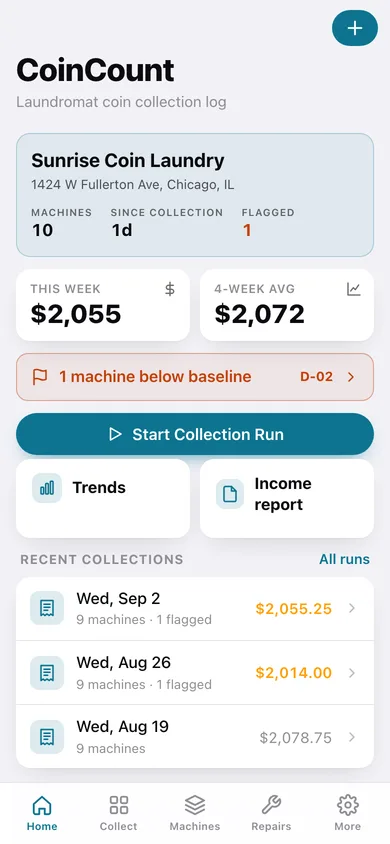
Store header with machines, days since collection and flagged count; this week vs 4-week average; start or resume a run; recent collections.
-
2
Collect
Start a collection run, resume a draft, and see how each entry method works.
-
3
Collection run
Walk-order checklist with progress bar and running total; tap a machine for the big-target entry sheet.
-
4
Run summary
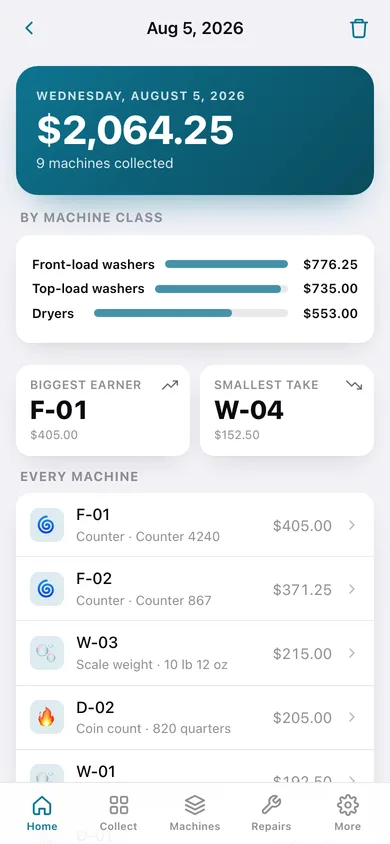
Total, anomaly callouts, subtotals by class, biggest and smallest take, and every machine's entry.
-
5
All collections
Every run grouped by month with totals and flag counts.
-
6
Machines
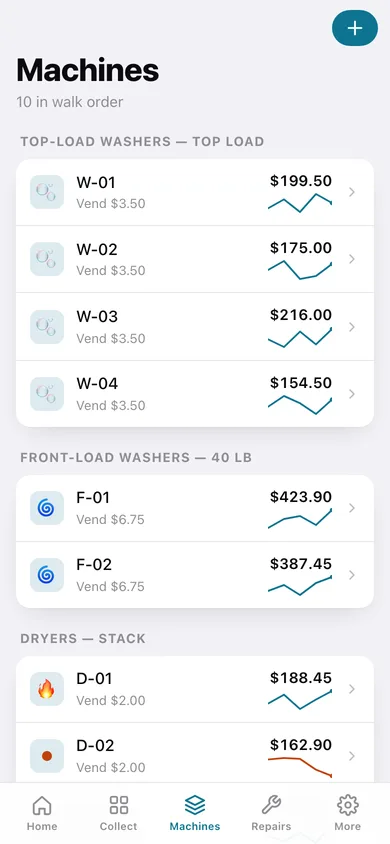
The roster grouped by class with average take, sparkline and flag dots.
-
7
Machine detail
Average, best, last, baseline chart, counter reading, maintenance and full collection history.
-
8
Machine editor
Label, type, size class, vend price, counter start, install date, notes and out-of-service.
-
9
Flagged machines
Machines currently below baseline with expected vs last take and percent below.
-
10
Trends
Collection totals, take by class, top and bottom earners over 4–52 weeks.
-
11
Income report
Period and grouping pickers, preview, and text/CSV download.
-
12
Maintenance
Every repair with error code, parts cost and status, filterable by open-only and machine.
-
13
Log maintenance
Machine, date, error code, title, details, parts cost, resolved.
-
14
More
Stores, reports, change fund note, backup, sample data and erase.
-
15
Store editor
Name, address, quarters-per-pound rate, change fund note and a starter roster.
Try it with sample data: Loads Sunrise Coin Laundry with ten machines in walk order, five weekly collection runs (dryer D-02 collapsing over the last two) and four maintenance entries. You can start fresh at any time.
Ready? It's free.
No account, no install, no subscription. Everything you do stays in this browser.
Your say
What should CoinCount do? Tell us before we build it.
Tell us what to build next.
Comments need a free Google sign-in, so every one is from a real person.
Sign in with Google to commentNo comments yet — be the first to say what this app should do next.
Questions
Is the web version of CoinCount free?+
Yes. Every screen is free to use: no subscription, no in-app purchases, no account.
Do I need an account?+
No. Open CoinCount and start using it right away. Sign in with Google only if you want to upvote an app, save it to your list, or leave a comment.
Where is my data stored?+
Only in this browser's local storage. Nothing you enter is sent to our servers, so we can't see it, back it up, or restore it. Clearing site data, a private window, or another device starts empty. Export a backup from the in-app menu to keep it.
Is there a CoinCount app for iPhone or Android?+
Not yet. CoinCount is a community proposal: the browser version is complete, and we build the iPhone and Android app once 100 people upvote it. Upvoters get one email when it ships.