
Web app · Finance
Coerced Ledger
Build your coerced-debt dispute file, account by account, in your browser
The fill-by-hand coerced-debt worksheet, turned into a guided file: classify each credit account as coerced or identity theft, answer the four signal questions, name who caused it and how, and get a sworn-statement draft plus the supporting documents that account needs. Free, no account, nothing leaves this browser.
Stored in your browser only. Nothing you do in the web version is sent to our servers. Clear your browser data and it's gone — so export a backup from the in-app menu if you want to keep it.
This app is a community proposal.
Try the full browser version now. We build the iPhone and Android app once 100 people upvote it.
We'll email you once, when it ships. Unsubscribe anytime.
In your browser
What you can do in Coerced Ledger on the web
Account-by-account assessment
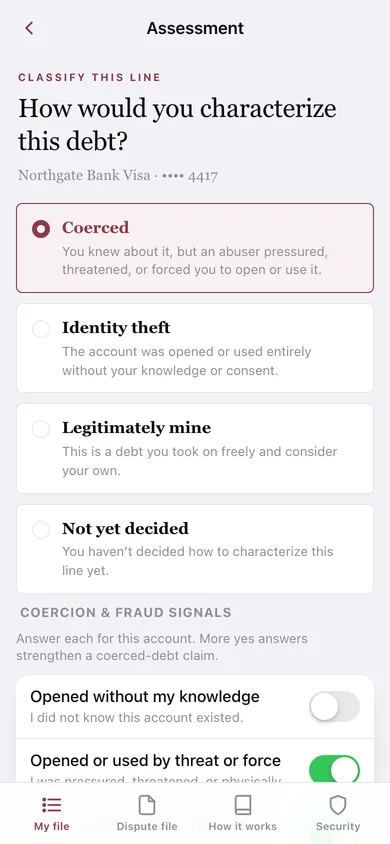
Log each credit card, loan, store card, utility or medical line, then classify it Coerced, Identity theft, Legitimately mine or Not yet decided and answer the four coercion signals — opened without your knowledge, by threat or force, no benefit to you, used after you objected.
Sworn-statement draft, written from your answers
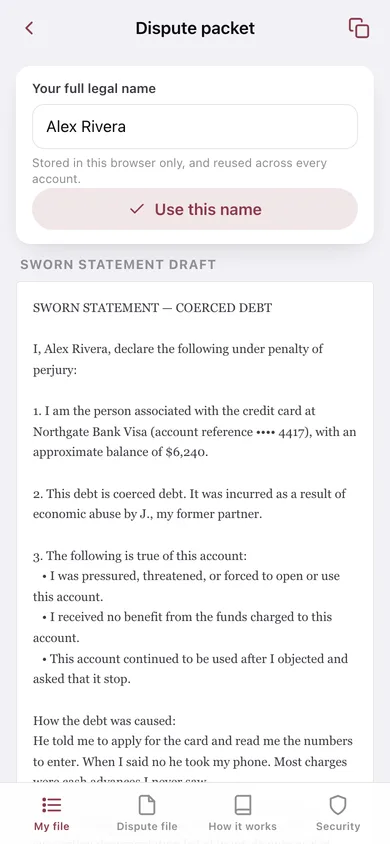
Every account gets a plain-language sworn statement naming the creditor, the balance, the person who caused it, their relationship to you and each signal you answered yes — ready to review, copy, download, print and sign.
Statutory document checklist
Change an account's classification and the packet rebuilds: a coerced line asks for documentation of the abuse, an identity-theft line swaps in an FTC report and a police report — and anything you already ticked off stays ticked.
Perpetrator, method and exhibit notes
Record who caused the debt (initials are enough), their relationship, the coercive transaction in your own words, and what the exhibit is and where the paper copy is kept.
One combined dispute file
Every account marked coerced or identity theft, each with its statement, notes and checklist, assembled into a single file you copy or download and hand to a creditor or an advocate.
A screen lock and an instant wipe
Put a code in front of the file, and erase every account, note and draft from this browser in one confirmed tap — with the app honest about what a browser lock can and cannot protect.
Screens
Every screen, rebuilt for the browser
-
1
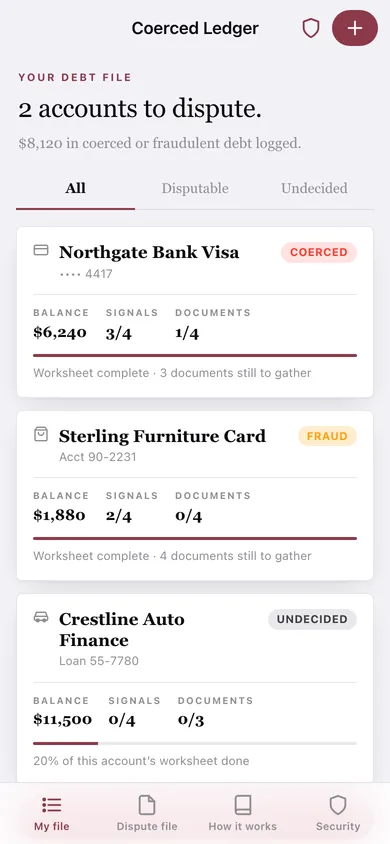
Your debt file
How many accounts you have to dispute and the total balance, with All / Disputable / Undecided filters and a worksheet-progress card per account.
-
2
Account worksheet
One account's summary and the five worksheet steps — assessment, perpetrator, evidence, packet, documents — each showing how far along it is.
-
3
Add an account
Creditor, a short reference (never the full number), kind of account, approximate balance and roughly when it was opened.
-
4
Assessment
Classify the line as coerced, identity theft, legitimately yours or undecided, then answer the four coercion and fraud signal questions.
-
5
Perpetrator & method
Name or initials, relationship, and a free-form account of the coercive transaction that feeds the sworn statement.
-
6
Evidence
Describe the statement or credit-report line you are keeping, where the paper copy lives, and give the exhibit a colour label.
-
7
Dispute packet
The sworn-statement draft for one account, signed with your name, ready to copy or download, with a link to its document checklist.
-
8
Document checklist
Tick off each supporting document as you obtain it, with what it is and where to get it.
-
9
Export dispute file
Every disputable account with its statement and checklist assembled into one file, with a preview before you copy or download.
-
10
Security & wipe
Screen lock, a count of what is stored locally, an instant wipe, and a backup export.
-
11
How this works
The 2025–2026 coerced-debt statutes in short, what a packet contains, and why nothing leaves this browser.
Try it with sample data: Loads three illustrative accounts — a coerced bank Visa with cash advances, a store card opened without your knowledge, and an undecided auto loan — each with its supporting-document checklist built, plus a signer name so the sworn statements read as real drafts. You can start fresh at any time.
Ready? It's free.
No account, no install, no subscription. Everything you do stays in this browser.
Your say
What should Coerced Ledger do? Tell us before we build it.
Tell us what to build next.
Comments need a free Google sign-in, so every one is from a real person.
Sign in with Google to commentNo comments yet — be the first to say what this app should do next.
Questions
Is the web version of Coerced Ledger free?+
Yes. Every screen is free to use: no subscription, no in-app purchases, no account.
Do I need an account?+
No. Open Coerced Ledger and start using it right away. Sign in with Google only if you want to upvote an app, save it to your list, or leave a comment.
Where is my data stored?+
Only in this browser's local storage. Nothing you enter is sent to our servers, so we can't see it, back it up, or restore it. Clearing site data, a private window, or another device starts empty. Export a backup from the in-app menu to keep it.
Is there a Coerced Ledger app for iPhone or Android?+
Not yet. Coerced Ledger is a community proposal: the browser version is complete, and we build the iPhone and Android app once 100 people upvote it. Upvoters get one email when it ships.