
Web app · Business
ClassCheck
Misclassified on a 1099? Score the tests, log the facts of control, build the case
The DOL six-factor test and California, New Jersey, Massachusetts and Illinois ABC tests, version-dated and offline. A factor-by-factor verdict card, a timestamped control-incident chronology mapped to legal factors, a damages estimator, a rule library and an SS-8-ordered dossier. Free, private, in any browser.
Stored in your browser only. Nothing you do in the web version is sent to our servers. Clear your browser data and it's gone — so export a backup from the in-app menu if you want to keep it.
This app is a community proposal.
Try the full browser version now. We build the iPhone and Android app once 100 people upvote it.
We'll email you once, when it ships. Unsubscribe anytime.
In your browser
What you can do in ClassCheck on the web
Five bundled rule packs, version-dated
DOL six-factor economic-realities (v2026-05) plus California, New Jersey, Massachusetts and Illinois ABC tests — each factor asked in plain language, with citation and publication date.
Prop 22 gate for California drivers
App-based rideshare and delivery drivers in California are routed to a Prop 22 note instead of a misleading ABC score, and offered the federal DOL test instead.
Verdict card
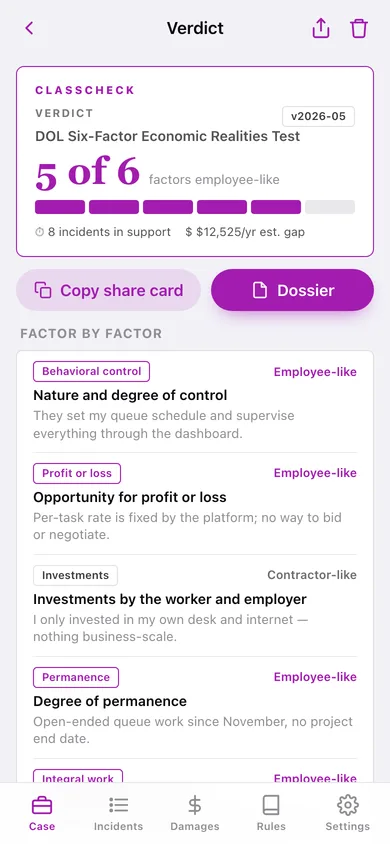
‘Employee-like on 5 of 6 factors under the DOL six-factor test. Estimated annual pay gap: $X.’ Factor by factor with your notes, copyable as a share card.
Control-incident chronology
Log schedule demands, monitoring, their equipment, required meetings, write-ups, exclusivity and dictated methods as they happen — each timestamped and mapped to the legal factor it supports, filterable by category.
Damages estimator
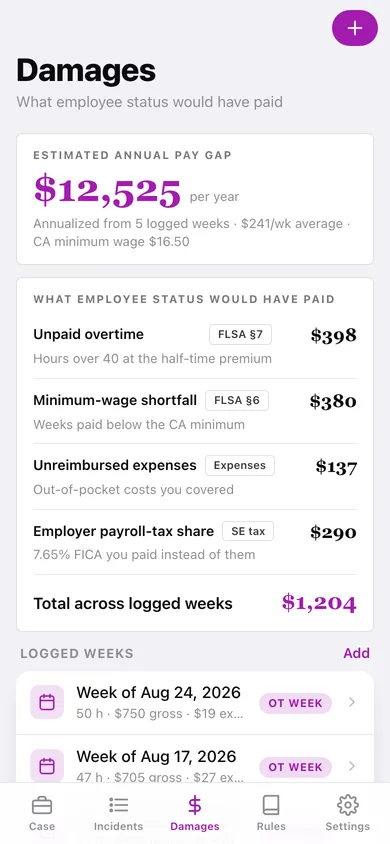
Enter typical weeks (hours, gross pay, expenses) and see unpaid overtime at the half-time premium, the minimum-wage shortfall against a 20-state 2026 table, unreimbursed expenses and the 7.65% employer payroll-tax share — totalled and annualized.
SS-8-ordered dossier
One tap assembles the case summary, assessment results, incident chronology, damages worksheet and an IRS Form SS-8 question map into a dated file to download or copy.
Screens
Every screen, rebuilt for the browser
-
1
Case file
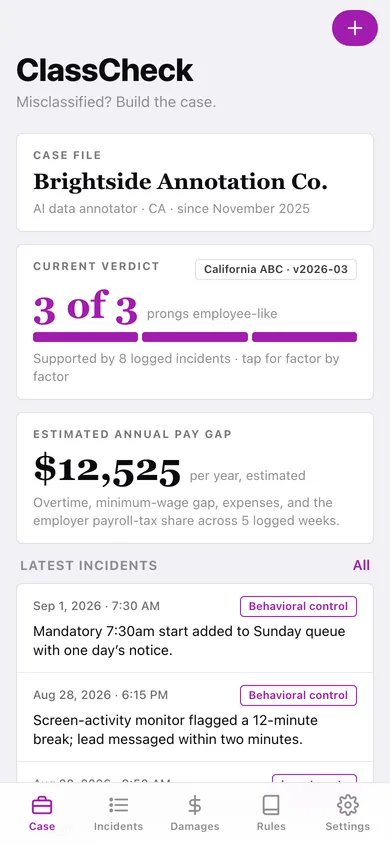
Company and role, current verdict with meter, estimated annual pay gap, latest incidents, assessments and dossier.
-
2
Assessments
Every completed test with score, rule-pack version and date.
-
3
Self-assessment
Pick a rule pack, pass the Prop 22 gate if it applies, answer each factor Yes / Somewhat / No with a note, get the score.
-
4
Verdict
Shareable verdict card and the factor-by-factor breakdown with your notes.
-
5
Incidents
Chronology of timestamped facts of control, filterable by category.
-
6
Incident
When, what they controlled, what happened, and the legal factor it supports.
-
7
Damages
Estimated annual pay gap, the four-line breakdown and your logged weeks.
-
8
Rule library
All five rule packs and the incident-category-to-factor map.
-
9
Rule pack
One pack’s citation, version and every factor or prong explained.
-
10
Dossier
What is included and the assemble / download / copy actions.
-
11
Settings
Case file, counts, CSV and JSON export, sample case, disclaimer, erase.
Try it with sample data: Adds an AI data annotator’s case file in California with a DOL six-factor test (5 of 6) and a California ABC test (3 of 3), eight control incidents over the last six weeks and five logged pay weeks. You can start fresh at any time.
Ready? It's free.
No account, no install, no subscription. Everything you do stays in this browser.
Your say
What should ClassCheck do? Tell us before we build it.
Tell us what to build next.
Comments need a free Google sign-in, so every one is from a real person.
Sign in with Google to commentNo comments yet — be the first to say what this app should do next.
Questions
Is the web version of ClassCheck free?+
Yes. Every screen is free to use: no subscription, no in-app purchases, no account.
Do I need an account?+
No. Open ClassCheck and start using it right away. Sign in with Google only if you want to upvote an app, save it to your list, or leave a comment.
Where is my data stored?+
Only in this browser's local storage. Nothing you enter is sent to our servers, so we can't see it, back it up, or restore it. Clearing site data, a private window, or another device starts empty. Export a backup from the in-app menu to keep it.
Is there a ClassCheck app for iPhone or Android?+
Not yet. ClassCheck is a community proposal: the browser version is complete, and we build the iPhone and Android app once 100 people upvote it. Upvoters get one email when it ships.