
Web app · Finance
ClaimLedger
Your insurer is running a clock you can't see — this shows it to you
Enter your date of loss and ClaimLedger builds the five deadlines that decide your property claim: recoverable depreciation, binding appraisal, proof-of-repair holdback, sworn proof of loss and the suit limitation. Plus a timestamped adjuster diary, an ACV-vs-RCV money ledger and an evidence vault. Free, no account.
Stored in your browser only. Nothing you do in the web version is sent to our servers. Clear your browser data and it's gone — so export a backup from the in-app menu if you want to keep it.
This app is a community proposal.
Try the full browser version now. We build the iPhone and Android app once 100 people upvote it.
We'll email you once, when it ships. Unsubscribe anytime.
In your browser
What you can do in ClaimLedger on the web
Five clocks from one date
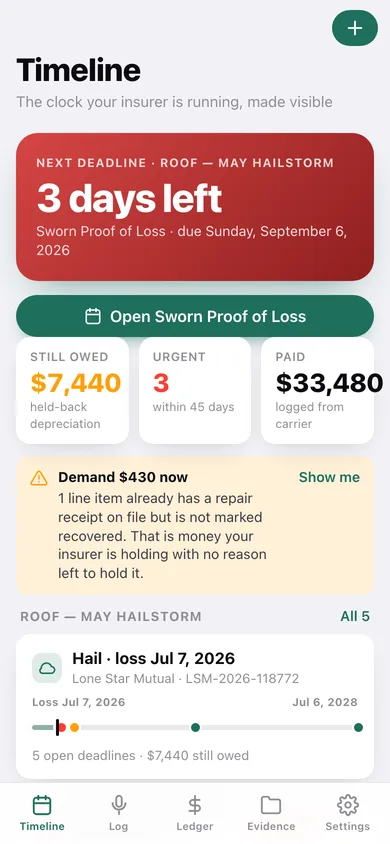
Type the date of loss once and the deadline engine computes the recoverable-depreciation window, the binding-appraisal demand (Texas SB 458), the proof-of-repair holdback, the sworn proof of loss and the suit-limitation period — each with days remaining and a red, orange or green urgency band.
A claim timeline you can read at a glance
Every claim gets a rail from the date of loss to the suit clock, with today marked and each deadline plotted exactly where it falls, colour-coded by how close it is.
Timestamped adjuster diary
Log every call, email, inspection, letter and cheque with who said it, what they promised and what they paid. Promises are pulled out into their own list, because a dated promise is what wins a dispute — and any entry copies out into a demand letter.
ACV / depreciation / RCV reconciled
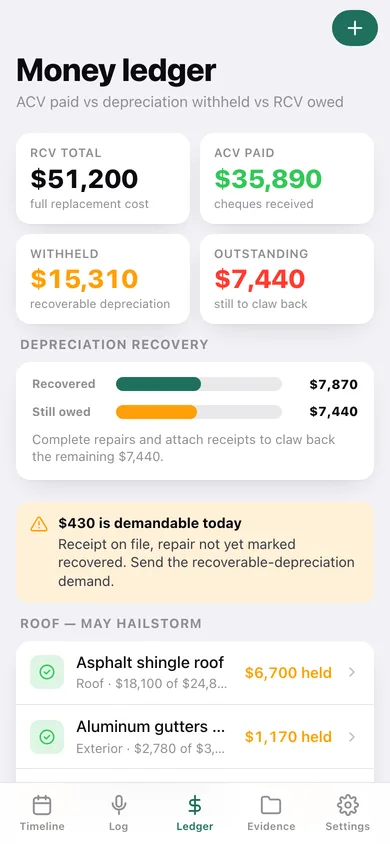
Add each damaged line item with its replacement cost and what the carrier has paid; ClaimLedger works out the withheld depreciation, what you have already recovered and what is still owed — and tells you exactly which lines are demandable today because the receipt is on file but the cheque is not.
A demand paragraph you can paste
On any line item with a receipt on file and money still held, one tap copies a ready-made recoverable-depreciation demand with the claim number, the line, the RCV, the ACV paid and the amount owed.
Evidence vault and a printable claim file
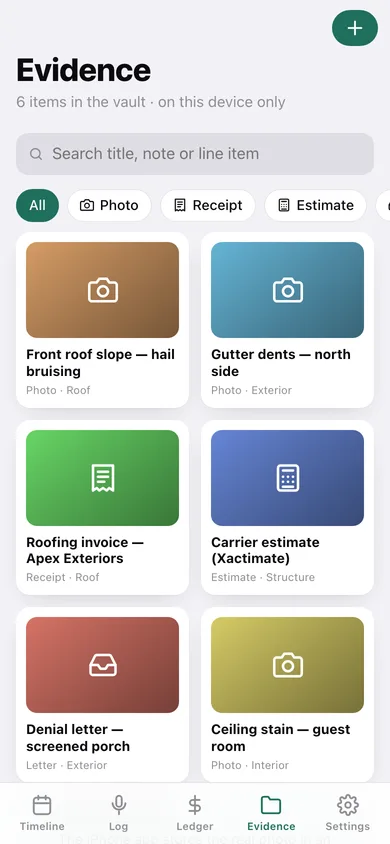
Store photos, receipts, estimates, letters and reports tagged to a line item, then export the whole claim — deadlines, money, adjuster log and evidence index — as one dated text file.
Screens
Every screen, rebuilt for the browser
-
1
Timeline
The next deadline counting down, money still owed, and every claim's deadline rail.
-
2
Money ledger
RCV, ACV paid, depreciation withheld and outstanding, with a recovery bar and every line item.
-
3
Evidence vault
Photos, receipts, estimates and letters as a searchable, filterable grid.
-
4
Claim detail
Carrier, claim number, deductible, the full deadline list and the money position for one loss.
-
5
Start a claim
Date of loss, peril, carrier, policy and deductible — saving builds the five deadlines.
-
6
Deadline detail
What the clock is, what your policy controls, and toggles to set the exact date or mark it resolved.
-
7
Adjuster log
Every contact grouped by month, plus the running list of what they promised.
-
8
Contact detail
One logged call, email or cheque, copyable into a demand letter.
-
9
Log contact
Date, channel, adjuster, what was said, what was promised and what was paid.
-
10
Line item
ACV vs withheld depreciation split, the claw-back toggles and the demand paragraph.
-
11
New line item
Name, category, replacement cost, ACV paid, receipt and repair status.
-
12
Evidence detail
One item: type, the line it is tagged to, the claim and its note.
-
13
Add evidence
Title, type, line-item tag, thumbnail colour and note.
-
14
Settings
Default deadline windows, warning thresholds, claim file export, backup, sample data and erase.
Try it with sample data: Loads a mid-claim hail loss on a Plano roof — five deadlines with the appraisal and proof-of-loss clocks already red, five line items with $7,440 of depreciation still owed, five adjuster log entries including a $20,880 ACV cheque, and six pieces of evidence — plus a settled burst-pipe claim from last year. You can start fresh at any time.
Ready? It's free.
No account, no install, no subscription. Everything you do stays in this browser.
Your say
What should ClaimLedger do? Tell us before we build it.
Tell us what to build next.
Comments need a free Google sign-in, so every one is from a real person.
Sign in with Google to commentNo comments yet — be the first to say what this app should do next.
Questions
Is the web version of ClaimLedger free?+
Yes. Every screen is free to use: no subscription, no in-app purchases, no account.
Do I need an account?+
No. Open ClaimLedger and start using it right away. Sign in with Google only if you want to upvote an app, save it to your list, or leave a comment.
Where is my data stored?+
Only in this browser's local storage. Nothing you enter is sent to our servers, so we can't see it, back it up, or restore it. Clearing site data, a private window, or another device starts empty. Export a backup from the in-app menu to keep it.
Is there a ClaimLedger app for iPhone or Android?+
Not yet. ClaimLedger is a community proposal: the browser version is complete, and we build the iPhone and Android app once 100 people upvote it. Upvoters get one email when it ships.