
Web app · Food And Drink
Churras
How much picanha, carvão and cerveja to buy — and who owes what
Enter the guest mix, how long the churras runs and how hungry the crowd is; get quantities per cut, charcoal in kg and drinks in litres, a priced shopping list, and a rateio that skips beer for non-drinkers. Free, no install.
Stored in your browser only. Nothing you do in the web version is sent to our servers. Clear your browser data and it's gone — so export a backup from the in-app menu if you want to keep it.
This app is a community proposal.
Try the full browser version now. We build the iPhone and Android app once 100 people upvote it.
We'll email you once, when it ships. Unsubscribe anytime.
In your browser
What you can do in Churras on the web
Duration-aware quantity math
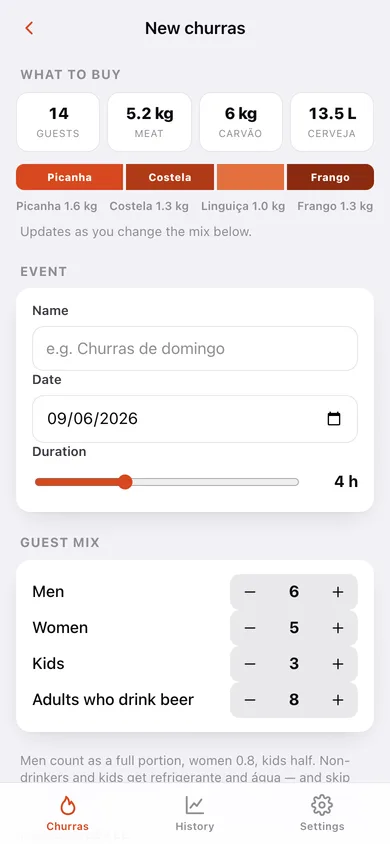
300 g of meat per adult under 3 hours, 450 g for 3–5 h, 600 g beyond that — then ×0.85 or ×1.2 for a light or hungry crowd. Men count 1.0, women 0.8, kids 0.5.
The whole shopping list, not just the meat
Picanha, costela, linguiça toscana and frango split 30/25/20/25, plus carvão and acendedor, pão de alho, farofa, vinagrete and queijo coalho, and cerveja, refrigerante, água and gelo.
Prices in, total out
Tick each line off at the market and type what you actually paid; the list keeps a running total and a per-category subtotal.
Rateio that matches how a churrasco really works
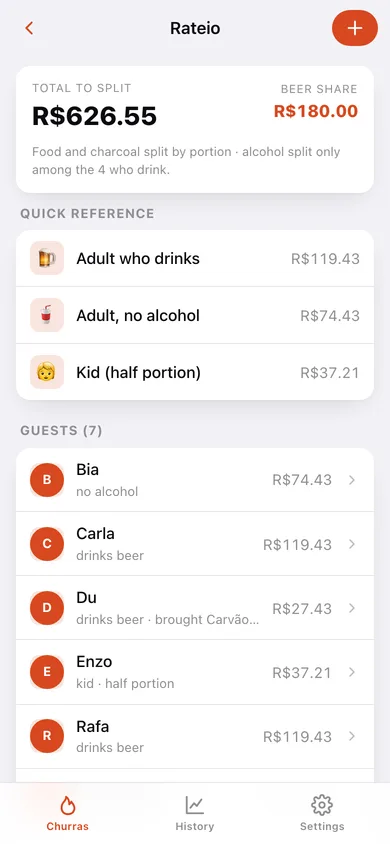
Food and charcoal split by portion, alcohol split only among the guests who drink, kids at half a portion, and whatever someone brought deducted from their share — then copy the whole split for the group chat.
History that calibrates the next one
Rate the churras, say who showed up and whether the meat ran short or was left over; a cost-per-guest chart and a grams-per-person recommendation come out of it.
Everything stays on your device
No account and nothing sent to a server — export a JSON backup or a CSV of every shopping line whenever you want.
Screens
Every screen, rebuilt for the browser
-
1
Planner
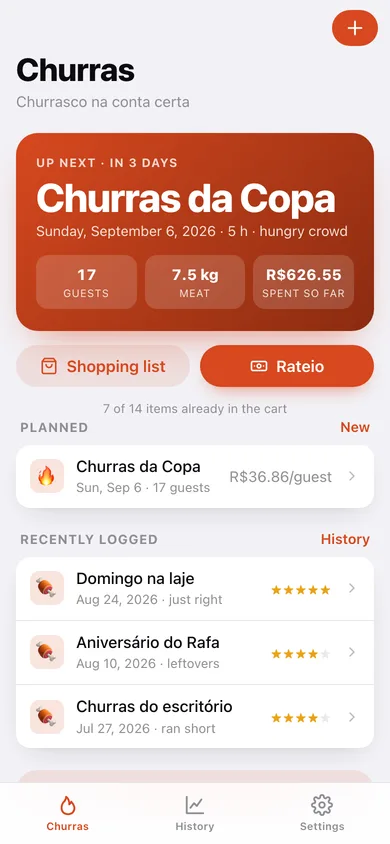
The next churras with its countdown, guests, meat and spend, then everything else you have planned or logged.
-
2
New churras
Guest mix, duration slider and hunger level, with the grams-per-adult figure and the full quantity plan updating as you type.
-
3
Churras detail
Guests, meat and total at a glance, the plan facts, links into the shopping list and rateio, and the grams suggestion for next time.
-
4
Shopping list
Every line grouped by meat, charcoal, sides and drinks with a tick box, quantity and the price you paid.
-
5
Rateio
Total and beer share, per-profile reference amounts, and each named guest's exact number ready to copy.
-
6
Log the churras
Star rating, who actually showed up, whether the meat ran short, and what ran out or was left over.
-
7
History
Average rating and cost per guest, the cost-per-guest trend, meat-balance bars and every logged churras.
-
8
Settings
Default duration, the full portion and quantity math, CSV and JSON export, sample data and erase.
Try it with sample data: Adds Churras da Copa three days out with the meat and carvão already bought and seven named guests, plus five logged churrascos going back nine weeks with ratings, prices and meat-balance notes. You can start fresh at any time.
Ready? It's free.
No account, no install, no subscription. Everything you do stays in this browser.
Your say
What should Churras do? Tell us before we build it.
Tell us what to build next.
Comments need a free Google sign-in, so every one is from a real person.
Sign in with Google to commentNo comments yet — be the first to say what this app should do next.
Questions
Is the web version of Churras free?+
Yes. Every screen is free to use: no subscription, no in-app purchases, no account.
Do I need an account?+
No. Open Churras and start using it right away. Sign in with Google only if you want to upvote an app, save it to your list, or leave a comment.
Where is my data stored?+
Only in this browser's local storage. Nothing you enter is sent to our servers, so we can't see it, back it up, or restore it. Clearing site data, a private window, or another device starts empty. Export a backup from the in-app menu to keep it.
Is there a Churras app for iPhone or Android?+
Not yet. Churras is a community proposal: the browser version is complete, and we build the iPhone and Android app once 100 people upvote it. Upvoters get one email when it ships.